Ken & Mike on the MATLAB Desktop
February 11th, 2008
Interactive web pages in MATLAB, part 1
This is the first post in a 3 part series on creating web pages in the MATLAB web browser that can interact with the MATLAB workspace. We’ll explore the building blocks for creating a HTML GUI in MATLAB.
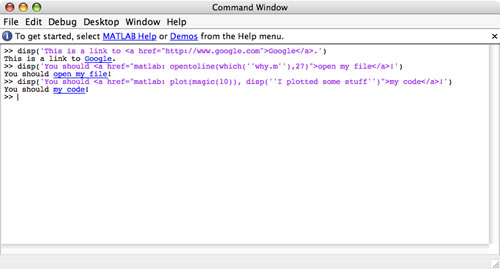
Last year Kristin posted how to use the matlab: protocol in the Command Window to create hyperlinks that run MATLAB commands. But did you know that you can use the same protocol in MATLAB’s web browser?
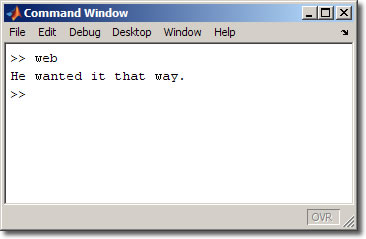
Open the web browser inside MATLAB using the web command. Then in the document location bar, type “matlab:why” and press enter. You’ll get a generated message in the command window, similar to the one below:
There are a few things worth noticing about this procedure:
- You can use matlab: to “navigate” to a command the way http: navigates to a web page or ftp: navigates to a file server.
- This protocol only works inside MATLAB’s built-in web browser. Using Firefox, IE, or any other browser will generate an unknown protocol error.
- The browser does not navigate away from the current page. For instance, if you had a page open already in the browser and then typed matlab:why, the address in the location bar would change, but the web page would not.
- The executed commands do not show up in the Command Window or Command History (though the output shows up in the Command Window). You’ll have the output but no record of the commands that generated it.
Let’s look at how to create MATLAB GUI’s with HTML.
Just like you can associate MATLAB commands as callbacks for buttons in a GUI created by GUIDE, you can associate MATLAB commands as “callbacks” to hyperlinks in a web page.
A standard HTML link looks like this:
<a href=”http://www.matlabcentral.com”>Go To MATLAB Central</a>
A MATLAB command link looks like this:
<a href=”matlab:why”>Why?</a>
Clicking on this MATLAB command hyperlink will run the why function in the MATLAB workspace.
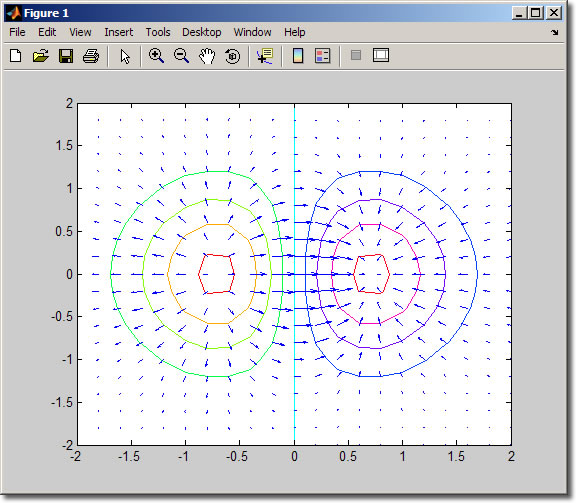
One good usage of MATLAB command links is providing a static list of commands, like a launchpad/portal page or a Choose Your Own Adventure of MATLAB code. For an example download and publishthe attached dvplots_hyperlink_demo.m file. The result is an HTML file with matlab: hyperlinks. This demo allows you to create and interact with a series of vector plots. Here is what the published demo looks like:
Clicking on the “quiver” link for instance, brings up the following plot:
Next time I’ll explain how to dynamically generate matlab: URIs using JavaScript. Until then, let us know if and how you have been using matlab: in web pages so far.
By
Michael Katz
Mike is a developer on the MATLAB Desktop team. When not describing himself in the third person, biking, homebrewing, or rooting for the home team, he's busy trying to make the world a better place for programming.
06:59 UTC |
Posted in Publish |
Permalink |
You can follow any responses to this entry through the RSS 2.0 feed.
You can skip to the end and leave a response. Pinging is currently not allowed.
Leave a Reply
|
We use the matlab protocol in our html help files that we have generated for the Matlab help browser. There is a link in our help files using the matlab protocol to open the pdf version of the user’s guide because we have a Matlab function that returns the path to our toolbox. It also makes use of the hyperlinks within our document to pull up specific information. For example:
Lookup Topic2 in User’s Guide
I’ve come to find your column is very useful since it directs me to features in the Desktop that might help my productivity.
But, I’ve got to sharply criticize this column.
Before this column, I was aware of the “web” function and the Web Browser. Not experienced, but aware. What surprised me was the syntax option that you used: matlab:command.
After reading you column, I searched the documentation for more details. Referring to the function reference page (FRP) for “web, ” it appears that this is an undocumented syntax option. Although there are 11 syntax options listed, the one you use isn’t listed.
Next, I reviewed the documentation for the Web Browser. Again, no reference to this syntax or use.
Finally, I stumbled upon the FRP for matlabcolon and there is a brief description. But, even though there is adequate documentation regarding using this function with the “disp” and “fprintf” functions, nothing indicates that it can be used with the Web Browser.
So, either you are using an undocumented feature of the “web” function or Web Browser, or the documentation has significant deficiencies.
Next, you demonstrate the function / syntax option by using the undocumented “why” function. You would have made your point much more clearly by using a more mainline function like “pi.” Further, because you used this undocumented function, I’m left with questions about how to deal with functions that require input arguments, like the “sin” function. I’ve seen a similar error in elements of MatLab documentation that use the “foo” or “humps” functions in examples. Many readers get tripped up by trying to figure out the context of these undocumented functions and can not understand the significance of the example.
The next part of the column is one of the most useful in that you list 4 notable items. Items 2 thru 4 are clearly significant. But, Item 1 leaves me hanging. How & why is this feature useful? Give us some examples of how this type of command navigating is clearly better than just executing the command in the Command Window or in an .m file. It appears that you are assuming that all readers clearly see the benefit of this feature. Yet, I’ve read the column several times and I still don’t see any way I would use it.
It appears the final part of the column is a distraction from the world of MatLab into the world of html code and I’m not following most of it. Although I am aware that MatLab can interact with web pages, the MatLab documentation is very poor on showing how this can be useful in technical computing. The only detailed example I’ve seen in the documentation relates to publishing and that is such a shallow example, that I haven’t been able to master the topic to the point where I can actually use it.
MatLab is first & foremost a technical computing tool and in this context, technical refers to the traditional meaning of the word, not as in the term, Information Technology. When developers at The MathWorks conceive of additional features to enhance the capability of MatLab, the documentation of these features should discuss the feature in terms of how technical computing can be enhanced because of the feature, not in terms of the computer science used to implement it. That context is missing in this column and the error is amplified by the incomplete documentation of the feature.
Hi Oliver,
Glad you’re finding the blog useful.
Your right that the documentation doesn’t cover our usage of matlab: (I’ll request that the web function page be updated). I’d hardly say that this is indicative of “significant deficiencies” in the documentation though. You’ll also notice that the function help page for matlab: describes creating links with functions such as magic, which do take input arguments.
As for your concern with not knowing why the feature discussed in this entry is useful, remember that this is part one of a three part series (see the intro sentence). We try to limit the length of our blog entries, so that you can read it within 5 to 10 minutes. Stay tuned for how you might use this command.
Overall, our blog has a slant towards the UI - that is, how you can more efficiently use the MATLAB Desktop, and how you can better make your own UIs using GUIDE. You’ll find some of the more language related issues on Loren’s blog, image processing specific stuff on Steve’s blog, and interesting stuff happening on the File Exchange on Doug’s blog.
Thanks for your feedback,
-Ken
Amy,
Thanks. That’s pretty much how we set up our links to and between documentation pages.
Oliver,
Those are excellent questions. Back in the dark ages (college) I learned WHY as the “is this thing on?” function. It’s a well-known, but as you say, under-documented Easter egg function.
In the attached demo, each link actually executes multiple commands with inputs and outputs, but I did not mention that.
Using the web browser to execute commands is not better than a traditional GUI or the Command Window; it is just one more way. Some people may be attracted to writing HTML GUIs because of their background or needs of their end-users.
Ken and I will follow up with our documentation team to make sure all these functions are adequately documented and the infrastructure made more accessible.
Thanks for the feedback.
Points well taken. I’ll eagerly await the next couple columns.
I also appreciate your comments offering opinions on this web technique compared to GUIs or the command window. Certainly I can understand how an inferior feature might still buy its way into the product for legitimate reasons. In some ways, the MatLab “inv” function is like that.
Regarding the dark ages, when I was in college, LinPack was new and Cleve Moler hadn’t even thought of MatLab yet. So, I had not heard of the “why” function until this column.
I think there is a more important generational difference. When I write code, I try very hard to make a module work right the first time. I work towards that by making sure I understand the expected syntax and code appropriately. I’ve observed other younger folks take an approach we call, “hack and hope.” They guess at the syntax and if it doesn’t work, they revise again and again until they stumble upon a syntax that doesn’t fail. I argue that that is not correct code, just code that worked in this case.
When I attended the MAB in October, the one thing that concerned me was the evidence I saw that some MatLab source code was not written from specifications. If you don’t define what it is suppose to do, how do you know it is working properly?
Now I see that your gleefully include Easter Eggs in the code! Good grief, we spend a ton of money on your products and I regularly argue that they are well worth the price. But now I see evidence that you are playing games with the source code. This only hurts your credibility and reputation.
I see the web feature not as an inferior feature at all.
Reports that matlab has works really well in the web browser such as the profiler, depfun, TODO report, for example.
I have used these tools as jumping off points and built my own tools that would be difficult to do in a traditional GUI.
The “matlab:…” protocol only works in the MATLAB web browser.
Have you considered writing a browser plugin for Firefox, IE, etc that could parse the matlab: protocol? The plugin would of course be MATLAB itself, and thus couldn’t be free. But if I have MATLAB, and am running Firefox and come across a matlab: link … why not fire up MATLAB when I click it?
Regarding the “why” command … This is not an easter egg; it has a long history. It’s been in MATLAB since the beginning. The “why” command serves as a nice example of how to write a finite-state machine in M. It’s not used unless you explicitly call it, so it doesn’t stand in the way of the real functions in MATLAB. There’s no game-playing in the MATLAB source code. Consider it a demo of “rand”. Is “why” any different than the “life” command, for example?
“why” is not undocumented. Just see “doc why” or “help why”. No surprise there. It’s no less documented than the “logo” command.
No need to get upset about a demo function that some might find useful. In real computing, sure, nobody uses “why”, but neither do they use “logo” either. Both serve their purpose of being useful demos.
I am sort of new to matlab and I just make my first GUI… Im unsure if this is question relates to the topic, but I need to Place my GUI on a website for all to use. Does anyone know how I might be able to go about that? By the way, I don’t know Java or HTML, im using googlepages. Thanks for the help.
Jen,
This is not possible. With some programming, you can run MATLAB code in the back end of a web-based UI, but you can not deploy a GUI directly to a Google page.
Hi Ken and Mike,
I’m interested in download some data for the html site, but not using the ftp server.
for example, using this site:
http://swdcwww.kugi.kyoto-u.ac.jp/dst_realtime/index.html
into, you’ll see the icons ‘01′, ‘02′…. in each ‘2007′, ‘2008′… lines.
ok,
the ftp form is:
>tmw = ftp(’ftp.ngdc.noaa.gov’);
>ascii(tmw);
>cd(tmw,’/STP/GEOMAGNETIC_DATA/INDICES/KP_AP/’);
>filename = mget(tmw,’2006′);
but I don’t need to use ftp.
I need to make the same (in matlab) with the html site.
Please….
if you get the solution, could you get in touch with me?
navivacu@gmail.com
Yvan.
thanks…
Yvan,
You can use the urlread to get the text content of a web page. It is up to you to parse that text to extract the meaningful data.