
Interactive web pages in MATLAB, part 2
Last time, I described how to use static hyperlinks to run MATLAB commands from the web browser (remember: this only works in MATLAB’s web browser). This time I will show you how to use JavaScript to assemble and execute matlab: commands.
How do we move beyond using explicit hyperlinks for issuing MATLAB commands? The hyperlink-click equivalent operation in JavaScript is setting the document.location property to the desired URL.
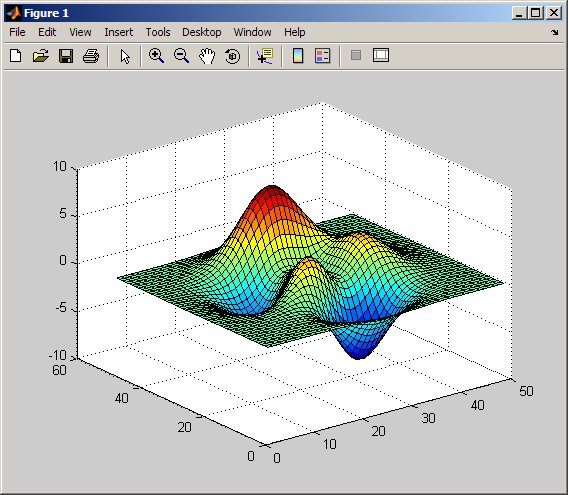
The following example uses the web page’s load event to trigger the execution of the surf command. When the page is loaded in MATLAB’s web browser, a figure window will be automatically created with the surface plot.
When you open this example file (right-click to save) in the MATLAB web browser, which includes the code below…
<html>

<head><title>Calling MATLAB from JavaScript 1</title><head>

<body onload="document.location='matlab:surf(peaks)'"></body></html>
You’ll see a blank browser window (there’s no real displayable content in the file), and then you’ll see a figure window popup:
 |
 |
One thing to notice in this example is that the JavaScript function in the HTML onload event is specified as a String, and the document URI is a separate string. The single quotes (‘) are the way to specify a string within a double-quoted (“) string, and has nothing to do with MATLAB strings, in this example.
How do we now make the MATLAB command dynamic so the web page user can influence what happens? For starters, we can read in the value of a control and use that in the URI string.
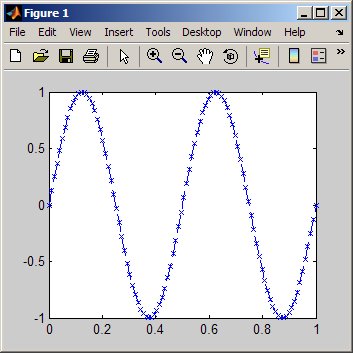
The next example (right-click to save) uses HTML forms to present controls to a user. When the button is pressed, MATLAB will plot (in a figure window) a sine wave of the given amplitude and frequency and plot appearance.
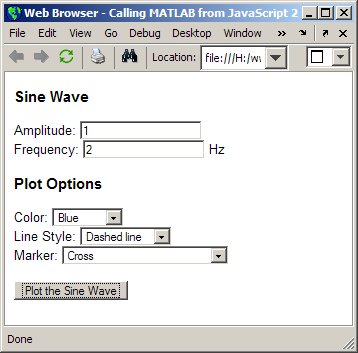
Pressing the “Plot the Sine Wave” button yields the following plot:
In the header I’ve created the following script block:
<script type="text/javascript">

function drawSine() {

commandURI="matlab:t=linspace(0,1,100);";

commandURI+="plot(t,";

commandURI+=document.sine.amplitude.value;

commandURI+="*sin(t*2*pi*";

commandURI+=document.sine.frequency.value + ")";

commandURI+=",'" + document.sine.color.value +

document.sine.linestyle.value +

document.sine.markerstyle.value + "'";

commandURI+=");";

document.location=commandURI;

}

</script>
A few key points about this code include:
- The code that builds the matlab: URI and executes it as a separate JavaScript function drawSine() in the web page’s header.
- For readability I’ve broken up the command into several lines and used the += syntax for String concatenation.
- I used the direct naming syntax for accessing the data in the form elements. This syntax requires us to give an explicit name to each of our form and input elements.
- The JavaScript code does not check for valid data in the input boxes, and bad values will produce an error in the Command Window (which may not be obvious to a person working only looking in the web browser).
Inside the body’s form, there are two text inputs, three choice elements, and a button input. The following code creates the button:
<input type="button" onclick="drawSine()" value="Plot the Sine Wave">
This is the starting point for dynamically building the MATLAB command URI strings. I’ve shown you how to use an HTML form to gather input to pass to a MATLAB function. Let us know if you know of other interesting usages of HTML and MATLAB, or run into something tricky.
Next time I’ll complete the tutorial by placing the figure back into in the web page, creating a full GUI.
Check out the first part of this entry:
For general information on programming HTML forms, see:
For general information on programming in JavaScript, see:
- Category:
- Publish





Comments
To leave a comment, please click here to sign in to your MathWorks Account or create a new one.