
Tools on the Side
About a year ago Ken Orr discussed the docked “maximize” feature that was introduced in R2007a (Focusing on your work). He explained how you can use this feature to temporarily expand a particular tool (sub-window) to fill the entire MATLAB window. Also introduced in R2007a was a docked “minimize” feature. Docked minimize and maximize have similar intent, allowing you to optimize your use of screen real-estate.
Here’s a scenario where I find docked minimize useful. I’m tweaking an M-File that generates a figure. I want to see the M-File and figure side-by-side so I dock both and arrange my MATLAB desktop as shown:

This facilitates my workflow reasonably well but it’s a bit cluttered and I’d really like my Editor to be wide enough to display the longer lines of M-Code. I could close the Current Directory, Workspace and Command History tools to recoup some real-estate. However, while they may not be central to the task at hand I do find occasional use for these. Instead of closing these tools I can minimize them by clicking on the small left-pointing arrows on their title bars.
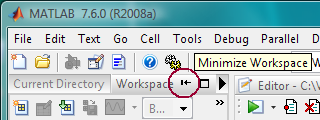
As I minimize each tool it is hidden and a corresponding button appears along the left border of the MATLAB window. I’ll refer to the row of buttons along the border as a “sidebar”. The documentation doesn’t use this term but doing so here is consistent with the title of “Desktop Bar Tender” to which I laid claim in my last post. With the Current Directory, Workspace and Command History all minimized to the left sidebar, my MATLAB desktop looks like this:

When I want to access one of the minimized tools I either hover over its button to reveal it without giving it focus or click its button to both reveal it and give it focus. For example if I click the Command History button, the Command History appears overlapping the left portion of the Editor like this:

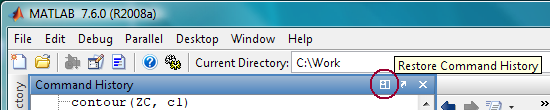
After I’ve gotten what I want from the Command History I hide it by clicking its button again or clicking on some other tool such as the Editor. If I find myself using the Command History so frequently that I want to return it to my layout I can either double click its sidebar button or click the “restore” icon on its title bar.
If you’ve found this feature useful in your work or if you’ve identified shortcomings that make it less useful than it could be, I’d love to hear from you.
- Category:
- Desktop


See Also
-

Default Docked Figures
Blogs



Comments
To leave a comment, please click here to sign in to your MathWorks Account or create a new one.