Ken & Mike on the MATLAB Desktop

October 13th, 2008

New and Updated Desktop Features in R2008b

R2008b (version 7.7) is here! With it comes a host of great new features and updates to MATLAB. Check out the full release notes here. Below, I’ve called out some of my favorite new and updated Desktop features.

Be sure to let us know what you think of these new features!

Function Browser
The Function Browser lets you search for functions based on name and their help contents. This tool was designed to dovetail into your workflow so that you needn’t switch windows to search for a function. You can access the Function Browser from both the Command Window and Editor by pressing the button.

Function Hints
Function Hints lets you view the syntax for a function in a popup window while you’re entering the function into the Command Window or Editor. This feature, like the Function Browser, was designed to fit into your workflow and help minimize switching between windows.

Current Directory
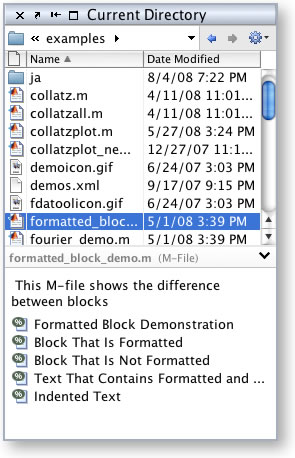
We’ve revamped the Current Directory Browser which now contains an address bar and details view. Common functions (e.g. New Folder, New File) can be found under the Actions button (I think this really helps to de-clutter the UI).

In the details view you’ll see more information about the selected item. For MATLAB files this will include functions, cells and properties. For MAT files, you’ll see their contents, so you no longer have to load the file before seeing what’s inside of it.

Help for User-Created Classes
You can now run the doc function on your own MATLAB Classes, which will open the documentation for your class right in the Help Browser.

Default Desktop Layout
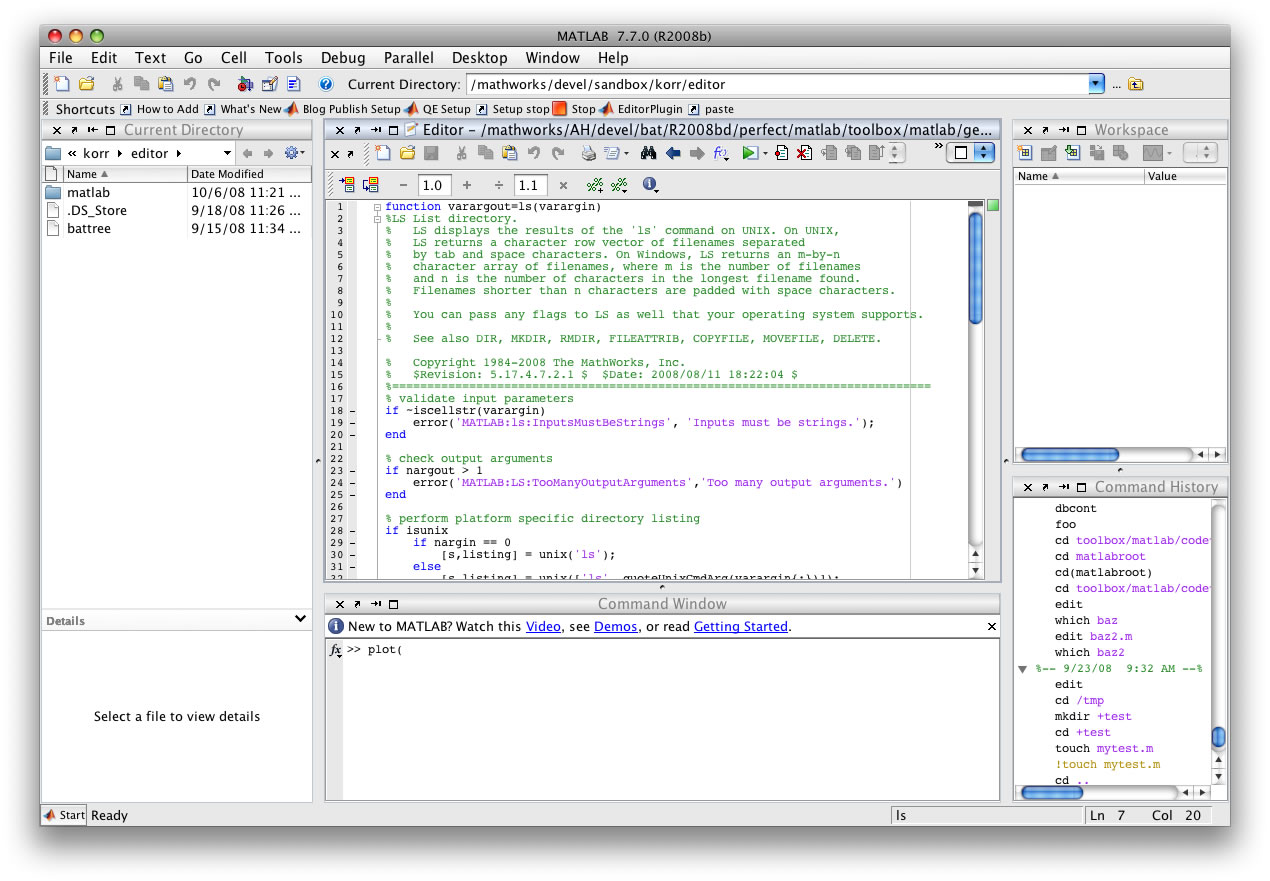
We’ve updated the default Desktop layout to use three columns and we’ve rearranged where some components are by default. We think this new layout will help streamline your workflow.

To try the new layout, select Desktop > Desktop Layout > Default.

6 Responses to “New and Updated Desktop Features in R2008b”

  1. Ryan Gray replied on :

    Nice about the doc function working for user classes. Is there a chance of it sometime displaying published HTML documentation for user functions? I know showdemo does this, but my published HTML from a function is documentation, not a demo. Why does doc have to just display the same as help does for my function, or am I missing how I’m really supposed to do it?

  2. Naor replied on :

    Are Desktop Layouts “exportable”? If so, maybe you could let us try out the new desktop layout without installing r2008b? Or maybe even create a little gallery of desktop layouts that people can d/l if they are too lazy to create their own…

  3. junziyang replied on :

    Dose the Editor surport Fortran source code highlight now? It’s really an usefull feature for users to create Fortran MEX files. I also hope the mex function surport Fortran free format code compiling.

  4. Ken replied on :

    Hi Naor,

    Desktop layouts are in fact exportable (select the Desktop -> Save Layout… menu item).

    To try out the R2008b default layout, right click this link and save the file to your prefdir. Start MATLAB and select Desktop -> Desktop Layout -> r2008b.

    Alternatively, you could just arrange it like the screen shot!

    -Ken

  5. Ken replied on :

    Hi junziyang,

    The Editor does not currently support Fortran. Please submit an enhancement request here.

    -Ken

  6. Mike replied on :

    @Ryan
    If you have published help (I believe it has to be a function.html in the html subdir), then the help browser (and the HELP command) will have a link for showdemo for that file.

Leave a Reply

Wrap code fragments inside <pre> tags, like this:

<pre class="code">
a = magic(3);
sum(a)
</pre>

If you have a "<" character in your code, either follow it with a space or replace it with "&lt;" (including the semicolon).


Ken & Mike work on the MATLAB Desktop team.
  • Ori: The current folder shortcut used to be alt-y. Now it is alt-o. However, while in the editor window, alt-o opens...
  • Jose Miguel: Hi First of all, thanks for the post, it is really useful. I am trying to develop a Java GUI within...
  • Ken: Hi Siddharth, There isn’t currently any way to move the docking controls. Feel free to submit an...
  • Phil: I have the same problem as described above with UITable working fine in the Matlab environment but showing no...
  • Siddharth: Is there any way to move the position of the docking controls (or eliminate them through some...
  • Chris: Yes, it is a challenge to organize functions into categories, especially with so many functions. Ken and I...
  • Mike: Thanks for fielding that one, Yair.
  • Yair Altman: Jimmy - if you mean that you wish to include hyperlinks in your function’s help comment, that will...
  • OysterEngineer: Thanks for explaining the Function Browser. I fired it up and gave it a try. It appears that it has...
  • Jimmy: Is there any way to include hyperlinks in a comment, such as the standard help at the beginning of a function?

These postings are the author's and don't necessarily represent the opinions of The MathWorks.