
Meet the new Current Directory navigation bar
The new Address Bar in the Current Directory Browser provides many point and click ways to navigate around your MATLAB file folders. The MATLAB current folder location is displayed as a series of buttons (or breadcrumbs) representing each subfolder in the path. This enables single-click transitions between folders above your current location.
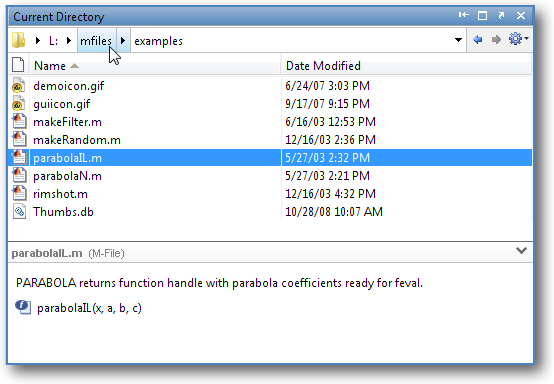
Instead of traditional slashes between folders in the path, there are drop-down menus displaying subfolders at each level. Select a subfolder to navigate to (notice the current location is in bold).

Use the Forward and Back buttons to jump to previously viewed directories.

Select an entry on the history drop-down for quick transition to a recent folder location.

Or, if you enjoy typing, click on white space in the address bar to convert the display into a regular old backslash-separated pathname for editing and viewing.

Whether you are veteran or a newbie we think the new Current Directory navigation will enhance your file navigation experience. It has the best of both worlds – it’s easy to visually navigate, and it’s easy to manually enter a path.
Let us know what you think.
- Category:
- Current Directory






Comments
To leave a comment, please click here to sign in to your MathWorks Account or create a new one.