
The Data is in the Details
Do you want to know more information about a file listed in the Current Directory Browser? The Details Panel is just what you need. You can view the structure of files as well as interact with other Desktop tools like the Editor and Workspace Browser directly from the file’s internal structure.
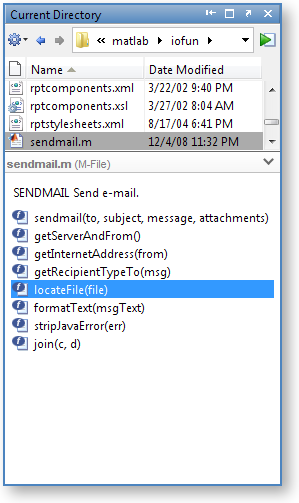
For MATLAB-Files, view the description of the file (the first line of the comment that is returned from the help command — a.k.a the H1 line) as well as a list of sub functions and cells. If you want more information on one of those functions, just double click on it in the Details Panel to open the file in the Editor at that location.
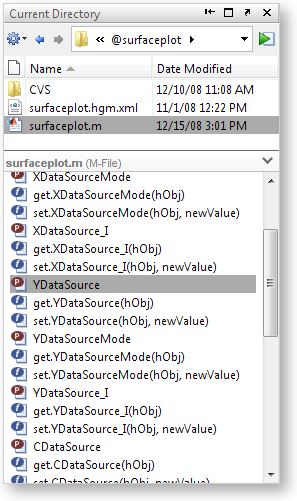
Class files display object properties and methods. You can double-click on a property or method to open the class M-file in the Editor at that property or method definition.
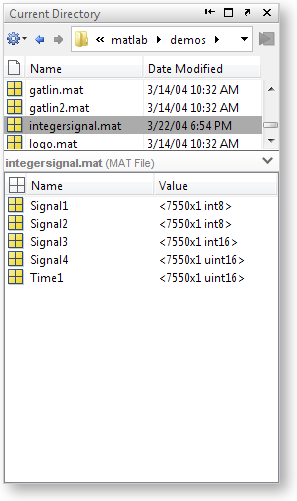
MAT-files display their variables (similar to the workspace browser). And, if just looking at the MAT-file isn’t enough, you can add individual variables to your workspace by dragging them from the Details Panel displaying the mat file content and drop them in the workspace browser. You can also add/update variables in the MAT-File by dragging variables from the workspace browser and dropping them in the Details panel.
The view isn’t big enough for all your details? Change the height of the Details Panel by dragging the separator line up and down to resize the view as needed.
And of course if the Details Panel takes too much of your viewing real-estate, collapse the Details Panel by clicking the arrow in its title bar.
Hope this helps you keep track of your data details.
- Category:
- Current Directory





Comments
To leave a comment, please click here to sign in to your MathWorks Account or create a new one.