Ken & Mike on the MATLAB Desktop

January 26th, 2009

Your Table of Contents

MATLAB provides a few command line tools to figure out what functions you have available in a directory. There’s dir, what, and of course, help. Using the help function with a directory (or toolbox) name will list the available functions along with their H1 lines.
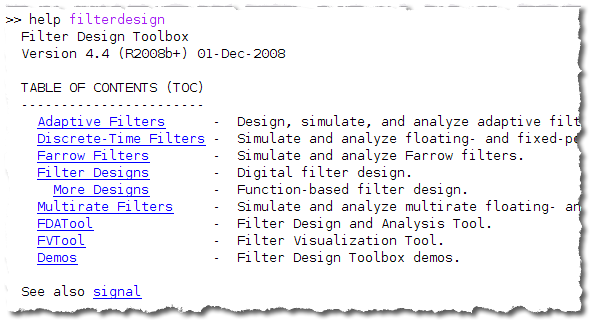
help filterdesign

By default, MATLAB displays a flat list of files, but if you’d like to control what information is actually displayed, you need to create a Contents.m file. We use Contents.m in toolbox directories to group together related functions, display copyright and version information, and exclude listing helper functions not meant to be called directly.

To create a Contents.m, you must create a new MATLAB-File named “Contents.m”. This file should have all your contents information in a single comments block at the top of the file. This file should not contain any executable code. The text of the comment block becomes the help information. Each directory on your search path can have a Contents.m.

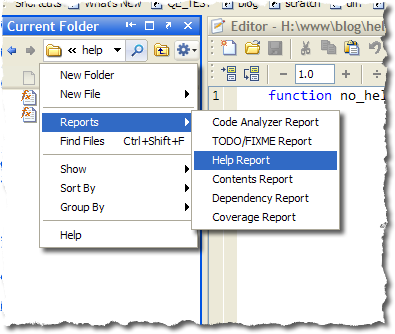
To assist in creating a standard format Contents.m, you can use the Contents Directory Report.
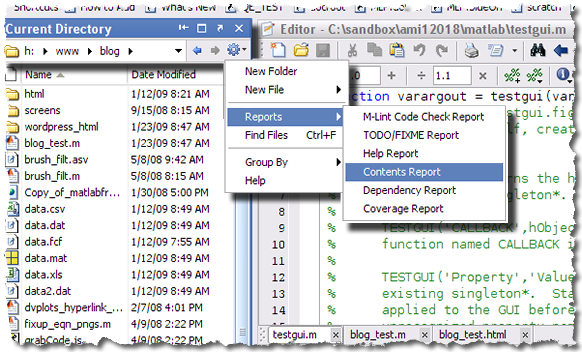
contents report

The contents report will look at the MATLAB files in a directory and build a Contents.m file using the filenames and H1 lines. If there already is a Contents.m in a directory. The contents report will identify discrepancies in the file listings or in the H1 lines.

—-Edit 1/26/09 … Loren has just reminded me that that the contents file is Contents.m (with a capital “C”) and not lowercase as I originally mentioned.

2 Responses to “Your Table of Contents”

  1. Aurélien Queffurust replied on :

    Hello,

    For my different projects, I am used to creating Contents.m
    It helps me to remind me what my differents function do.
    I just regret that it is not possible to save the report in HTML format. Idem for M-Lint Check report, I would find useful to be able to save these reports by using File -> Save As. Currently I use mlintexcel (downloaded from FEx) to send my users the report of their M-lint messages in a Excel Sheet.

    Have a nice week ;)

    Aurélien

  2. Mike replied on :

    Aurélien,

    Thanks for the suggestions, they are good ones.

    Mike

Leave a Reply

Wrap code fragments inside <pre> tags, like this:

<pre class="code">
a = magic(3);
sum(a)
</pre>

If you have a "<" character in your code, either follow it with a space or replace it with "&lt;" (including the semicolon).


Ken & Mike work on the MATLAB Desktop team.
  • DP: Hi i have a problem with ezplot3, i want to plot more than i curve in the same graph but hold on command...
  • Ken: Hi Arsalan, Unfortunately there is no way to get the new Editor API in older versions of MATLAB. -Ken
  • Arsalan: Hi, I am very excited about the MATLAB API for editor because right now i am working on a project and i need...
  • Johannes: Since I started using matlab-emacs some days ago I never experienced Emacslink. But I experienced some...
  • Francisco J. Beron-Vera: Hi all, I have recently learned about ViEmu (http://www.vimemu.c om) which, for Vi/Vim...
  • OysterEngineer: When I first learned of the Publish feature in MatLab, I thought it might be useful to help to...
  • Ken: Hi Herve, I’m not quite sure what you mean by “stand-alone&# 8221; mode? -Ken
  • Herve: I wonder when the publish fonction will be supported in standalone mode.
  • Mike: Ravi, What you described should work as far I understand it. Please follow up with technical support. With a...
  • Mike: @Daniel, Thanks for that note.

These postings are the author's and don't necessarily represent the opinions of The MathWorks.