Ken & Mike on the MATLAB Desktop

February 2nd, 2009

The new search and filter field

I’ve talked a lot about wanting to improve the platform fidelity of the MATLAB Desktop. Along those lines, I think it’s also important to improve the consistency of the MATLAB Desktop. In R2008b, we’ve introduced a new search and filter widget that will help do both of these things.

The search and filter field is used to help narrow the scope of items that your looking at. I refer to it as a search and filter field because sometimes it’s more natural to think of it as a filter (e.g. when your narrowing the set of functions visible in the Function Browser), while other times it’s more natural to think of it as a search (e.g. when your looking through the documentation in the Help Browser). Either way, this widget will help you find things.

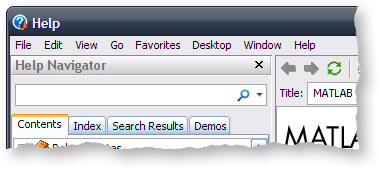
This style of widget is available on both Mac and Windows, so we’ve taken great care in making sure that it matches what you’d expect on those platforms. Here’s what the MATLAB search and filter field looks like on Mac and Windows:

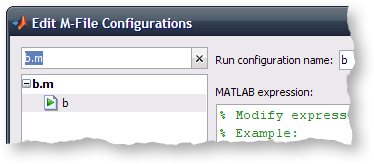
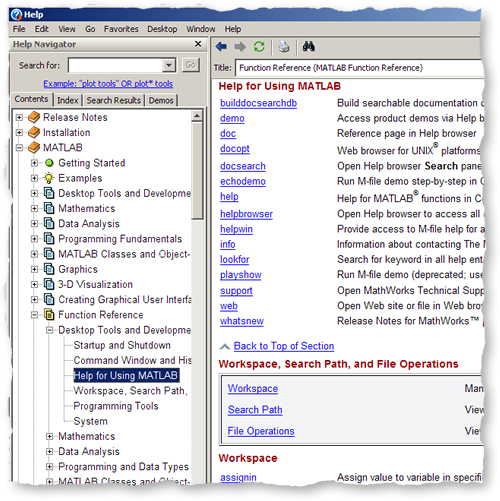
And here are all the places you’ll see the search and filter widget in R2008b:
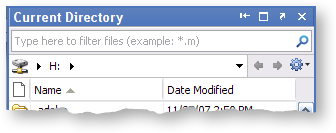
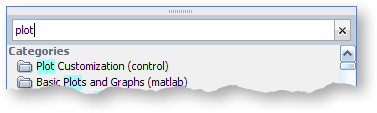
Current Directory Browser

Function Browser

Help Browser

Configuration Editor

Using a platform specific widget like this consistently across the MATLAB Desktop makes it easier to use the product. You won’t have to learn a different idiom for each Desktop component, but can instead pull from the shared idiom of the application.

9 Responses to “The new search and filter field”

  1. Han Geerligs replied on :

    hello Ken,

    to improve the unification of the search widget you might consider to use the “magnifying glass” icon at the right in all widget instances. I am missing that icon in the search field in the Configuration Editor.

    Another suggestion is to use the lightgrey hint “type here to …” in all widgets, so also for the Help Browser and Function Browser.

    kind regards, Han

  2. Ken replied on :

    Hi Han,

    I guess I should have taken the screen shots above such that all the search and filter fields were in the same state. Let me clarify:

    Where’s the magnifying glass? On Windows, the magnifying glass only shows up when there is no text in the field, and is replaced by an “x” button when text has been entered. This is the standard Windows behavior for this widget.

    Where’s the prompting text? The prompting text only shows up when the search and filter filed doesn’t have focus, and is empty. This is the standard behavior on all platforms.

    Let me know if that helps to clear things up.
    -Ken

  3. Han Geerligs replied on :

    Hello Ken,

    thanks for the clarification.

    However I think that it is confusing to change the look of the search field depending upon the ’state’ (focus).
    When looking at UI guidelines i.e. the Apple HIG I see that for a search field the magnifying glass is always visible. It also features a stop-button.

    I was wondering which path Matlab uses when searching for M-file configurations? Apparently it is not only the Matlab path.

    kind regards, Han

  4. Ken replied on :

    Hi Han,

    If your on the Mac, you too should always see a magnifying glass. You should also see the clear button (the “x”) when there is text entered into the text field. What version of MATLAB are you running?

    The Configuration Editor shows you *all* of your configurations, even for files not on the path. So when you type text into the filter field, it’s filtering on all of the configurations you’ve ever created.

    -Ken

  5. Han Geerligs replied on :

    Ken,

    I am running on Windows, but was only referring to the Mac HIG guidelines. I used this as an example of a proven guideline for search field interfaces.

    I suppose the configurations are retrieved from \Mathworks\MATLAB\\publish_configurations.m and
    \Mathworks\MATLAB\\run_configurations.m.

    Anyway, thanks again for the clarification.

    Han

  6. Ken replied on :

    Hi Han,

    We do follow Apple’s Human Interface Guidelines on the Mac, and the Microsoft’s guidelines on Windows. I think you’ll find we adhere pretty closely to Microsoft’s specification of a Search Box.

    You’re right about the configuration storage location. Both of the files you mention (run_configurations.m and publish_configurations.m) are pure MATLAB files.

    -Ken

  7. Han Geerligs replied on :

    Ken,

    thanks for the quick response and the useful link.

    Han

  8. Lasse replied on :

    Hi,

    Is it possible to exclude files from search? I would like to remove files starting with dot and maybe some others.

    Lasse

  9. Ken replied on :

    Hi Lasse,

    There isn’t any way to exclude files from the filter just yet, though we are working on it.

    -Ken

Leave a Reply

Wrap code fragments inside <pre> tags, like this:

<pre class="code">
a = magic(3);
sum(a)
</pre>

If you have a "<" character in your code, either follow it with a space or replace it with "&lt;" (including the semicolon).


Ken & Mike work on the MATLAB Desktop team.
  • Ori: The current folder shortcut used to be alt-y. Now it is alt-o. However, while in the editor window, alt-o opens...
  • Jose Miguel: Hi First of all, thanks for the post, it is really useful. I am trying to develop a Java GUI within...
  • Ken: Hi Siddharth, There isn’t currently any way to move the docking controls. Feel free to submit an...
  • Phil: I have the same problem as described above with UITable working fine in the Matlab environment but showing no...
  • Siddharth: Is there any way to move the position of the docking controls (or eliminate them through some...
  • Chris: Yes, it is a challenge to organize functions into categories, especially with so many functions. Ken and I...
  • Mike: Thanks for fielding that one, Yair.
  • Yair Altman: Jimmy - if you mean that you wish to include hyperlinks in your function’s help comment, that will...
  • OysterEngineer: Thanks for explaining the Function Browser. I fired it up and gave it a try. It appears that it has...
  • Jimmy: Is there any way to include hyperlinks in a comment, such as the standard help at the beginning of a function?

These postings are the author's and don't necessarily represent the opinions of The MathWorks.