Ken & Mike on the MATLAB Desktop

February 9th, 2009

Ready, Set, Action!

Well, it may not be as “action” packed as the movies, but it is a go-to place for operations on files and directories.
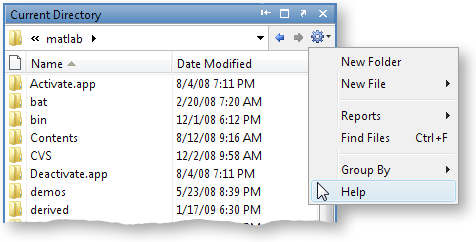
Have you used the Actions button? We’re interested in knowing how discoverable and convenient this menu is. Every action on this drop-down is also accessible from other context menus in the Current Directory Browser. Depending on your workflow, some clicks and keystrokes are more effiecient than others. How often do you go to the Action button for common operations like creating a file or grouping the Current Directory view?

If you’ve read previous blogs then you might be familiar with modifying your toolbar by the right-click Customize… option from the Actions button. That is handy if you want to provide single click access to streamline frequent operations, by placing items from the Actions menu right on the Current Directory toolbar.

7 Responses to “Ready, Set, Action!”

  1. Han Geerligs replied on :

    Hi Lori,

    thanks for asking feedback on the Action button.

    When looking at the Icon of the Action button I was expecting a settings menu rather than an Action menu. Also the little arrow down glyph doesn’t add anything for me: it’s part of the icon rather than a separate option.

    I expect Actions to be presented when using the right mouse button. So when right clicking in the breadcrumb-navigator I hoped to see the relevant action (as in Eclipse)

    The “Group by” option should also be available with right-click on the ‘name’-splitter.

    maybe offtopic: in R2008B/PR2009A only the back button is implemented and not the up-directory button as it was in R2008A. I am missing that one.

    kind regards, Han

  2. Daniel Armyr replied on :

    I hadn’t even noticed that button, and now that I notice it, I see nothing it does that right-clicking in the appropriate place doesn’t do.

    So I am sorry, but now it resides in the gray limbo. There it can keep company with the other toolbars that used to take up my valuble screen space without giving added value.

    –DA

  3. Tom Clark replied on :

    Yeah, I’m afraid it seems like clutter for me.

    For example, I’ll always right click for a new file, not just because I’ve always done it that way in ML… but because that’s the way it’s done for most Operating Systems too. Where people have a comfortable habit of doing something, why attempt to replace it with an unfamiliar action, which actually requires an additional click?

    What’s more, the greater the number of icons you have up there, the more impenetrable ML will seem to a novice user. Clear up!

    Cheers,

    Tom Clark

  4. Mike replied on :

    Daniel and Tom,

    You can control the number of icons on the top of the bar. For instance, my Current Directory toolbar looks like:

    I’ve added back in the “up one level” button. But you could remove all the buttons, if you desire:
    http://blogs.mathworks.com/desktop/2008/11/24/customize-your-current-directory-toolbar/

  5. Mike replied on :

    Han,

    Thank you for those comments. You should be able to select “Group By” by clicking on the Name column header. If not, please contact technical support and let them know your system details.

    As for the [edit: up one folder] button, take a look at my previous comment here. I’ve added it back in with the customize toolbar setting.

  6. George Kapodistrias replied on :

    I agree with Tom and Daniel. There are toolbars ‘everywhere’ and they just add to clatter. I have customized that particular ‘action’ button out of the toolbar. It does not offer any additional useful functionality.

    As long as you give me the opportunity to customize my desktop and turn off icons and windows I do not want to see I am OK. However, you might want to consider a single toolbar that adjusts the visible icons depending on which window is active (e.g. editor vs command window). Customizable of course!

    gk.

  7. Han Geerligs replied on :

    Hello Mike,

    Thanks for your note on customisation, it really helps.

    I observed that the Group By option changes depending upon which splitter is right clicked. E.g. when right clicking on “Name” only “Group By Name” can be selected, and when right clicking on “Date” only “Group By Date Modified” can be selected (or grouping can be stopped).

    My suggestion is to make all groupings selectable using the right click on any splitter (as in Outlook).

    The advantage is that the menu is more similar, and not depending on which splitter is right-clicked.

    kind regards, Han

Leave a Reply

Wrap code fragments inside <pre> tags, like this:

<pre class="code">
a = magic(3);
sum(a)
</pre>

If you have a "<" character in your code, either follow it with a space or replace it with "&lt;" (including the semicolon).


Ken & Mike work on the MATLAB Desktop team.
  • DP: Hi i have a problem with ezplot3, i want to plot more than i curve in the same graph but hold on command...
  • Ken: Hi Arsalan, Unfortunately there is no way to get the new Editor API in older versions of MATLAB. -Ken
  • Arsalan: Hi, I am very excited about the MATLAB API for editor because right now i am working on a project and i need...
  • Johannes: Since I started using matlab-emacs some days ago I never experienced Emacslink. But I experienced some...
  • Francisco J. Beron-Vera: Hi all, I have recently learned about ViEmu (http://www.vimemu.c om) which, for Vi/Vim...
  • OysterEngineer: When I first learned of the Publish feature in MatLab, I thought it might be useful to help to...
  • Ken: Hi Herve, I’m not quite sure what you mean by “stand-alone&# 8221; mode? -Ken
  • Herve: I wonder when the publish fonction will be supported in standalone mode.
  • Mike: Ravi, What you described should work as far I understand it. Please follow up with technical support. With a...
  • Mike: @Daniel, Thanks for that note.

These postings are the author's and don't necessarily represent the opinions of The MathWorks.
