Ken & Mike on the MATLAB Desktop

March 23rd, 2009

More Mac-like tabs

Part of my New Years resolution was to increase platform fidelity - that is, to make MATLAB fit in better with it’s host operating system. One particular thing that had been bothering me in R2008b and earlier, was the look of the tabs in the MATLAB Editor on the Mac. They just didn’t look right - they were more like buttons than tabs, and they stood out like a sore thumb.

I decided to freshen up the look of the tabs on the Mac, by doing the following:

  1. Use more Mac-like close buttons (the little round “x” below)
  2. Add a subtle highlight gradient on mouse-over
  3. Add a dark inverse gradient for the selected tab

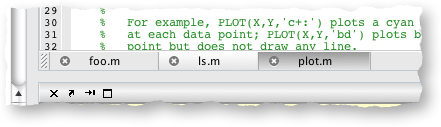
Here is a look at the old tabs, and then the new:

Old Editor tabs on the Mac (R2008b and earlier)
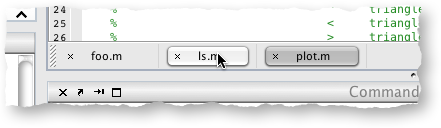
New Editor tabs on the Mac (R2009a)
While this may seem like an insignificant detail, it is the sum of many such details that make an app “fit in”. We’re constantly receiving requests to make MATLAB feel more like a Mac app on the Mac, and I promise, we’re trying very hard to do that.

22 Responses to “More Mac-like tabs”

  1. yonatron replied on :

    I was going to say that while they’re better than the old bubbly-buttony tabs, they still don’t look quite right. Like if the circle were a tiny bit bigger, the x would look narrower and more like tab-close widgets in other apps.

    But then I looked at Safari 4’s awful disappearing rounded-square widgets for closing tabs, and it seems like Apple’s just going to make it hard to try to fit in. Who knows what you should do.

    Anyway, the main thing that I’d like to see to really feel at home using Matlab on a Mac is if you could get the menus back into the system-wide menu bar instead of stuck to the window like a Windows/Unix app. I’m sure it’s not trivial, but I’ve seen it done in cross-platform apps with Java UIs.

  2. Ken replied on :

    Hi yonatron,

    Thanks for the feedback. We are trying hard to push the menu bar back up to the top of the screen on the Mac, but we’re fighting some technical issues - we’ll definitely keep on this one though.

    -Ken

  3. yonatron replied on :

    Hey, thanks for blogging. I think it’s great when software developers do this, especially for products with massive scope like Matlab. Of course, knowing that you’re trying to make the menu bar properly Mac-like, I might delay buying my own student copy for another revision…

  4. Mike replied on :

    yonatron,

    With the way our release cylces work out, and especially since the student version doesn’t always line up with the regular version, don’t wait for us to resolve this issue. We can’t give a timeframe for when we’ll have it fixed.

  5. yonatron replied on :

    Oh, I know, but I don’t absolutely _need_ a copy on my own computer just yet. As a grad student, I’m in the lab a lot, and when I’m not, I have a few options for remotely accessing computers with Matlab installed. So I can live without it for another 6 mos - a year. Since there’s no upgrade pricing for student version purchases, I want to time mine just right and only buy it once or twice in my time here.

  6. Quan replied on :

    That’s a pretty neat detail that The MathWorks looked into. Personally, I like throwing my MacBooks off 36 floor buildings instead.

    Any idea on metrics for the # of mac users who use MATLAB?

  7. Ryan Gray replied on :

    Nice. Looks cleaner and more professional, but what I like best is that it reduces the vertical space the tabs bar takes up. I’ll be upgrading my Mac to this version soon; already did the Windows box. Did the window focus problem get fixed? Where switching away and back to MATLAB loses the window focus.

  8. kena replied on :

    Quan (#7),

    While I won’t say exactly how big the Mac install base is, I will report that the Mac is the fastest-growing platform we support.

  9. jason replied on :

    Now if only Matlab would play nicely with Compiz (3D-effects) under Linux.

  10. Chris replied on :

    Given that the Mac is the fastest-growing platform, I don’t suppose there’s any hope that we’ll see a real (i.e. Aqua) front end for Matlab in the future rather than the Frankenstein version we suffer under today? Anything us poor users can do to help bring that about?

  11. Ken replied on :

    Hi Chris,

    The current UI on Mac does use the Aqua theme (Aqua refers to the actual look of the widgets). I think what your asking is whether we’ll rewrite the UI in Cocoa — I’d say thats unlikely, but I never say never.

    As you’re probably aware, our current user interface is written in Java. Java has a stigma for resulting in poor quality UIs, which is probably true more times than not. However, you can write good UIs in Java — just check out this entry on my personal blog, which demonstrates how good a Java app can look.

    The app in that blog entry is based on an open source library I work on in my free time. I spend time building and providing this library because I believe Java apps can offer a high fidelity experience on the Mac:.

    The MATLAB Desktop will slowly evolve it’s user experience to be more in line with Apple standards — we just ask that you be bear with us while we get there!

    -Ken

  12. joshua vogelstein replied on :

    thanks for fixing this! i wonder, are they any other 2009a mac specific improvements? in particular, i’m wondering whether starting mac using the command line now allows for figures in a reasonable way (matlab seems to have stopped supporting that in an earlier version). but i’m curious to hear any other mac specific improvements. many thanks, joshua

  13. Ken replied on :

    Hi Joshua,

    I don’t think there are any other Mac specific user interface changes in R2009a, but if I think of any more, I’ll be sure to post about them.

    -Ken

  14. Tom Lawton replied on :

    Nice touch- but I’ve got something a bit more fundamental… Googling “matlab mac” gives this page- http://www.mathworks.com/access/helpdesk_r13/help/base/install/mac/inst_mac.html
    as the top hit- which, on inspection seems scarily out of date….

    Cheers,
    Tom

  15. Ken replied on :

    Hi Tom,

    Glad you like the new tabs on the Mac.

    As far as Googling…we don’t have any control over what Google hands back to you when you do a search. For some reason, it’s giving you our R13 documentation. Here’s the latest doc on installing MATLAB on Mac:

    http://www.mathworks.com/access/helpdesk/help/base/install/mac/macinstallguide.html

    -Ken

  16. Tom Lawton replied on :

    Many thanks Ken!
    I wonder if there’s any way they can pull, bury or robots.txt the old page? It had me worried!
    Cheers, Tom

  17. Hans Meier replied on :

    I would also like to encourage MATLAB developers to start working on bringing the menu bar back to the top of the screen (Mac style).

    #7, the window focus problem did not get fixed. That’s probably an even more serious issue than the menu bar. What’s the status on this bug?

  18. Mike replied on :

    Hans,
    These two issues are at the top of our list. We’ve been working with our vendors to get these resolved. We’ll let you know when these are fixed and on what platforms as soon as that version of MATLAB is released.

    Thank you for your feedback and continued patience.

  19. Kevin replied on :

    I love Matlab and I’m going to get a Mac soon. I wish they would play well together.

    What’s the best way for us to “lobby” Mathworks to get Matlab to work well with a Mac, besides posting here?

    As Apple’s market share increases, especially among young academic types, Matlab’s reputation for not working well with Mac’s might have a serious impact on Mathwork’s bottom line.

  20. Ken replied on :

    Hi Kevin,

    Your comment is timely, as we’ve just posted about MATLAB support on Snow Leopard. As I’ve said before, The MathWorks is committed to enhancing the experience of MATLAB on the Mac. As I mentioned in this blog entry, I spend much of my time tweaking MATLAB’s user interface to make it more Mac like and there are many others focused on MATLAB’s Mac performance and general OS X integration. The overall user experience of MATLAB on the Mac is something we’re working very hard on.

    It would be helpful for us if you could articulate what you mean by “play well together”. What is bothering you the most about MATALB on the Mac? We can factor this type of information into how we prioritize the various tasks involved in our Mac-ification of MATLAB.

    -Ken

  21. Siddharth replied on :

    Is there any way to move the position of the docking controls (or eliminate them through some configuration setting) on a Mac ?
    I would like to move the controls in line with the “File” menu, instead of being on the same line as the other toolbars such as the ‘Cell Mode’ controls. (More Linux or Windows-like, if you will)

  22. Ken replied on :

    Hi Siddharth,

    There isn’t currently any way to move the docking controls. Feel free to submit an enhancement request.

    -Ken

Leave a Reply

Wrap code fragments inside <pre> tags, like this:

<pre class="code">
a = magic(3);
sum(a)
</pre>

If you have a "<" character in your code, either follow it with a space or replace it with "&lt;" (including the semicolon).


Ken & Mike work on the MATLAB Desktop team.
  • Ori: The current folder shortcut used to be alt-y. Now it is alt-o. However, while in the editor window, alt-o opens...
  • Jose Miguel: Hi First of all, thanks for the post, it is really useful. I am trying to develop a Java GUI within...
  • Ken: Hi Siddharth, There isn’t currently any way to move the docking controls. Feel free to submit an...
  • Phil: I have the same problem as described above with UITable working fine in the Matlab environment but showing no...
  • Siddharth: Is there any way to move the position of the docking controls (or eliminate them through some...
  • Chris: Yes, it is a challenge to organize functions into categories, especially with so many functions. Ken and I...
  • Mike: Thanks for fielding that one, Yair.
  • Yair Altman: Jimmy - if you mean that you wish to include hyperlinks in your function’s help comment, that will...
  • OysterEngineer: Thanks for explaining the Function Browser. I fired it up and gave it a try. It appears that it has...
  • Jimmy: Is there any way to include hyperlinks in a comment, such as the standard help at the beginning of a function?

These postings are the author's and don't necessarily represent the opinions of The MathWorks.