Ken & Mike on the MATLAB Desktop

April 6th, 2009

Finding the right M-Lint message

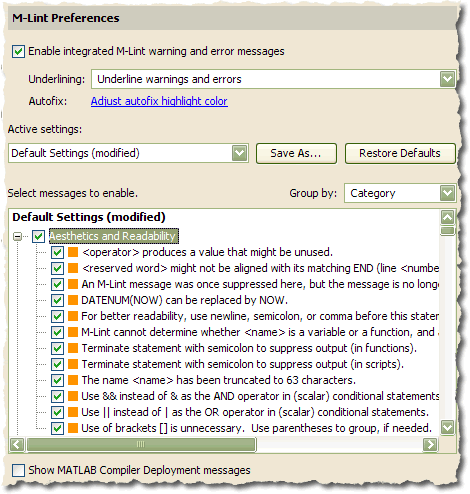
I promise that this’ll be my last post on the new M-Lint features (for awhile anyway). In last week’s post on the new M-Lint preferences, I glossed over the new search bar, so this week we’ll dive into its features.

Every release since M-Lint was first integrated into the editor has had more and more messages, making it difficult to find a particular message to turn off. For R2009a, we took Ken’s search and filter box and added it to the M-Lint preferences panel.

Let’s say you found the “Input argument … might be unused” message annoying and wanted to turn it off, but could not remember the exact text of the message. Searching for “be unused” shows us all the messages that contain the words “be” and “unused”.
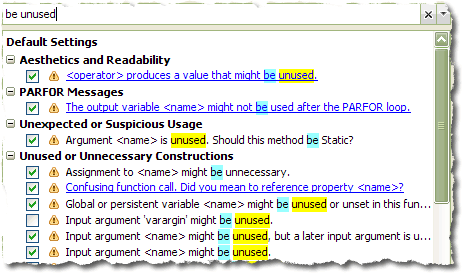
searching for the text 'be unused'

The search mechanism searches all the messages’ text, message identifier, category, and extended help, but only the message text and extended help is highlighted with the results. For instance, if we wanted to search for messages pertaining to MExceptions, we see that there are no messages that contain the term “MException”, but there are four messages that discuss MExceptions in their extended help.
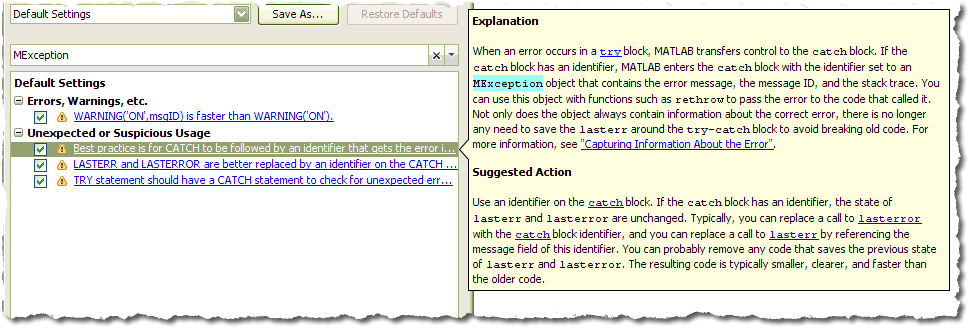
searching for the text 'MException'

In addition to filtering based upon the text of messages, the filter’s dropdown menu contains options for filtering messages based on if they are enabled/disabled, if the setting has been modified from the factory defaults, by category, and a few others.

the filter's dropdown menu'

The one thing that the new UI doesn’t make easy is finding out what the (%#ok) tag is for a particular message. This would be handy for typing in the ok’s for a particular file by hand. Since we weren’t sure how many people would use it or come to this panel to find out those tags it did not seem worth it to complicate the UI just to show them. We might revisit that again in the future if it becomes compelling.

3 Responses to “Finding the right M-Lint message”

  1. Aurélien Queffurust replied on :

    Hi!

    I just wonder why there is no M-lint message for fclose or fprintf. It is common to see numbers displayed in the command window because we have forgotten the coma separator ; after a fclose(fid) or a fprint(fid,…)

    Aurélien

  2. Mike replied on :

    Aurélien,

    Are you thinking of the message: “This call of will produce output that will be printed.” ?

  3. Aurélien Queffurust replied on :

    Yes Mike. It is exactly this kind of message that I thought

Leave a Reply

Wrap code fragments inside <pre> tags, like this:

<pre class="code">
a = magic(3);
sum(a)
</pre>

If you have a "<" character in your code, either follow it with a space or replace it with "&lt;" (including the semicolon).


Ken & Mike work on the MATLAB Desktop team.
  • Ori: The current folder shortcut used to be alt-y. Now it is alt-o. However, while in the editor window, alt-o opens...
  • Jose Miguel: Hi First of all, thanks for the post, it is really useful. I am trying to develop a Java GUI within...
  • Ken: Hi Siddharth, There isn’t currently any way to move the docking controls. Feel free to submit an...
  • Phil: I have the same problem as described above with UITable working fine in the Matlab environment but showing no...
  • Siddharth: Is there any way to move the position of the docking controls (or eliminate them through some...
  • Chris: Yes, it is a challenge to organize functions into categories, especially with so many functions. Ken and I...
  • Mike: Thanks for fielding that one, Yair.
  • Yair Altman: Jimmy - if you mean that you wish to include hyperlinks in your function’s help comment, that will...
  • OysterEngineer: Thanks for explaining the Function Browser. I fired it up and gave it a try. It appears that it has...
  • Jimmy: Is there any way to include hyperlinks in a comment, such as the standard help at the beginning of a function?

These postings are the author's and don't necessarily represent the opinions of The MathWorks.