Mike on the MATLAB Desktop
April 20th, 2009
It’s the little things that count
A large (but oft unnoticed) part of what we do on the desktop team is elimination of waste. We eliminate waste by deleting unneeded or unused code, removing functionality that no longer contributes anything useful, or by reducing the rigmarole you have to go through to get your work done.
As part of our ongoing “interaction beautification” project, we’ve done a bunch of minor things in R2009a that we hope you didn’t notice because they should help rather than impede your workflow. For instance, we’ve turned on “wrap around” by default in the find dialog in the Editor.
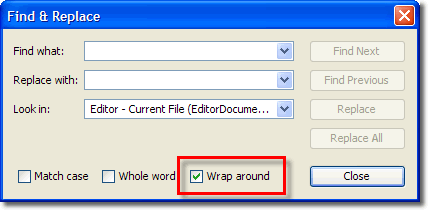
For me at least, most of the time when I’m in the middle of my file somewhere and I want to find a particular use of a name, it can be above or below where I am currently editing. This means that I am more often than not clicking the “wrap around” checkbox. We figured that most of our users are in the same boat, and so we decided to make that box checked by default. That means more often you have one less mouse click: one less thing to think about and getting between you and your work.
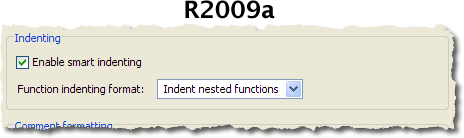
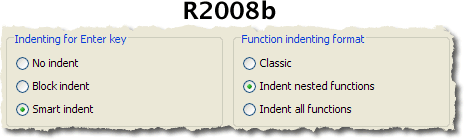
Other times it makes sense to remove little-used options that cause confusion for users and code bloat and maintenance headaches for developers. One of the features we culled in R2009a was block indenting in the editor. If this is the first time you’re hearing about this feature, you’re not alone. In addition to the popular “smart indenting” which indents depending on nesting level of block of code you’re editing, there was block indenting which just used the previous line’s indentation for each new line. In addition to all the code savings, we were able to present you with a cleaner, more understandable interface:
 
Finally the other preference we got rid of was the Integrated text editor (”EmacsLink”) option, which you would have only seen if you had previously installed EmacsLink. This was our chance to once again clean up a little-used and buggy piece of software. Removing this option allows us to implement new features without having to worry about backwards compatibility with a niche add-on. For some people this might be painful, but we think the benefits are well worth it.
Finally I want to give a shout-out to Doug and the many people in the greater MATLAB community running the Boston Marathon today. Good luck!
By
Michael Katz
Mike is a developer on the MATLAB Desktop team. When not describing himself in the third person, biking, homebrewing, or rooting for the home team, he's busy trying to make the world a better place for programming.
14:14 UTC |
Posted in Editor, Find tools, Preferences |
Permalink |
You can follow any responses to this entry through the RSS 2.0 feed.
You can skip to the end and leave a response. Pinging is currently not allowed.
Leave a Reply
|
One enhancement that I’d like to see (unless it’s possible somehow already) is to have the option to replace all within the current function only. I’d make use of that a lot.
I’m actually the opposite on the wrap-around thing . I tend to keep it turned off but it’s nice to have the option.
Oh NOOOOO!
Why are you doing this to me? I guess this means that you are forcing the end-statements to line up with if-for-while et.al. I just HATE that in my code. I want the end-statements to be indented one more level. It make the code look so much nicer.
Can you PLEASE reconsider in future versions?
Matt,
Thanks for the suggestion, it’s a useful idea, we’ll look into it, but we won’t want to complicate the gui.
Jerker,
Please don’t take it personally. We want to move the editor forward, and that means eliminating things like the block indenting that overly-complicate the underlying code. We understand that it is a painful transition, but this will make it easier for the overwhelming majority of our users. I don’t want to sound flip as we did not make this decision lightly or without a lot of debate and review.
You can still turn indenting off and manually manage your file structure with tabs and spaces. In a future release we may make it possible to customize the formatting.
I don’t mean to sound ungrateful, as these little tweaks and features are nice. But when is Mathworks going to fix one of the most glaring bugs that is painful to work with every single day on Mac OSX: http://www.mathworks.com/support/bugreports/details.html?rp=418140
This bug has been around for five releases, 2.5 years. Help us Mac users, Mathworks!!!
Hi Kris,
I’ve brought this issue up to the right people, and they’ve started the ball rolling on working with Apple for a fix.
Thanks for bringing this up.
-Ken
Ken,
Thanks for the responsiveness. I have enjoyed these blogs bridging the gap between the users and the developers for this very reason. Thank you!!!
Matt,
I really don’t take it personal. I just thought that the pro’s and con’s came out very much to your favour.
Your con’s: A few customer complaints.
Your pro’s: Simpler code maintenance.
My con’s: A serious nuisance that will affect me every other line I write in Matlab.
My pro’s: “A cleaner, more understandable interface”. Removing a radio button and replacing the remaining two with a checkbox in a dialog that I use once. Lame, huh?
Now that I’ve unloaded my daily dose of sarcasms, I feel much better!
I am a part of the ‘niche’ group of users that is rather upset about the removal of emacslink. There are many of us that want to make code development work the way we think is optimal, not the way anyone at Mathworks thinks is optimal. Emacs is the one environment that allows us to do that. I will not be upgrading Matlab anytime soon, and will switch to Octave if need be.
Leo,
What about emacs do you consider to be optimal? What features is the MATLAB Editor missing that impedes your workflow?
Hi Leo,
We apologize for the inconvenience your experiencing due to the removal of EmacsLink. Pulling it form the product was a tough decision to make, but when we weighed the number of users and the limited functionality it offered, supporting it further just didn’t make sense.
Our hope is that by removing EmacsLink, we’ll be able to make the official MATLAB Editor’s code even more solid and bug free.
Once again, sorry for the inconvenience.
-Ken
Another user here who depends on EmacsLink. I’m generally enthusiastic about Matlab, but this is a very unpleasant surprise for me. With respect, I sincerely doubt the builtin editor will ever give me the productivity boost that being able to work in emacs does, once I’ve got it set up right.
Things like
-emacs’ advanced cursor movement and editing commands and keybindings (HUGE). In particular:
–keyboard-based navigation by if/end construct, words, lines, etc .. without having having to lift my hands to find the mouse or the arrow keys
–paragraph ‘filling’ (for comments)
–dynamic word expansion (which I like much better than “tab completion”)
-superb support for working with other file types — text, cpp, etc — it’s nice to have the ability to have that all in the same editor
-customization and scripting ability .. for instance I have the following custom cmds I use //all// the time:
– toggle a line as being a comment or not, and simultaneously moving to the next line
– sending the current line to matlab for evaluation in the base workspace, and simultaneously moving to the next line
– marking a fixed location in the file, and thereafter being able to run whatever code is between the current cursor location and that point, in the base workspace
How was EmacsLink “buggy”? I’ve been using it for many years with no major problems.
How can I get it running again?
Why have you abandoned me?!
Regards,
-Eric
Woburn, MA
Hi Eric,
There’s nothing stopping you from using Emacs as your editor of choice, though you won’t be able to debug MATLAB files from Emacs. To set Emacs as your default editor, go to Preferences -> Editor/Debugger, then select the Text Editor radio button and enter the path to Emacs in the adjacent text field. Doing this will keep your editing in Emacs, and meet all the needs you mentioned.
-Ken
Eric,
Thank you for that list. Information like that helps us prioritize which features we work on each release. As Ken said you can still edit your files in emacs, and cell mode is meant for partial file evaluation, but may not be fine grained enough for your workflow.
We haven’t abandoned you, but reaffirmed our commitment to making the MATLAB Editor the best editor available for MATLAB code.
No more Emacs support means it’s time to start exploring alternatives to Matlab. Without debugging support, there is no point to using Emacs. While this decision may only affect a small percentage of Matlab users, many of these users are the faculty who determine what packages their universities will purchase and thereby what systems students will be trained on.
I, along with many of my colleagues, will only use Emacs for editing and coding.
Ken, Mike — thanks. I tried setting emacs as the editor, as you suggested.
Comments:
1. This creates a new emacs process every time I ‘edit’ or ‘open’ a different function. What should happen is that only the first ‘edit’ should start a new session, and subsequent ‘edit’s should open the file in the existing session. I can pretty quickly have about 30 extra windows open on my desktop.
2. Upon an error, clicking on the error link in the matlab command window opens the official editor, not emacs, even though I specified emacs in the preferences.
3. And, of course, none of the other interactivity features are working .. no eval’ing code from emacs, no debugging, etc.
Anyway, I think it’s a bit of a stretch to say that setting the ‘Text Editor’ value to another editor provides much value. I find I am able to start up an emacs session alright without the help of Matlab.
It’s the //combination// of efficient emacs editing and interactivity with Matlab that works so well for me (and plenty of others who have discovered it). Eval’ing code from emacs, running the debugger, jumping from an error to the source location, with an editor that suits me.
I do use the official editor, BTW. Despite my griping here, I actually like it far more than almost every other bundled editor I’ve come across. It’s great for what it is. Yes, cell mode was a great addition. It’d be great to not have to mess with setting up EmacsLink every time I get a new version of Matlab or am working on a computer that’s not my own. But editing in emacs is so. much. faster. Have you tried it?
Probably the functionality within an emacs editing session that I’ll miss the most, is the ability to send one line over, from emacs, to matlab, and have it eval’d in the base workspace. Is there any way I can get that one piece working?
Is the “external editor interface” gone also? (I presume that was mainly to support EmacsLink.)
How about a suggestion?
Open-source the EmacsLink code. With whatever “no support, you’re on your own” disclaimers the company feels are in its interest. Maintain the EEI, and let us know how to use it. There are plenty of emacs fanatics that would be more than happy to put in some effort so we can keep working with the editor that lets us get the most out of Matlab, if given the ability. If something like the EEI interface was available then the vi folks could do the same, and users of other niche editors as well. You wouldn’t have to support the emacs-specific parts, and folks could get a lot of mileage out of the EEI stuff.
Here’s hoping,
-Eric
PS, why doesn’t C-Shift-n highlight the line it moves past? (this is in linux)
Is there a way to use matlab editor when working with no display (via ssh to a remote server) ? If not, in this (common) mode matlab has no alternative to emacs.
Michael.
I was recently considering writing a vim script for using the EmacsLink in Vim, as I had been looking for a way to do matlab debugging in Vim and got very excited when I found out there was a way to do it in Emacs. This was just as 2009a came out, but then I found out that EmacsLink had gone and I was very disappointed.
I have already written a script that integrates mlint checking in Vim, by running mlint.exe and parsing the output. I did this because wanted to use Vim to edit my files, but the lack of the mlint checker bugged me and forced me to continue using the matlab editor. My fingers work automatically with the Vim commands and I was typing lots of random “:w”s and wishing I could use the commands to quickly jump from place to place in the file, or delete a whole line of code quickly and paste it elsewhere with a couple of key presses, or use search and replace with regular expressions (there’s a great satisfaction seeing a set of function calls changing with a clever regex).
Once you’ve gone to a fully-featured editor like Vim or Emacs it is incredibly frustrating to go back to a simpler editor, which is why people don’t just live with it, instead they consider using a different product, and I’m sure you don’t want that.
For now I’m happy editing files using the external editor, I had to hack edit.m to allow me to pass command-line arguments to gVim so each new file would open in a tab rather than a new window (I’ve already submitted an enhancement request for this).
If EmacsLink truly has gone for good, I would like to request a Matlab debugger program “mdb”, for which scripts could be written in Emacs and Vim to regain debugger functionality. Although I realise this would probably be a large undertaking, and I guess in your opinion not a high-priority as we Vim and Emacs users are a “niche” minority.
Sorry for the long post, we geeks get very attached to our editors.
Hi Thomas,
Thanks for the detailed feedback. We’re lucky to have such clever and devoted users! It’s always useful to hear how users are using MATLAB tools and how you’d like us to improve them.
Thanks again,
-Ken
Yes indeed, it is the little things that count! So why are you taking Emacslink away? It is one of those ‘little’ things that enable me to be a ‘power’ user of Matlab. It is actually a very ‘big’ thing for me; I’d very much like to see the feature re-instated.
Rather than removing Emacslink, it should be expanded, and the whole interface of Matlab should be exposed via a suitable API. By removing Emacslink, you’re forcing your customer base away from Matlab towards octave, or python + atlas. The more you make it inconvenient for power users, the more those power users (who are the ones making decisions about future products) will use other tools.
My best regards
Christian Peel
Correction: I meant ‘SciPy’ instead of ‘atlas’ in the previous post.
Christian,
Thank you for the additional comments. Like we’ve told everyone else, we really are sympathetic to the pain this causes. The reasons for this change are good ones, but it is going to take a few releases to realize the payoff. Until then, please continue to send us feedback.
Discontinuation of Emacs support is yet another reason for dropping Matlab for alternatives like octave and scipy.
Why am I using this old piece of ‘niche’ technology called ‘Emacs’? First of all, the Matlab editor is not usable for me within MacOS X: Usage feels slow, startup takes forever, it is the only application having its own in-application-window-taskbar. How special must an application be to deserve that?! (Sorry I had to write that :-P) And: the additional X11 server running in the background is nothing better than a bad joke if you ask me. First thing I thought when I saw ‘this’ was ‘I cannot believe this is a commercial product’. No offense guys, it just seems to me that Emacs, even and especially on MacOS, is superior in quality compared to the Matlab editor. What is what the Matlab editor can do better than Emacs? (No, cell mode doesn’t count, sorry.) If you ask me, if you want to get better than Emacs you will first of all get rid of the obvious flaws described above. Then you will have to invest just as much time in developing this piece of software as was into Emacs. And this surely has been a lot ;-) I think if you ask the Linux people out there they will tell you the same thing. No such thing as a better editor than Emacs or vim.
I wouldn’t even think about convincing Emacs or vim people about the superiority of your own editor. They’d been trying to convince each other about ‘their’ editor’s superiority. What they found out is it just doesn’t work to do so.
Doesn’t mean to stop the discussion with ‘us’. But please consider giving us back Emacs integration for Matlab. I don’t care about the 10 new toolboxes that I will never ever use. What a programmer needs most is a good user interface for *coding*. Emacs provides exactly that. And due to its customizability the back-end is exchangeable. Sorry guys, you are not the only ones providing an excellent numerics platform. So my advice: don’t rely on that alone!
Thanks,
Flo
PS: What are you guys at Mathworks using to code something up? I bet you have a favorite editor too and can’t turn to another one.
Mike, You say “The reasons for this change are good ones”; what are those reasons? What is the payoff that you talk about? What will happen in a few releases?
@Flo,
For us it’s not a matter of superiority or overall functionality. We’re trying to make the best editor for the MATLAB language. You are absolutely right that we’d be missing the point trying to make own emacs. Many of us come from software engineering backgrounds and use multiple IDEs and editors during the day (including emacs), depending on the type of file and project we’re editing.
I want to be clear, we’re not preventing anyone from using emacs, vim, notepad, a hex editor, etc. If that’s your favorite environment and the benefits it provides is more important to you than the benefits of the MATLAB Editor, by all means go ahead and use it. We’re not going to judge or admonish anyone.
Which brings me to @Christian’s question. As per MathWorks policy, I can’t comment on any future features or when they might be released. You’ll notice that we haven’t been pushing out a lot of big features for the past few releases and that’s because we’ve concentrated our efforts on infrastructure and quality work. Over the next 2-3 years you can expect better support for new MATLAB language features, toolbox features, programmatic and customization support, and smarter tools and assistive technologies.
@Mike
In response to your reply to @Flo, I think we are aware that you are not preventing us from using other editors (that would of course be pretty difficult to do with a plaintext language). The problem as I see it is that neither the MatLab editor nor other editors have a full set of features any longer. With EmacsLink other editors had everything they needed for MatLab programming, by taking that away you have crippled them in a small but significant way.
You say that: “We’re trying to make the best editor for the MATLAB language. You are absolutely right that we’d be missing the point trying to make [sic] own emacs.” However to make the MatLab editor the best editor for Matlab code would require making it at least equal to Emacs or Vim. This is completely unnecessary (and would be a huge undertaking) as we already have those editors and with EmacsLink they had all the features they needed.
Anyway enough of that. For the benefit of those people who know no better than to use the Matlab editor can I request a filename completion feature? Some shortcut to complete a path. I can do this simply in Vim using Ctrl-X Ctrl-F and it will search through my path for matches and show them in a list for me to choose from. It’s a severe pain to have to type long paths out manually as I’ve had to do on several occasions with the Matlab editor.
Thanks,
Tom
I’m finding that in 2009a, the Matlab editor seems to be the cause of a number of uncaught Java exceptions (mostly in AWT components), and that the debugger barely works (for example, if I move around directories, breakpoints don’t work unless I set them using an absolute path from the command line). At first I thought that the fact that emacslink was missing from 2009a would force me into using the Matlab editor, but, as it turns out, the Matlab editor is sufficiently broken that I’m using emacs anyway, and doing all my debugging from the Matlab command prompt. It’s not ideal, but there’s no longer anything like an ideal solution.
One small, but helpful addition would be to add Ctrl-l to clear the command window (clc).
Ustun,
I can’t promise anything, but you might be happy with MATLAB R2009b.
Hi Ken and Mike
Here yet another user who depends on EmacsLink. I was very frustrated to see the rather new 2009a release. For the older Matlab releases, I have created a DOS program to make it possible to run Matlab from within Emacs on both Windows and Linux. I used etags for auto-completion of not only Matlab built-in functions but also my own work and was very fond of it.
Another thing that is bothering me is that the libraries shipped with Matlab depends on numerous other libraries (non-static linkage) so you need to recompile everything twice a year, which often requires a lot of work due to your frequent changes in the API. As a result, I am spending quite som time on convincing my employer to switch to octave.
For me it seems like some business people at Mathworks are getting bored and maybe are thinking that the developers have to little work to do. As a result, the quality of your product is degraded from release to release - that is my opinion.
Does there exist a text-mode debugger and some documentation? If so, please let me know.
Thanks in advance
Jens
Hi Jens,
I’m not sure what you mean about needing to recompile twice a year? MATLAB code doesn’t need to be compiled at all (though you an p-code it). What libraries are you depending on? Any Java libraries are considered internal, so you shouldn’t be hooking into those.
I assure developers aren’t getting bored here at The MathWorks. One of our biggest motivators is to increase the quality and performance of MATLAB for an overall better user experience.
What do you mean by a text-mode debugger? There are function like dbstop if that’s what you mean.
-Ken
I’d also like to use Matlab in emacs, including stepping through code and jumping to error lines. Right now I’ve moved to Numpy which has a similar emacs integration (python.el and python-mode.el) and replaces a surprising amount of Matlab’s functionality — I’d suggest others do this same while waiting for the return of emacslink.
Since we’re talking about “the little things that count”, (couldn’t quite think where else to post), how about adding basic spell checking for comments in .m files? Given that all documentation can be in .m files, it would certainly be a nice feature to have.
Hi Tom,
Good suggestion. We’ve got an enhancement request for this.
-Ken
Another frustrated customer who depends on EmacsLink for years. I just upgraded (unfortunately) to R2009b a few days ago and found EmacsLink is gone. Many people, especially those from academia, use matlab only via ssh to a remote server. To give an example, I used to work at CMU, and most of people I know in my department use matlab this way; this is also the way we teach students how to use matlab. I don’t understand why mathworks makes such an irresponsible decision.
http://blogs.mathworks.com/desktop/2009/09/14/matlab-emacs-integration-is-back/