Ken & Mike on the MATLAB Desktop

May 18th, 2009

M-Lint across a project

Oftentimes I find myself working not just on one MATLAB file, but a whole project-full of multiple files. When I’m in a multi-file mode, I like to know how my code is doing and how much cleanup work I still have to do to get the files into a stable, presentable state. The M-Lint code checker built in to the Editor is a great tool for analyzing and fixing a single file, but not practical when you have a bunch of files.

Why open a series of files consecutively and tab between them just to find the outstanding messages when you can use the M-Lint report to see them all at once?
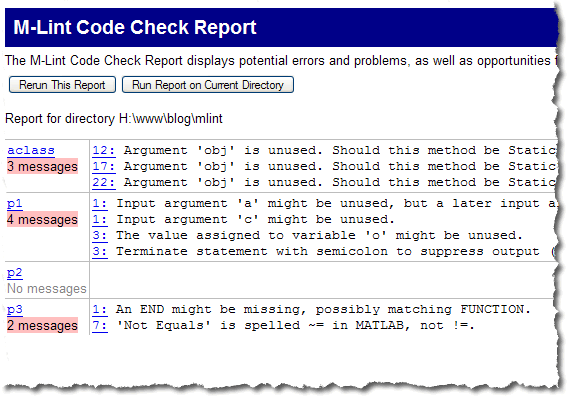
The M-Lint Report

The report lets you see all the unresolved warnings and errors in all your files at once. This provides a quick way to gauge the health of your project.

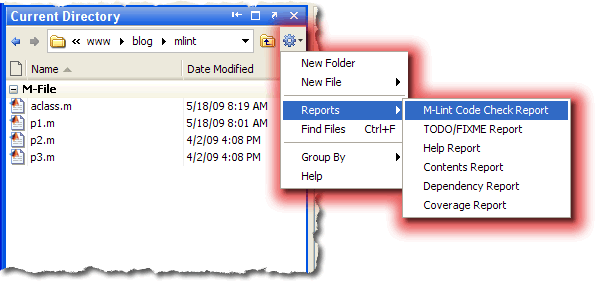
There are two ways to get to the M-Lint report. First is through the Current Directory Browser:
The M-Lint Report

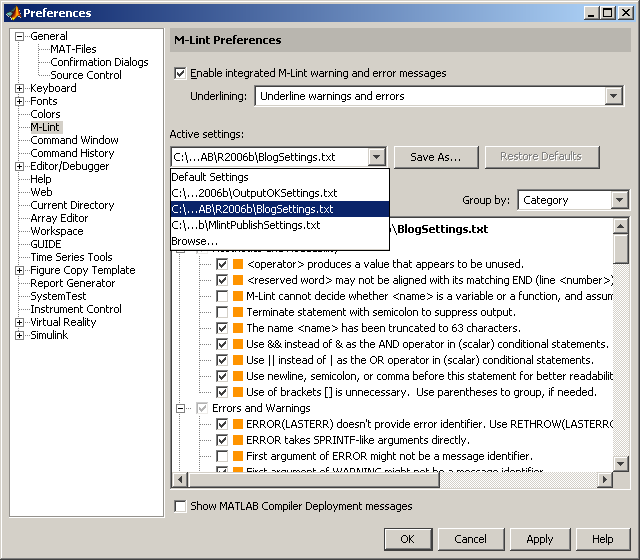
The other is through the mlintrpt command. By default The M-Lint report uses your active M-Lint configuration, but you can use this command to specify an alternative configuration. See our previous post about M-Lint configurations for more details.

Let us know how M-Lint has helped or hindered your project-wide workflows.

7 Responses to “M-Lint across a project”

  1. George replied on :

    This is useful - glad I stumbled upon it. What I’m looking for, though, is how to easily search and replace all occurrences of a whole word in multiple files (i.e. all files in a directory). Basically, I want the same functionality provided by Ctrl+F with the “whole words only” option but with the ability to perform on multiple files at once.

    After writing my PSO toolbox, I decided that some of my variables could have been named more transparently. For example, “Ns” could be named “num_trials_successful” so as to be obvious in meaning to any user. I’ve been going through the process: Ctrl+Home, Ctrl+F, Alt+A (with “whole words only” selected), click in m-file, Ctrl+S, click new tab, repeat. But lately I’ve been breaking my code up into m-files of specific purpose to make it easier to understand, and making project-wide improvements is now a more painful process.

    A simple search and replace is not what I want though since “ns,” for example, could occur within words, which is why I want to keep the “whole words only” option.

    Any ideas???

  2. Aurélien Queffurust replied on :

    @George : Are you looking for the “Find Files tool” (just select Edit > Find Files from any desktop tool):
    Finding Files and Content Within Files in Any Directory
    http://www.mathworks.com/access/helpdesk/help/techdoc/matlab_env/f10-14803.html#brpyzt7-1

    For all my projects I use M-Lint to find unused variables or variables growing in the loop for example.

    Aurélien

  3. Mike replied on :

    George,

    This is a capability we’re definitely interested in bringing to the editor. If you think it’s safe to a string replace, you can use regexrep and file i/o to just parse through your files and replace a string. It’s not as nice or clean as it will be when we have a GUI.

    files = what;
    mfiles = files.m;
    for n = 1:length(mfiles)-1;
        afile = mfiles{n};
        fid = fopen(afile);
        txt = textscan(fid,‘%s’,‘delimiter’,‘\n’,‘whitespace’,);
        fclose(fid);
        txt = txt{1};
        txt = regexprep(txt,pattern_string,replacement_string);
        fid = fopen(afile,‘w+’);
        fprintf(fid,‘%s\n’,txt{:});
        fclose(fid);
    end
  4. Subhankar replied on :

    Hi i pretty happy with this concept, but is there any way we can make our customize file as read only , bcoz if you ignore this mLint warning in editor it updates the mLint configuaration file , is there any way to disable “Ignore This “m-Lint ” on right click.

  5. Mike replied on :

    There’s no way to disable the disabling of a message. You can make an individual configuration file read only on the system, but that won’t prevent a user from changing his configuration.

  6. Tom replied on :

    Can we please make these tools have a “recursive” option? Would be very useful, especially for code written using package directories!
    Thanks!

  7. Mike replied on :

    Tom,

    Thanks for the suggestion. These tools predate classes and packages and the infrastructure they use doesn’t really deal well with the workflow. We’re working on a much more useful and comprehensive solution, but that will take a few releases.

    Thanks for the suggestion.

Leave a Reply

Wrap code fragments inside <pre> tags, like this:

<pre class="code">
a = magic(3);
sum(a)
</pre>

If you have a "<" character in your code, either follow it with a space or replace it with "&lt;" (including the semicolon).


Ken & Mike work on the MATLAB Desktop team.
  • Ori: The current folder shortcut used to be alt-y. Now it is alt-o. However, while in the editor window, alt-o opens...
  • Jose Miguel: Hi First of all, thanks for the post, it is really useful. I am trying to develop a Java GUI within...
  • Ken: Hi Siddharth, There isn’t currently any way to move the docking controls. Feel free to submit an...
  • Phil: I have the same problem as described above with UITable working fine in the Matlab environment but showing no...
  • Siddharth: Is there any way to move the position of the docking controls (or eliminate them through some...
  • Chris: Yes, it is a challenge to organize functions into categories, especially with so many functions. Ken and I...
  • Mike: Thanks for fielding that one, Yair.
  • Yair Altman: Jimmy - if you mean that you wish to include hyperlinks in your function’s help comment, that will...
  • OysterEngineer: Thanks for explaining the Function Browser. I fired it up and gave it a try. It appears that it has...
  • Jimmy: Is there any way to include hyperlinks in a comment, such as the standard help at the beginning of a function?

These postings are the author's and don't necessarily represent the opinions of The MathWorks.