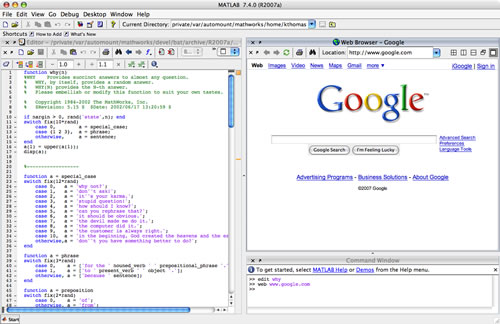
Ken & Mike on the MATLAB Desktop

September 21st, 2009

The Front Page of the File Exchange: Your Desktop

It may seem backward in late 2009 that one of the great new features in MATLAB is integrating a web application, the MATLAB File Exchange, into the Desktop. However it’s not surprising to me that this arrangement works out quite well. Because the file exchange exists for sharing files created in and to be used in the MATLAB environment, this actually streamlines the workflow. This new tool solves the pain of making files from the exchange available and searchable right there without having to leave MATLAB.

The File Exchange window is not open by default, so to bring it up, use the toolbar menu: Desktop -> File Exchange.

Downloading is quite simple. Let’s say I wanted to download Ken’s breakpoint muting program:
1. Search
2. Download
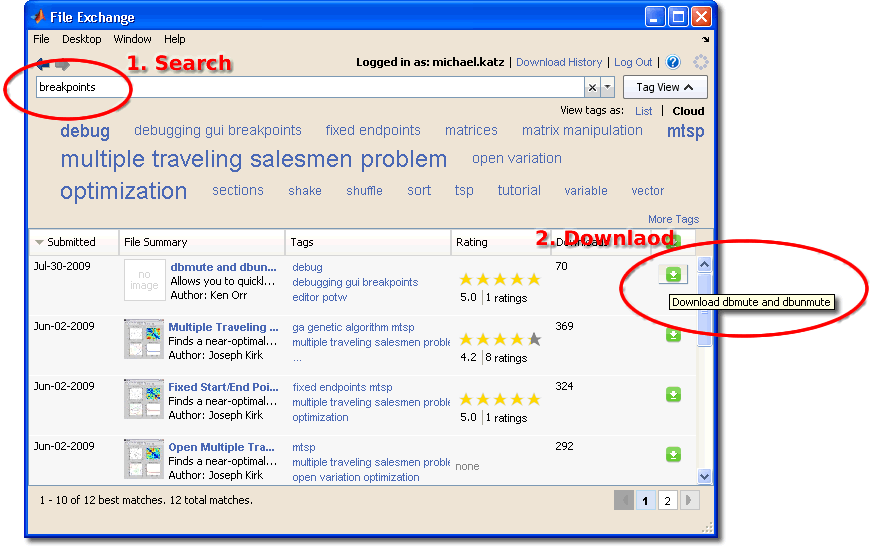
File Exchange search

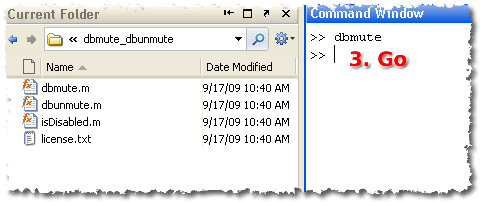
3. Go

File Exchange search

It’s pretty a simple feature, but the convenience factor is really there. You can search for toolbox functions using the Function Browser, and if we didn’t give you a particular function, you can then turn to the File Exchange and see if one of your friends on the web has already done the work for you.

The file exchange is an active and friendly community and if you’ve come up with useful program, we encourage you to share that with the community through the File Exchange web interface. If your program is up to snuff, it may even be chosen as the File Exchange Pick of the Week.

Resources:

  1. FAQ
  2. Watch the tutorial video

12 Responses to “The Front Page of the File Exchange: Your Desktop”

  1. Han Geerligs replied on :

    Hi Mike,

    I’d like to mention that both links (FAQ and Tutorial Video) at the bottom of the blog don’t work.

    –Han

  2. Mike replied on :

    Thanks, Han. We’re constantly improving (and therefore changing) how we do things on the web, which left my usual link process wanting…

  3. StephenLL replied on :

    Thanks. I like having the FEX available from within MATLAB.

    One feature that I think would make it even more useful:

    Check for updates of the downloaded files and have ability to download those updates.

  4. Mike replied on :

    Stephen,

    That is a interesting idea. I will let the developers know.

    Thanks!

  5. Duane Hanselman replied on :

    This is a great feature. I can now get Marco’s help right from the desktop!

  6. Mike replied on :

    For you File Exchange Pick of the Week fans out there, check out their post on the File Exchange widget: http://blogs.mathworks.com/pick/2009/10/02/integrating-the-file-exchange-with-the-matlab-desktop/.

    Use this new feature to upload your cool projects and maybe they will highlight it a a pick of the week!

  7. Oscar replied on :

    Can we change the default download folder? I’m on Win7 x64 and files are being placed c:/documents/matlab/downloads/… in their respective folders. I’d prefer if things were placed in my home folder’s matlab folder, or perhaps in a “downloads” folder in the c:/progra~1/Matlab/2009b/toolboxes folder.

  8. Mike replied on :

    Oscar,

    I don’t think you can change the download folder but the File Exchange app remembers the last download location so once you choose one, you can just click the download button to download the next file to the same directory.

  9. Iram replied on :

    When I download a file from the FEX, I like to select “Watch this file” to get email on updates and comments. So it would be nice to have this available here as well

  10. OysterEngineer replied on :

    It appears that to use this, I need to set up the Web Preferences a certain way. I don’t understand the significance of what your documentation is asking me to do & I don’t know where to get this Proxy host / Proxy port information. I don’t know how to figure out if this is “safe,” so I’m not likely to try it.

    Among the ~4 dozen users I know of out here, I don’t think more than a couple of us ever look at the File Exchange. And even then, it is only to find good ideas. Or, to down load tools like Code Metrics or xUnit Test. Which seem kind of like quasi MathWorks tools anyway.

  11. Mike replied on :

    @OysterEngineer, I’ll forward your comments on the developers and documentation folks.

    My hope is that if you and handful of your colleagues find the File Exchange useful, you’ll extol its virtues to your non-File Exchange-using friends, and maybe even contribute a file or two!

  12. OysterEngineer replied on :

    Mike,

    I understand you hope. But, my employer owns my intellectual property, so I can’t put useful things that I’ve developed into the public domain.

    It is one of those unfortunate realities that I’m happy to agree to in return for a regular paycheck. After all, my oyster farm is only part time.

Leave a Reply

Wrap code fragments inside <pre> tags, like this:

<pre class="code">
a = magic(3);
sum(a)
</pre>

If you have a "<" character in your code, either follow it with a space or replace it with "&lt;" (including the semicolon).


Ken & Mike work on the MATLAB Desktop team.
  • DP: Hi i have a problem with ezplot3, i want to plot more than i curve in the same graph but hold on command...
  • Ken: Hi Arsalan, Unfortunately there is no way to get the new Editor API in older versions of MATLAB. -Ken
  • Arsalan: Hi, I am very excited about the MATLAB API for editor because right now i am working on a project and i need...
  • Johannes: Since I started using matlab-emacs some days ago I never experienced Emacslink. But I experienced some...
  • Francisco J. Beron-Vera: Hi all, I have recently learned about ViEmu (http://www.vimemu.c om) which, for Vi/Vim...
  • OysterEngineer: When I first learned of the Publish feature in MatLab, I thought it might be useful to help to...
  • Ken: Hi Herve, I’m not quite sure what you mean by “stand-alone&# 8221; mode? -Ken
  • Herve: I wonder when the publish fonction will be supported in standalone mode.
  • Mike: Ravi, What you described should work as far I understand it. Please follow up with technical support. With a...
  • Mike: @Daniel, Thanks for that note.

These postings are the author's and don't necessarily represent the opinions of The MathWorks.