
Help browser search updates
Everywhere you look, searching is becoming the standard way of accessing information, and our documentation is no exception. In MATLAB R2009b we’ve updated the Help browser’s search functionality to help you find what you’re looking for more quickly. In this post I’ll give you a quick tour of the changes.
First, let’s take a look at the R2009a search results display. Using the default Help browser layout, here are the results of a search for “fft” with all MathWorks products installed:
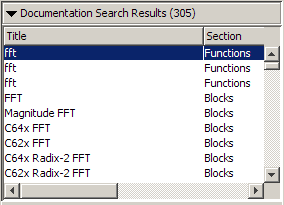
We weren’t happy that this display does not give you an easy way to differentiate among the top three results. They’re function reference pages from different products, but you’d never know it because the Product column is scrolled off the right side of the results area. If you want to see what products the results are in (or sort by product), you need to scroll over and lose sight of the title. There are a few other issues that we fixed, but that’s the big one.
Now lets see how the same search looks in R2009b:
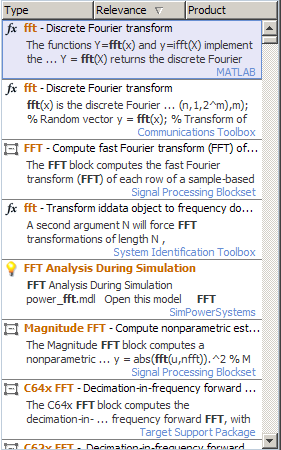
The first thing you might notice is that each result takes up a lot more vertical space, so you don’t see as many results. That’s true, but we think the new features are worth the tradeoff – we’re going for quality over quantity in the results. Let’s take a quick look at what we’ve changed:
- There’s no awkward horizontal scrolling in the search results area, ever.
- We’re using an icon to display the type of result – these icons are the same ones that are used in the top level of the new table of contents.
- Demo search results are now listed together with the documentation results.
- Each result includes some snippets from the result page, which shows the context in which the search term is used.
- For reference pages, we’re including the summary line (for example, in the top result above we’re displaying “Discrete Fourier transform”).
- The sorting options have changed.
About those sorting options… In R2009b sorting is all about organizing your search results. Now that we categorize results by type, that was a natural addition to the sort options. We also felt that the old options to sort by title or section didn’t provide a lot of value, so we removed them. To further emphasize the notion that sorting helps you organize your results, when you sort by type or product we group the results into collapsible sections. That way you can easily show or hide entire groups of results that you find useful or not.
We hope that these new features will help you find what you’re looking for when you search our documentation. Give them a shot and let us know what you think.
- Category:
- Help Browser


See Also
-
R2009 in review
Blogs




Comments
To leave a comment, please click here to sign in to your MathWorks Account or create a new one.