
Using Run Configurations for Debugging
Astute readers may notice that this blog has once again changed name. Ken has moved out to California to work for Apple and we wish him the best of luck there. In his honor, I'm going to highlight another clever way of using Run Configurations. Earlier this year Ken posted about using the Run Configurations to profile a file, and now I'm going to describe how to use Run Configurations for debugging.
I've put together a toy example below that combines two elements that I find useful for debugging with run configurations. With these you can have a "run in debug" mode configuration and a "run regular" configuration.
- Use a debug flag.You can add an additional boolean parameter to your function to switch behavior or print out informational messages to a file or the Command Window. Use an integer if you want to have different levels of logging. In my example when the debug flag is set, my code prints information with disp to the Command Window and runs a potentially dangerous subfunction without a try/catch.
- Use dbstop. Add breakpoints or break conditions (such as "if error" or "if caught error")
before running the file. This allows you have to a consistent and controllable debug environment for the file. It's useful if you're like me and constantly clear your breakpoints accidentally with a clear all, or don't want to be in a dbstop if error situation during your whole MATLAB session.
You can see here I have two configurations for this file: "broken" (the name of the function) and "debug" which from the tooltip you can see is my debug configuration.
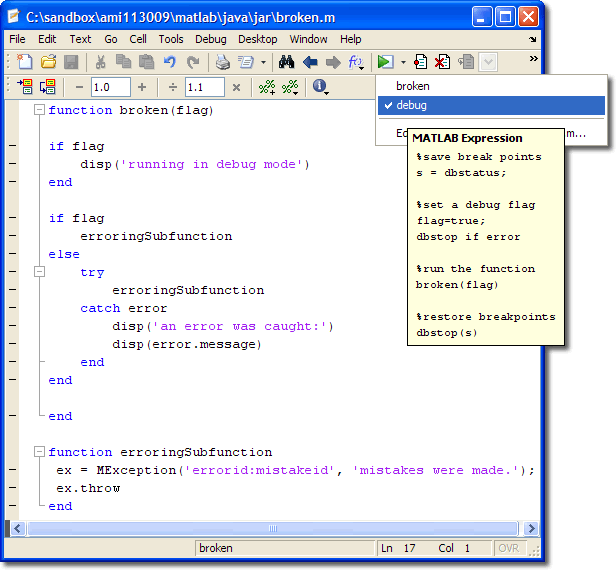
Here the configurations in detail:
1. regular configuration
%turn off the debug flag


flag = false;

broken(flag);
2. debug configuration
%save break points
s = dbstatus;

%set a debug flag
flag=true;
dbstop if error

%run the function
broken(flag)

%restore breakpoints
dbstop(s)
- Category:
- Configuration Editor,
- Debugging





Comments
To leave a comment, please click here to sign in to your MathWorks Account or create a new one.