Mike on the MATLAB Desktop

January 11th, 2010

The Preferences folder: matlab.prf

Continuing my discussion on the MATLAB Preferences folder, today’s article is about one particular file in that folder. (Remember you can find the folder location with the prefdir command). That file is matlab.prf, which stores the changes you’ve made to your preferences from the Preferences panel. This file is just a simple list of the various preferences altered from their default with their new value, encoded in a way that makes sense to our preferences code. Even though it’s ASCII, the file is not meant to be human readable, but if you look closely, I’m sure you can figure it out.

Between releases, you shouldn’t rely on the continued existence of any particular key or value type, as we often change these from release to release. Knowing about this file is useful when manually managing different preference sets or manually upgrading. For example, since you can’t have multiple preference directories, you can set up one session of MATLAB how you like it, copy the matlab.prf file to safe location, and repeat for as many configurations as you wish. To switch between them, you have to manually copy the saved .prf file back into your preferences directory. Obviously this is annoying and does not work well if you have to switch often. This workflow is more useful for sharing preferences; that is, copying the file from one user’s prefdir to another’s. (Note since the prf file contains paths to other files those files may not exist on the new user’s computer, or may be incompatible with their system).

If you skip a release or two and don’t get your preferences automatically carried up, you can try copying the matlab.prf from the old preferences folder to the new one. I can’t guarantee that will work or won’t prevent MATLAB from starting properly, so please back up the original one first. Deleting the file or replacing it with a working backup will fix any issue caused by copying a different prf file.

MATLAB caches the preference values once it reads the prf-file; if you manually modify this file, you’ll have to restart MATLAB to see the effects.
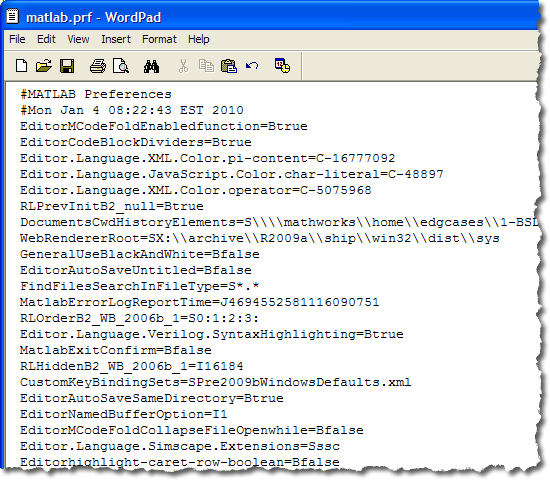
My R2009a matlab.prf file
A matlab.prf file

5 Responses to “The Preferences folder: matlab.prf”

  1. Han Geerligs replied on :

    Hi Mike,

    I was wondering what the reason is to use a plain text format, and not an XML format? Using XML has several advantages:
    - use on machines with different endianness
    - use with several encodings
    - checking against a scheme.

    -Han

  2. Daniel Armyr replied on :

    OK, I like the configurability provided here, but in terms of usability, this has got to be a Mathworks all-time low.

    With this many maybes and “cannot guarantee”, I think I’ll be pretty far along before I use this file.

  3. Michael Croucher replied on :

    Thanks for the info Mike. Personally, I am perfectly happy with ‘maybes’ and ‘cannot guarantee’ because every product has essentially two parts to it.

    The first part, the supported part, is the bit that’s talked about in the manuals and this is what you guarantee for us all.

    The second part, the stuff that is usually not talked about, is completely unsupported and can change from minute to minute. This is the ‘bleeding edge’ and is not for the faint hearted but it can be useful if you are happy with the caveats.

    I would rather know about the 2nd part and ‘use at my own risk’ than not know about it at all so thank you.

    Best wishes,
    Mike

  4. Mike replied on :

    @Han,
    This mechanism was created a long time ago when XML parsing was not as mature as it is today. I don’t expect that this will be the way the we’re going to store settings forever. …And that’s all I have to say about that.

    @Daniel,
    I consider using this file this file to be an “advanced maneuver.” This was never designed to be a real part of a user workflow. The installation procedure automatically takes care of bringing preferences up from the previous release, and users are expected to modify their settings through the GUI in File -> Preferences.

    @Michael,
    Thanks for the comment. If you are anyone else actually does anything directly with this file, we’re interesting in hearing how you make use of it, so we can build a supported workflow.

  5. Chad Gilbert replied on :

    Hi Mike,

    I’d like to be able to register changes that I make to this file automatically. Probably, I need to make a call to some java method from MATLAB, which will reload and set preferences from the matlab.prf file. Any ideas? Thanks,

    Chad

Leave a Reply

Wrap code fragments inside <pre> tags, like this:

<pre class="code">
a = magic(3);
sum(a)
</pre>

If you have a "<" character in your code, either follow it with a space or replace it with "&lt;" (including the semicolon).


MathWorks
Mike works on the MATLAB Desktop team.

These postings are the author's and don't necessarily represent the opinions of The MathWorks.