Mike on the MATLAB Desktop

May 10th, 2010

Taking suggestions, giving suggestions

This week I’d like to once again welcome back guest blogger Chris Kollett to tell you about one of the new features of the MATLAB R2010a Help Browser.

When I wrote about some of the new Help browser features in R2009b, a lot of the feedback centered around the removal of the index tab. When we really dove in and tried to understand what people liked so much about the index tab, one theme stood out above all the others: incremental search. If you didn’t quite know how to spell a function name, you could just start to type and the index tab would update with each new letter. Even if you only knew a couple of letters, it was probably enough to get the function name on screen in the index. When we removed the index tab we removed incremental search from the Help browser altogether, which was a much bigger deal than we realized at the time.

While we were developing R2010a, we tried a couple of things to improve the situation. Our first attempt was just to make the Help browser search itself incremental, with the search results updating as you typed. We were surprised to discover that this actually made things worse; by performing only wildcard searches we were reducing the precision of the search too much. We found search suggestions to be much more effective. In R2010a, when you start typing a search string, we look in the search index for common words that start with whatever you have typed and provide them as suggestions in a dropdown list beneath the search field. This removes a lot of the guesswork from searching, which should help you find your results much more quickly.
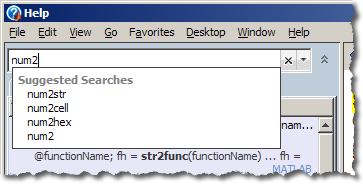
Search Suggestions in the MATLAB Help Browser

We’re always working on improving the MATLAB help system’s search functionality, and we think search suggestions are a big step forward. We’re sure there’s plenty more work to do, though, and the more feedback we have the better. So, how are we doing? What works well, and what can we do better? For those of you who miss the index tab, are there still things that the index tab did better than the R2010a search tab? Your suggestions are always welcome!

14 Responses to “Taking suggestions, giving suggestions”

  1. Kelly replied on :

    Since I missed out on the previous thread, I’d like to add my two cents to the “bring back the index” campaign. I have to admit I was shocked that you even asked the question about how we use the index, since it has always been my first stop in searching for help, and I very rarely touch the search function in the help browser. I was thoroughly disoriented when I was teaching my students basic Matlab and I realized it had been removed from the newer versions.

    In my normal workflow, I usually keep the help browser open and undocked, and I always keep it on the Index tab (although I have access to 2009b, I prefer to stick with 2007b for a variety of reasons, including the Help changes). In addition to the obvious benefit of incremental search in the Index tab, I really liked the fact that the index seems to include only a subset of the help pages. Usually, those pages hold the info I’m looking for, while a full search brings up too much peripheral stuff.

    For example, look at the differences in the results turned up in the Index vs Search if you enter “sin”. With my toolboxes, the index brings up sin, sinc, sind, mex-C and mex-Fortran examples of a sin function, fitting a sine function via the curve-fitting toolbox, and the symbolic version of sine and sine integrals. Whereas the search function in 2009b returns help pages from all over the place, including the definition of pi, how to rotate a plane, and the Fourier expansion of a square wave (all within the first 8 entries returned). Generally, my “searches” in the help are intended to be keyword type searches for specific functions, sort of a GUI combination of lookfor and help; the index is perfect for that. If the index fails to bring up the topic I was looking for, then I’ll move on to a full search. But I find I only have to resort to Search on rare occasion.

    I also liked the way entries were listed in the index, one line per page, occasionally grouped into a sublevel under a parent topic. I found it much more intuitive, and easier to see at a glance if the particular page I was looking for was there. For some reason I also find it much easier to distinguish function-reference pages from other broader topic help pages based just on the short index list than with the expanded-info-with-little-graphics method in the new version.

    Overall, I really dislike the new interface, and would really like to see the return of the index, or at the very least a keyword-only search, in future versions.

  2. Chris replied on :

    Kelly, thanks for the detailed feedback. We do our best to get the most relevant search results up near the top and to present the results in a way that makes sense to users. Examples where we don’t get it quite right for important keywords like “sin” are great to have.

    If you prefer a one-line view for the search results, you can right-click on the search results area and select “Hide Previews” to collapse the results down to a single line each. It’s not the same as the index tab was, but perhaps you will find it a little easier to scan.

    You say “Overall, I really dislike the new interface”, but most of your comments are specific to the missing index tab. Are there other things about the new interface that you do or don’t like?

    Thanks again for taking the time to write.

  3. Kelly replied on :

    To compact the search results, I tried right-clicking in the search results area, but the only option that comes up is “Clear Search”. So I tried searching for “Hide Previews” to see if I could find the proper way to do this, but that returned nothing.

    My dislike of the new interface was entirely based on the missing index tab. Since 95% of my previous use of the Help Browser was based on this feature, removing it made me dislike 95% of the new interface. Now the dislike is based on 95% missing index tab and 1% my inability to figure out this collapsing of the list thing. The remaining 4% is great though. :-)

  4. Chris replied on :

    Kelly, I misread your post, sorry. Hide Previews was introduced in R2010a along with search suggestions, and I see that you are commenting on R2009b. If you get a chance to use R2010a I’d be interested in hearing how much these changes improve your experience with the Help browser search.

  5. Sven replied on :

    Hi Chris,

    I’m one of those (like Kelly) that were unimpressed when the index browser went. You can find my comments in the last post about the help browser in the 2009 version. Thankfully the changes to 2010a *are* improvements. Here’s a ramble:

    In my last comments I lamented the loss of the index browser, and was put onto the function browser as a somewhat replacement (shift + f1). Just to report my own experience… it never really caught on. I used it for an afternoon or two, but it never really entered my normal work flow. Perhaps that’s because my normal workflow is something like the following:
    1. If I know the function I’m looking for, just can’t remember the parameters/syntax, I type “help myfunc”
    2. If I know the function, and remember some useful explanations in the full doc (regionprops, for example), I type “doc regionprops”.
    3. If I don’t know the function, I type “doc some-guess-at-what-I’m-looking-for”, and usually end up searching the full docs rather than function browser anyway.
    Since the Shift+F1 browser wasn’t part of any of the above workflow (or a hugely useful addition to it), I never really adopted it. Maybe I’m still missing out.

    Anyway, the context sensitive suggestions to the help browser *are* a good improvement. I noticed them when they arrived, and was pleased to find them to somewhat mimic how I used the old index browser.
    One request:
    Let’s say I’m searching for regionprops.
    1. I type “regionp”, and a helpful set of suggestions appear.
    2. I clumsily mash the keyboard and press “/” + Enter, instead of “down” + Enter.
    3. I now have the phrase “regionp/” in my ‘recent searches’ list, and it comes up as the first suggested entry the next time I type “regionp”.

    While recent searches can be helpful, it’s perhaps a cruel punishment for clumsiness when you mistype a search. In the next version can we, for example, be able to right-click and remove a recent search?

    And while I’m at it, here’s an unrelated request. When I write GUIs, my mind is constantly thinking uicontrol this, ui component that. Very occasionally, I want to use one of the canned modal ui widgets to accomplish a simple task. I know they’re there somewhere, but it seems that practically every time I’m searching for them, I can’t find them in the help. Usually I give up after two minutes, try to remember a project in which I used them before, find that code to retrieve the function name. It seems they’re in some kind of help-black-hole, unlinked to from other somewhat-related pages such as “doc uicontrol”. The ones I’m talking about are dialog, errordlg, helpdlg, inputdlg, msgbox, questdlg, warndlg. I guess the keyword to search for is “dialog”, but that never seems to spring to mind when I start searching for “list”, “listbox”, and inevitably end up at “uicontrol”.
    Ha, maybe this black hole is simply in my thought process.

  6. Chris replied on :

    Sven, thanks for all the feedback. Your normal workflow sounds pretty reasonable, and I can see how the function browser doesn’t quite fit in for you. Thanks for providing such a specific description of how you’re using the help system – it really helps us to figure out how to improve the product.

    As for the recent searches, I’m afraid that there’s no easy way to remove a single search from your history. You can clear your history entirely if you’d like: in the Preferences dialog, select Help on the left side and you’ll see a couple of Search History preferences at the bottom of the dialog. I can’t promise more fine-grained control than that in any specific release, but I’ll enter the enhancement request.

    As for the difficulty you have finding the doc for the UI dialogs, I’ll take a look at whether that example leads me to any improvements we can make to the Help browser search and/or the structure of the documentation. As it is, if you are frequently looking for those specific pages, I think browsing the table of contents will serve you better. Take a look at MATLAB > Functions > GUI Development > Predefined Dialog Boxes. You might want to add that page as a Favorite. You can also open the page directly using:

    >> web([docroot '/techdoc/ref/f16-40727.html'])

  7. pk replied on :

    I would like to make a general point about changing interfaces in software. Most of us use software to be more productive and the more we use something we get quicker at it. Eventually we are at a point where we are thinking more about the problem we are trying to solve rather than how the software’s features work. And believe me it takes time and effort to get to that point. Then some intelligent folks at the software company come up with these ideas that *they* decide will make things easier for users without realizing that overhauling an interface rarely every makes things easier for existing users. Personally, I absolute hate the fact that I have to put in all the effort and time to re-learn something which I was already good at. If you really have to come up with these brilliant ideas of changing interfaces, why don’t you at least give an option to the users to switch back to the old interface if they prefer it. I’m sorry I can’t be more constructive about this and pardon my sarcasm but I really hate other people making my decisions for me.

  8. pk replied on :

    Oh and I forgot to mention that my comments had to do with taking away the “Index” tab from the help window.

  9. Luca Gandossi replied on :

    Mike, Chris,

    I agree with what several other MATLAB users have written above about the INDEX tab in the Help window. I absolutely loved that feature. It was extremely useful in quickly finding information. Today I installed MATLAB version R2010a (after having used R2006a for the last 4 years!) and was literally shell-shocked when I could not find the INDEX tab. I eventually googled the relevant keywords, and ended up at this page!

    PLEASE bring that INDEX tab back!!!!!!!!!! It was an extremely clever way to browse the help documents.

    Best regards
    Luca Gandossi

  10. Wolfgang replied on :

    Mike,

    I just switched from 2009a to 2010a and I am delighted by the new capabilities of the help browser!

    Well done,
    Wolfgang

  11. Alan Jennings replied on :

    I’m sure missing the index tab, since I used it to browse functions. I used it as a general alphabetical list of functions that I could quickly guess what it was called. Organizing functions by toolbox is frustrating for me with well over 40 toolboxes, I can’t guess which product a given function is under. I will say one thing I didn’t like was the extra work to find the function reference page, since it seemed most pages pointed to suggested uses rather than the parameters that could be passed to the function and output order. I know this can often be done with the doc command, but that isn’t my first instinct.
    Cheers, Alan

  12. Gasha replied on :

    PLEASE VECTORIZE THE TRANSFER FUNCTION BLOCK !!!!!!
    Why is that block not vectorized? Many, manu times I had to create a subblock, use mux/demux, and insert many indentical transfer function blocks. VECTORIZE IT PLEASE!

  13. Guy replied on :

    @Gasha: In R2011b, you can put the Transfer Function block inside a For Each subsystem and it is automatically vectorized.

  14. Spyro replied on :

    Just checking in on the status of the index tab removal debacle. Wow … Mathworks is still asking us what we liked about it, and what they can do to restore the original functionality. After 3 years, the obvious solution to restoring the lost capabilities remains: RESTORE THE INDEX TAB. Since this seems to be the only thing that Mathworks is not willing to do, or even to discuss, we are left to guess at the reasons for its demise in the first place. Maybe it was a patent infringement issue? So Mathworks, if you can’t bring back the index tab, how about providing the real reason, so we can get over it. Otherwise some of us will continue to hold out hope that you will see the light and simply RESTORE THE INDEX TAB.

Leave a Reply

Wrap code fragments inside <pre> tags, like this:

<pre class="code">
a = magic(3);
sum(a)
</pre>

If you have a "<" character in your code, either follow it with a space or replace it with "&lt;" (including the semicolon).


MathWorks
Mike works on the MATLAB Desktop team.

These postings are the author's and don't necessarily represent the opinions of The MathWorks.
