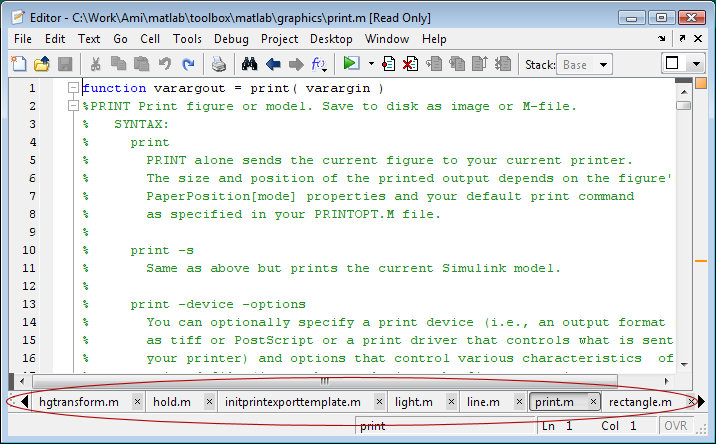
Note that these only work when the documents are docked together in the Editor (although the Editor group itself can be undocked from the Desktop).
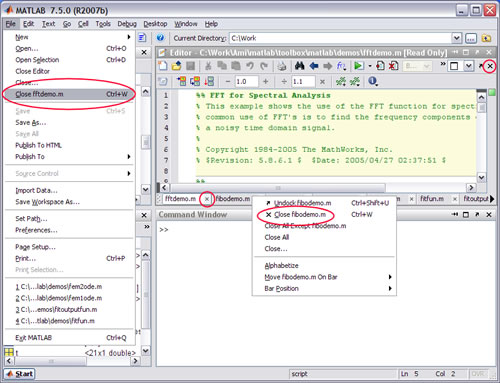
If you were previously unaware of these keyboard shortcuts, you might also be unaware of these other features of the Editor tabs:
When there is only one Document open in the Editor, the Tab Bar goes away. To access that context menu functionality, you can use the menu items in the Desktop -> Document Bar menu. Just make sure the Editor group has focus first.
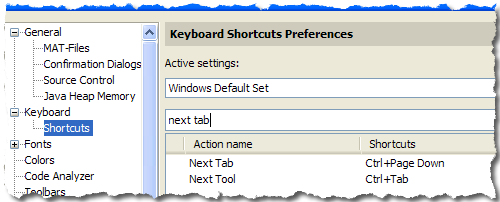
Bonus tip: You can also switch focus between Desktop components (not just documents) with shortcuts Ctrl+Tab and Ctrl+Shift+Tab. And remember, you can customize any of these shortcuts in the preferences: File -> Preferences -> Keyboard -> Shortcuts:
By
Michael Katz
Mike is a developer on the MATLAB Mobile team. When not describing himself in the third person, biking, homebrewing, or rooting for the home team, he's busy trying to make the world a better place for programming.
Good stuff, keep it coming!
Is there a keyboard shortcut for jumping to the last used file in the editor?
I find myself having some 10 files open and jumping from one to another. Then I know: That was the last (second last …) file that I worked with, but not necessarily the position in the tabbar, so f.ex. ctrl-alt-PageUp for last file would be perfect.
@Jochen,
There is not a shortcut for that. A good idea, though.
You mention ‘ctrl+Tab’ as a shortcut. What good is that when you are focused on the editor? It doesn’t seem to do anything – and didn’t that shortcut control document switching in earlier versions of Matlab?
@Eric,
I’m not sure about the earlier versions of MATLAB, but the Ctrl+Tab is meant to move between the docked tools in the Desktop. If you’re focused on working with the Editor, and you don’t want to work work with the other tools, you can reassign that shortcut to something else.
my tabs at the bottom of the m-file editor have dissappeared. How can I make the reappear so I can select between multiple m-files?
Thanks!
@Seth,
1. Make the Editor Active (click on it)
2. select the desired position using the Desktop -> Document Bar -> Bar Position menu
Note: MacBook Air users have no PgUp/Dn, but they can use Fn + Up/Dn instead. It works in combination, too. Thus: Ctrl+Fn+Up = Ctrl+PgUp = move to previous tab in the editor.
Of little use. As Jochen and others have said, need most recently used file switching. In Windows, Ctrl-Tab switches between open programs in MRU order, and has done for the past 20 years for a good reason. Most recent files are most likely to be needed, just like most recent programs in Windows, most recent tabs in Firefox and Opera, etc, etc. Please update this keyboard shortcut.
Mike, just use Ctrl+Shift+PgUp or PgDown. If Ctrl+Tab gets you to the next tool or window, Ctrl+Shift+Tab do the reverse thing.