Mike on the MATLAB Desktop
June 14th, 2010
Helping your help
MATLAB files that are a part of the public API of MATLAB all have nice help comments in them. The files we ship with MATLAB follow a standard format: function line, summary/description line (commonly referred to as the H1 line), description of what the function does along with examples describing the inputs and outputs, and then finally a list of related functions followed by a copyright. In order to make sure that our files have these help parts, we developed a program to analyze all the files in a folder and report on their help completeness. For many years this report has been available for your use as well, in the form of the Help Report in the Folder Reports.
You can obtain the Help Report for a folder through the Current Folder Browser Action button under the Reports sub-menu:
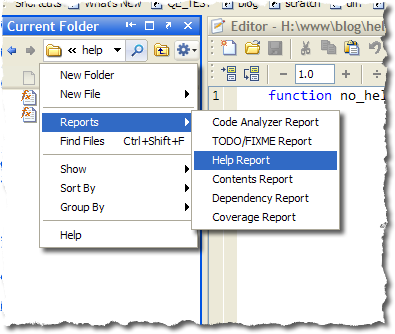
After choosing the “Help Report” item, the MATLAB Web Browser will open with a table that lists each MATLAB file in the current folder and reports the existence of the help parts for them. If an item is present, it will be shown on the right column of the table. Some of the items (such as “See Also” and “Copyright”) have line number links that will open the file to that section of its help.
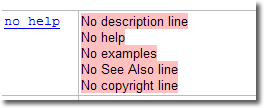
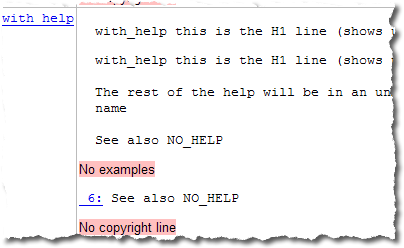
Here is an example entry of a script with no help comments. Highlighted in pink are all the missing items: description line (H1), help body, examples, see also, and copyright:
For files that do have help comments, you might see an entry more like the following. This file has a help block and a “see also”, but does not have copyrights or examples:
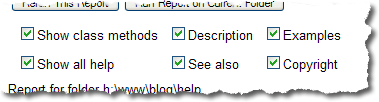
If you don’t care about copyrights, examples, or only care about help on class methods, you can control which parts appear in the report with the checkboxes at the top of the page:
If you have any great stories about the help comments of your functions, let us know!
By
Michael Katz
Mike is a developer on the MATLAB Mobile team. When not describing himself in the third person, biking, homebrewing, or rooting for the home team, he's busy trying to make the world a better place for programming.
16:58 UTC |
Posted in Uncategorized |
Permalink |
6 Comments »
You can follow any responses to this entry through the RSS 2.0 feed.
You can skip to the end and leave a response. Pinging is currently not allowed.
Leave a Reply
|
Since you’ve brought up the topic of these Reports, can you compare & contrast the Code Analyzer Report, M-Lint and the Code Metrics?
I’ve developed the habit of including a Code Metrics report with the job file of .m files for my projects. Would it be good practice to instead use these standard Reports?
@Oyster,
In R2010a, you can save files in the Web Browser as html files, and then use the file comparison tool to compare them. Of course, this not a great workaround since you’re then dealing with ugly, not-human-formatted html. It’s an oft requested feature that we’re looking into, but don’t expect a good solution in the next release or two.
I’m not sure what you mean by a “Code Metrics” report, but its a good practice to be aware of code quality and hygiene.
The Code Metrics I’m talking about is the standard report that is run on every submission to the File Exchange. The Code Metrics package is available for download from the File Exchange & it makes a nice summary report of all the files in the selected folder. The report includes a by-file listing of the Line Count, Percent Comments, Cyclomatic Complexity, Number of M-Lint Messages, etc. And, it lists all the M-Lint messages by file, including the line number where the message was generated. My habit is to write code such that the M-Lint report is silent. But, I’ll also re-write code to keep the complexity index below 10.
I’ve previously asked why many of the .m files of the standard MatLab functions have noisy M-Lint reports or complexity indices above 10. Usually the answer is the vague, “We try to better now.”
The funny thing is that Code Metrics has a maximum complexity index of 16.
Anyway, if you don’t have any experience with Code Metrics, than my question probably didn’t make any sense to you. I was just looking for input about how these built-in reports compared to the Code Metrics report.
OysterEngineer—There are several reasons why MathWorks code might have M-Lint warnings or high complexity metrics. First, many software developers (myself included) shy away from modifying working, shipping code when there’s no pressing reason to do so. Whenever you modify working code, there is always a risk of breaking it. Also, there’s opportunity cost to consider; time spent modifying working code is time not spent fixing bugs or implementing new features that users are waiting for. There is some variation in practice and policy among the various development teams, but I tend to follow the practice of cleaning up M-Lint warnings in code whenever I happen to be editing that code for other reasons.
Regarding high-complexity code—prior to 1997 and MATLAB 5, the MATLAB language did not have the scoping features needed to be able to write a lot of small, low-complexity functions. MATLAB function files could contain only one function, and all MATLAB function files shared the same global search path. A lot of high-complexity code was written (including by me) and a lot of bad habits were acquired (including by me) back then.
So that’s why a lot of older code has very high complexity. My personal practice is to write all new code with low complexity. For existing code, I refactor high-complexity code when I happen to be editing that code for other reasons.
Writing low-complexity functions in new code is now pretty widely practiced at MathWorks, but it’s still not universal. Not everyone is in complete agreement about this, and not everyone uses the same complexity-metric threshold.
Steve-Thanks for the detail & history. It sounds like a very practical approach.
Can you provide any commentary regarding the similarities or differences between Code Metrics & the other reports available in MatLab’s development environment? Or maybe more generally, what tools do development teams at The MathWorks use to aid in developing easy to maintain code that has low complexity indices & silent M-Lint reports?
@OysterEngineer,
I wasn’t sure by the term you used, as I’ve heard it called a different name. We don’t use same reports as the File Exchange, but the Current Folder Reports grew out of the tools we use internally, but @Steve is right in that different teams use different metrics and we try to avoid modifying older files as much as possible.
In general we use these reports (or at least a modified form of them that works with our internal systems). In particular we pay attention to M-Lint, code coverage, completeness of Help and Contents. We also check our code for things like typos (you’ll still find plenty in older code, though) and internationalization.
The best aid for making sure code has a low complexity and silent M-Lint is to use the MATLAB Editor and eliminate errors and warnings on the right panel. Although complexity is part of M-Lint, you can only get to it from the Command Line.
For example:
mlint('edit.m','-cyc')