
R2010b Comment Wrapping Improvements
In R2010b we made a series of improvements to the “comment wrapping” feature in the MATLAB Editor. In this two-part series, we’ll take a detailed dive into those improvements.
In this first part, we’ll introduce comment wrapping and talk about how it’s now easier to use. In the second part, we’ll cover more advanced maneuvers for the serious comment writer.
Wait, what’s comment wrapping?
In short, comment wrapping is a feature of the MATLAB Editor (accessible via the “Text” > “Wrap Comments” menu item) that allows you to go from ragged, messy comments:
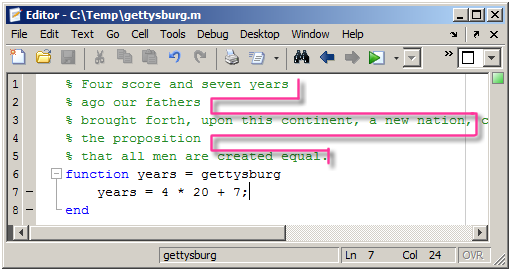
to neatly formatted ones:
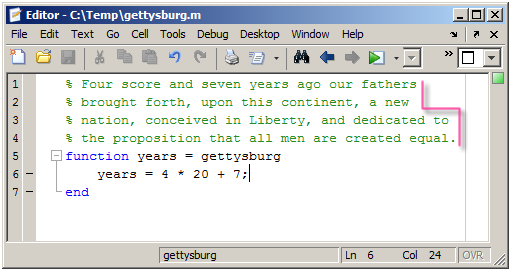
The feature also includes automatic comment wrapping, which occurs as you type beyond the end of a line. In R2010b, we’ve made this feature easier and more powerful.
No selection required
Previous to R2010b, if you wanted to reformat a section of comments as you edited, you first had to select the region that needed reformatting and then press Ctrl-J (or Shift-Fan-W on the Mac).
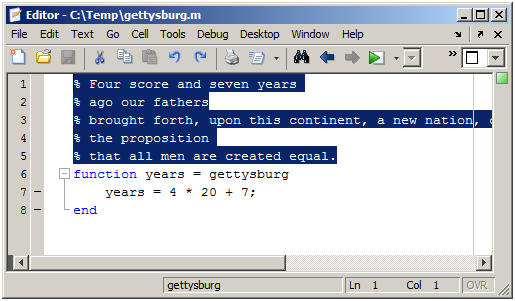
In R2010b, you can still do it this way. But much more conveniently, you can skip making a selection and just let the Editor infer the current section of comments for you. For example, suppose your caret were at the end of line 5 below:
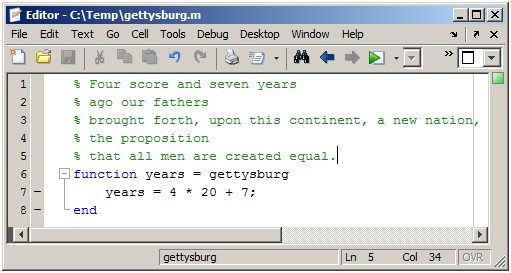
Now you can simply press Ctrl-J to reformat this section of comments, and your caret remains at the same location in the text that it had before. Your caret could in fact be anywhere on lines one through five. This allows you to tidy up what you’ve written without taking you out of the flow of typing.
Note that the Editor wraps only the current “section” of comments. So what defines a section? Hopefully, exactly what you’d think: a series of contiguous, identically-indented comment lines. So a non-comment line, a blank line, or a comment indented differently each represents the end of a section. This allows independent “paragraphs” of comments to remain intact and prevents them from being strung together, even if you do a “Select All” > “Wrap Comments” to reformat your whole file.
No more broken strings
One frustrating behavior of comment wrapping prior to R2010b was that if your comments contained text that shouldn’t be broken, such as a URL in publishing hyperlink markup, comment wrapping would go ahead and break it:
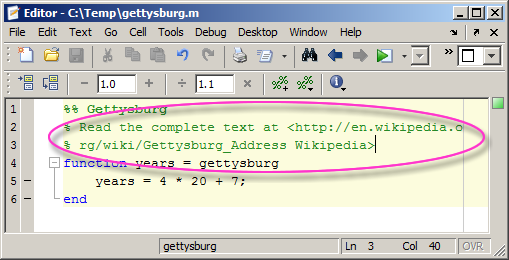
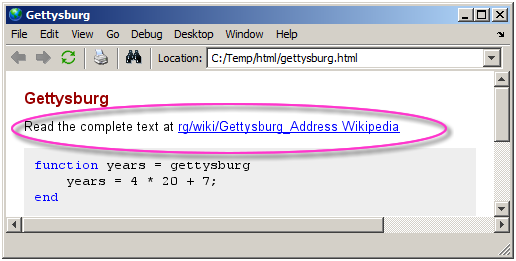
This was true with automatic comment wrapping as well – if you were typing a long string and reached the right-hand margin, it would break. That’s no good for reading and was particularly pernicious for publishing:
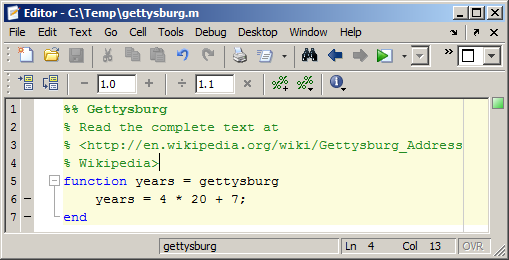
In R2010b, comment wrapping abides by this simple rule: if there’s no whitespace, don’t break! This means that URLs, or any long strings, are preserved:
Wrapping up (groan)
That’s all for now. In the next part, we’ll discuss a few more enhancements to this feature. In the meantime, try it out and let me know what you think!




Comments
To leave a comment, please click here to sign in to your MathWorks Account or create a new one.