Mike on the MATLAB Desktop
October 11th, 2010
Automatic Variable Highlighting
Another new feature in the MATLAB R2010b Editor is the automatic highlighting of variable and subfunction names. Highlighting a variable or subfunction usage is easy, just click on any variable or subfunction name in the editor, and after a brief pause, all the usages of that variable or subfunction will be highlighted in light blue.
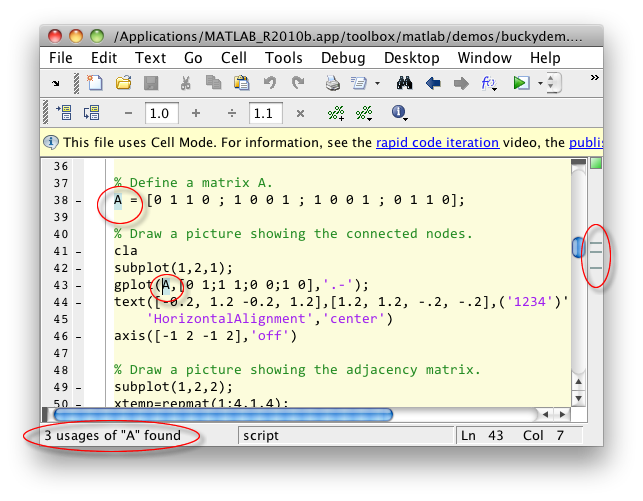
In addition to showing the usages of the selected variable in the text, all of the highlights are overlaid on the right-side information bar. If there are M-Lint messages present, those will be dimmed to make it easier to see the variables or subfunctions. Finally, a count is presented in the editor’s status bar (or MATLAB’s status bar if the editor is docked in MATLAB’s main window). If there is only one usage of that name, it will not be highlighted, but the informational message will still be displayed.
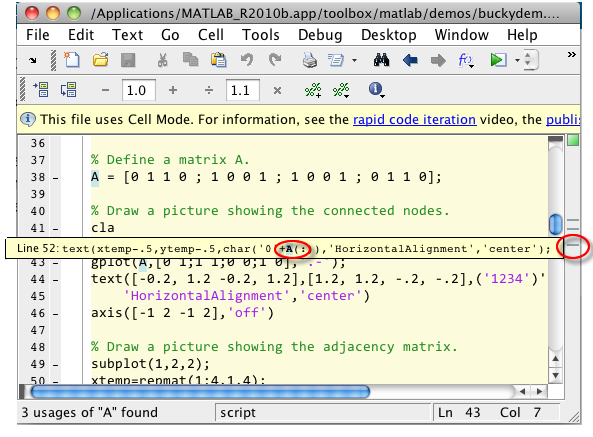
If there are multiple usages, hovering over the blue-gray stripes in the message panel will display the line of code where that variable or subfunction appears, with the name highlighted. This way you can see code that may be off-screen.
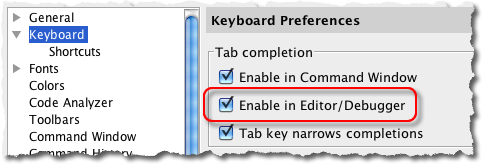
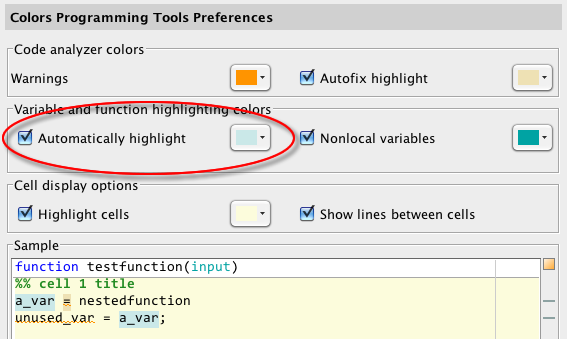
We think for most users this functionality is very useful for editing and debugging, and the feedback so far has been very positive. But we know that some of you may want to change the color or disable the auto-highlighting feature. This can be done in the new Colors preferences panel. File -> Preferences -> Colors -> Programming Tools -> Variable and function highlighting colors -> Automatically Highlight. If you do disable the automatic highlighting, you will see that you will then be able to highlight variables and subfunction names on-demand with a keyboard shortcut or context menu.
The highlighting does have some limitations. It will only find the matching names in code that are in scope. For instance, if you have pass a variable “x” to a subfunction as input argument “x”, the highlighting feature will only highlight the “x”s in either the main function or the subfunction, but not both. And, it won’t recognize that “x” in a comment or string passed to the eval function.
By
Michael Katz
Mike is a developer on the MATLAB Mobile team. When not describing himself in the third person, biking, homebrewing, or rooting for the home team, he's busy trying to make the world a better place for programming.
17:44 UTC |
Posted in Editor, Preferences |
Permalink |
19 Comments »
You can follow any responses to this entry through the RSS 2.0 feed.
You can skip to the end and leave a response. Pinging is currently not allowed.
Leave a Reply
|
This is another one of my favorite new features for R2010b. What’s cool is that it can tell me about any shared variables within nested functions. It prevents me from mistakingly using a shared variable inside a nested function and changing its value unintentionally.
Also, once I have a variable highlighted, I can quickly toggle through the occurrences by using Alt+ArrowKeys.
This is also one of my favorite new features. I find it particularly useful in finding the first occurrence of a variable. One thing I think might make it even better is if in the right-side information bar, the highlight for the variable under the cursor would show up in a different color. Then I would know exactly where the cursor is in relation to the other instances of the variable.
After highlighting one variable, if I then click on another, the several usages get highlighted but the informational message does not update.
I like the highlighting, but in a longer function where you might fold switch or if..else, the highlighting does not help. I know the bars on the right hand side serve this purpose, but sometimes it may be hard to navigate these bars as they can lie close together and get overlaid with warnings, etc. A further enhancement I think would be to highlight the ellipses or something to indicate that the folded code contains an instance of that name.
@Eric,
That is an interesting idea. I’ll suggest it to the team. The trick will be making obvious without overloading that bar with colors.
@Iram,
That’s a bug. We’ll get to work on it right away…
@Jason,
That too is an interesting suggestion. I’ll let them know.
This is a handy new feature, especially for new users! Thanks. I wish I’d had all this and all these M-lint features when I started learning Matlab 10 (oof!) years ago. However, it’s not clear to me how I would’ve learned about switching between instances of the highlighted variable had jiro not mentioned it. Somewhere in the release notes?
I just installed 2010b this morning on my Mac, and I’m happy to see that there’s no more X11 background window or additional Matlab icon in the Dock anymore. Does 2010b represent the end of the X11 “heritage” you mentioned last year? It seems so.
@Joe,
Thanks for the feedback. We didn’t want to make the switching between messages an in-your-face kind of thing. It is mentioned in the release notes under “navigating to a specific location“.
As for X11, we’ve unwound it from MATLAB startup but there are still a few operations that require it, but the involved teams have been working hard on that for a long time.
This variable highlighting is nauseating. Thanks for showing me how to turn it off. The “team” should probably check out Visual Studio….
30 usages of “V” found.
Please… please tell me how to turn that noise off.
Really, I am begging you.
It is just blinking as I move through the program that I wrote. The one that I debugged. The one that I understand. Who would need this? Really, if there is a problem you step through and see what you need to see. You have the workspace to look at. It really couldn’t be an simpler. I can’t believe that you are helping the phd’s who use your program with this.
This has already been done much better in visual studio.
Replicate it.
Implement it.
Be loved for it.
Check out the preferences – you can change the highlighting behavior at colors->programming tools and then look at the variable and function highlighting colors section. Two choices – nonlocal vaiables and automatic highlight
–loren
Thanks for replying Loren.
Unfortunately (for me, maybe not others) when turning off the feature in preferences the information on the detected variable still appears beside the MatLab Start button. I find it to be distracting.
The variable highlighting is useful. No question. But personally it is something that I would prefer to have available on the context menu when I right click on a variable.
That way I can have it enabled and it can help in debugging/jogging my memory when I need it but it won’t be going off like an alarm as I cursor around my code.
In short, I believe it is possible to have too much of a good thing.
I hope that the development on improving the IDE continues. I would personally love to see #region SomeRegionName “many lines of code” #endregion code folding and variable name refactoring.
This is great, I’ve been meaning to suggest this feature for a while! I find it terribly useful in Notepad++, but for ML code I use the Matlab editor because I miss M-lint too much.
I don’t have R2010b yet, so I have one question: does it highlight when you place the cursor on a variable, or only when you select its text (for example, double-click it)?
It’s understandable that people find it distracting if it’s the first case; my suggestion then would be to switch for the second case, which fires less often and is just as easy to use.
Hello Mike,
when reading the blog I was thinking about having an intelligent “go to definition” function.
As of now it is possible to select the name of a function and open it by using “control D”. This looks to me as a basic implementation of “Go to definition”. It is not possible to distinguish between an existing function or script on the Matlab path and a variable. When looking at the example:
[1] function [out]=test2(in)
[2] a=1;
[3] b=2*cosd(90);
[4] out=a+b;
[5] end
It is possible to go to the definition of ‘cosd’ (internal function, so opening will open the m-script).
However when trying to go to the definition of ‘a’ in line [4] the editor comes up by asking for the file ‘a.m’. I would expect that the editor would point to the first occurrence of the variable a in line [2].
Another example: when using fields and methods in classes. Have a look at the code:
classdef TensileData
properties
[a] Material = ‘carbon steel’;
SampleNumber = 0;
Stress
Strain
end
properties (Dependent)
Modulus
end
methods
function td = TensileData(material,samplenum,stress,strain)
if nargin > 0
[b] td.Material = material;
td.SampleNumber = samplenum;
td.Stress = stress;
td.Strain = strain;
end
end % TensileData
end
When trying to go to the defintion of ‘Material’ in line [b] I’d expect to go to the line [a]:
[a] Material = ‘carbon steel’;
and not trying to open the file ‘material.m’.
Please refer to the implementation of “Go to definition” in Visual Studio.
Any plans to incorporate such context sensitive functionality?
kind regards, Han
Hello Mike,
I am still curious for your response to my question posted above.
regards,
–Han
@Han,
Sorry for letting your comment fall through the cracks. There’s a number of points here so let me address some of them first.
1. You can go the previous instance of a highlighted variable with the Alt+Up keyboard shortcut. You can use that to navigate through the first one.
2. We’re working on a more comprehensive idea of “go to” but that is still a ways off.
3. Image this example:
If you’re at the third “a”, would you expect go to to take you line 2 (the first usage of a) or line 3 (most recent place a was set)? We had different use cases for those two desires and couldn’t come up with a comprehensive model in the R2010b time-frame.
4. Classes and structs pose a unique problem for this system. Since MATLAB is an interpreted language this imagine this code, synatically speaking:
is td.Stress now a field or method invocation of some other object? There are heuristics we could use to figure out what would actually happen and make a guess that is right 90% of the time. Since then, we’ve been improving our code analysis abilities, so this will become easier and more accurate to implement in the future.
Hello Mike,
thanks for the comprehensive answer.
Issue 3: I understand that in this example it is dfficult to choose between line 2 and 3. When looking in the Visual Studio the “Go To” will always point at the definition (typedef) of the variable. This might not be true for simple type, but is true for classes. So for issue 4 one might go to the definition of class TensileData when the definition of td is queried.
Issue 4: you are right when referring to the late runtime binding of objects and variables due to the interpretated Matlab language. I am curious whether improved code analysis will allow you to determine the definition of a given instant.
kind regards
–Han
N.B. Also the java based Eclipse platform support “Go To Definition”
When I turn off variable highlighting (and code analyzer) I still have the (empty) information bar. How do I remove that in 2010b?
Thanks
Is it possible to change the speed of the automatic highlighting? It would be nice to have it much faster so that I can quickly check that I’m not missspelling variable names.
-Xtan
@Bob,
I am not sure it is disableable.
@Xtan,
No, there is not setting to increase its speed.