Mike on the MATLAB Desktop
October 25th, 2010
R2010b Comment Wrapping Improvements, Continued
In our last post, we talked about how you no longer have to select anything to tidy up your comments, and about how comment wrapping no longer splits long strings like URLs. In today’s post we’ll finish up with a few more improvements.
Wrap where you want
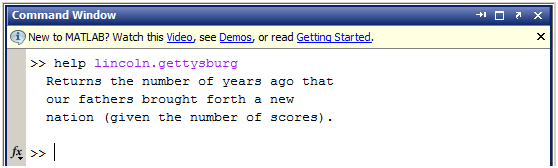
If you are writing MATLAB help associated with a class, you may have encountered the following scenario. You want to provide “help”-style comments for a method, which naturally is indented a bit because of the “classdef”, “methods” and “function” blocks. But comment wrapping occurs at the preferred column (which, for the sake of this example’s screenshots, I have set to 50) without regard for this initial indent:

In other words, instead of a comment block that is 50 characters wide, I only get 50 – 12 = 38 characters. As a result, when we ask for help on our method, the output is narrower than it would typically be:
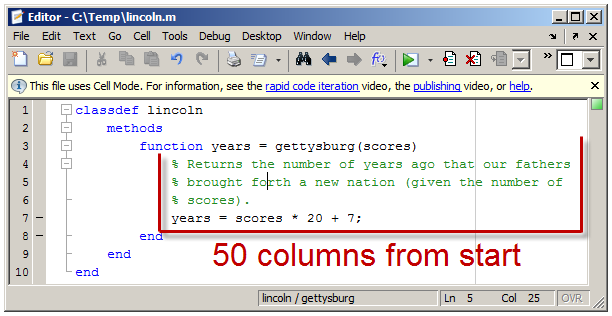
In R2010b, we introduced a preference to control this behavior. If you want your comments to have the same character width regardless of the column at which they begin, then choose the “columns from start of comment” preference via File > Preferences > Editor/Debugger > Language:

Now, your comments will wrap at that many characters from the start of the comment (the “%” character) rather than from the very first column:
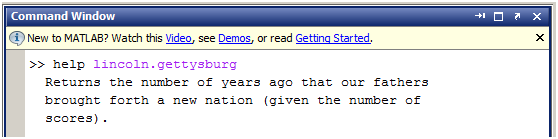
And the ”help” output will always be a consistent width:
Since most people want their code to wrap at a fixed location, this preference is set to “columns from start of line” by default.
Wrap block comments
Do you use block comments? Many users had wondered why they didn’t have the same wrapping capabilities as regular line comments. Now they do:

If you copy and paste large bodies of text into block comments, or simply write the occasional novella within your MATLAB code, you can now make them nice and neat with a keystroke.
That’s a wrap
That’s it for our deep dive into this feature. Thanks for reading, and let me know if you get a chance to try out these improvements, and what else you’d like to see!
14:52 UTC |
Posted in Desktop, Editor |
Permalink |
4 Comments »
You can follow any responses to this entry through the RSS 2.0 feed.
You can skip to the end and leave a response. Pinging is currently not allowed.
Leave a Reply
|
OK, I am putting on my grouchy hat today.
The idea behing code (and comment) wrapping is, Im my opinion, to ensure that the code looks good when you are reading it. Noone wants to scroll left and right because the lines are too long.
To link the wrapping of the comments in the source code to the wrapping of the code in the displayed help text is, in my opinion, completely wrong. When looking at source code, the comments should be wrapped to fit the source code. When looking at the help the text should be wrapped to ensure that reading the help becomes easy.
In conclusion, i think you here added an option that tries to poorly patch up a problem that should be solved at its root.
But that’s just me.
–DA
@Daniel,
Understood. At some point the need for this feature will, with any luck, go away, when the formatting of help text within a .m file is independent of the presentation of that help in some other context.
Jared
29th,October 2010
Chennai-62.
Dear sir,
I am very keen interest on knowing in Simulink programmes of Subsynchronous resonance reducing by Thyristor controlled series capacitor simulation. please help in this regard.
Mahaboob Basha Qureshi
Asst. Professor in EEE dept.
It seems like what might be better as expected behavior is for the help header to come out to the command window as if that had been published to HTML as a fragment. The console already supports some styling and hyperlinks the resulting HTML would have. The output would flow to fit the command window and you wouldn’t have differences in the line breaking and have to do tricks to make both help and publish look good.
Unfortunately, it looks like many headers might not publish well as-is, and you’d have to get the HTML publishing to start hyperlinking the ‘see also’ items.
Another option is to have the editor, being much more syntax aware these days, soft wrap long comment lines. This should satisfy those that complain about having to scroll to read long comment lines as well as those like me who hate that even with a wide editor window, you have all these very short comment lines. Maybe also have a settable maximum width for the soft wrap so it doesn’t get unreadable.
