
Enumeration Templates
Ever since Class Objects were first introduced in R2008a, we’ve improved or added to their functionality. In R2010b, we have official support for Enumerations. Enumerations are type-safe collections of discrete, named values. Classic textbook examples are the days of the week (Monday, Tuesday, etc) and months (January, February, etc), because they represent a simple, complete set.
There are some similarities between MATLAB enumerations and those in other languages. You can use enumerations in set operations, comparisons, string expressions, switch/case statements. Like in Java, enumerations are themselves classes so you can add methods and customize their behavior. In C, enumerations are represented by ints, which means there is an implicit ordering. In MATLAB enumerations can subclass numeric types and thus have an ordering, but they don’t have to. Although enumerations can subclass other data types, they themselves cannot be sub-classed. Simulink enumerations are MATLAB enumerations that are subclasses of Simulink.IntEnumType.
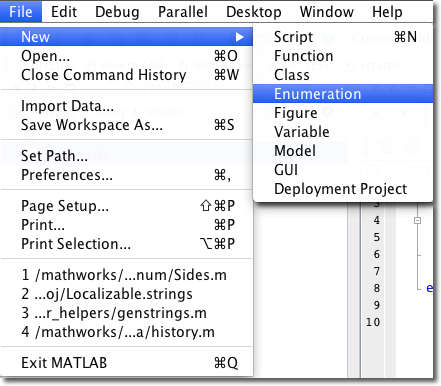
How does the Desktop support enumerations? Because enumerations are class objects, they are supported out-of-the-box with features like M-Lint, file preview, and tab completion. One new enumeration-specific feature is the Enumeration Template that can be reached from File -> New -> Enumeration.
- Category:
- Editor,
- Programming





Comments
To leave a comment, please click here to sign in to your MathWorks Account or create a new one.