Mike on the MATLAB Desktop

January 31st, 2011

MATLAB Mobile 1.2 Released

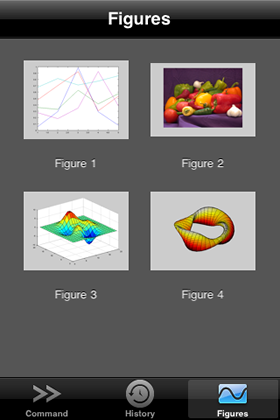
In this release, MATLAB Mobile figures come to life. No, we are not talking about using 3D glasses. MATLAB Mobile will make a live connection to the figures on your MATLAB desktop.

What does a live connection enable?

  • Each time you zoom in, the figure will rerender and give you a sharper image.
  • Any figures open on the desktop will automatically appear on your MATLAB Mobile. You don’t need to use findobj(‘Type’,'figure’) anymore!
  • Aside from zoom and pan, you can display data tips. Simply tap and hold.

Data Tip on MATLAB Mobile

So do these live figures get stored on phone? As in previous releases, the figures are still generated on the desktop. But we do keep the latest snapshots of your figures in your command history.

Give the live figures a try and if you create an interesting figure, feel free to send it to Daniel through the email figure option! I have some MATLAB goodies to give away.

Before I jump back to preparing the next release, I want to mention that we are eager to grow our team and add another developer to join Mike in our MATLAB Mobile team. You can help us by promoting this position to any qualified mobile software engineers you know.

Download MATLAB Mobile

10 Responses to “MATLAB Mobile 1.2 Released”

  1. Otto Manneberg replied on :

    Is it just me who can’t find the android version, or is it not finished yet?

  2. Daniel replied on :

    @Otto

    Currently MATLAB Mobile is only available on iOS devices. In the meantime, all I can say is that we hear the Android requests, but I cannot comment further on our MATLAB Mobile product roadmap.

  3. Oliver Woodford replied on :

    Otto: ditto.

  4. Richard Mc replied on :

    Come on Mathworks, Android!!!

    Android sells are far outpacing iPhone sells, get on the ball.

  5. Muiboso replied on :

    Yet another vote for the Android version. Cool engineers use Android, not iOS!

  6. Petter replied on :

    My figures don’t rerender. A few seconds after I start the connector (in startup.m) I get the following message:

    ??? XML-file failed validation against schema located in:
    C:\Program Files\MATLAB\R2009b\sys\namespace\info\v1\info.xsd

    XML-file name: c:\program files\matlab\r2009b\toolbox\connector\connector\info.xml
    To retest the XML-file against the schema, call the following java method:
    com.mathworks.xml.XMLValidator.validate(…
    ‘c:\program files\matlab\r2009b\toolbox\connector\connector\info.xml’,…
    ‘C:\Program Files\MATLAB\R2009b\sys\namespace\info\v1\info.xsd’, true)

    Errors:
    org.xml.sax.SAXParseException: cvc-complex-type.2.4.a: Invalid content was found starting with element
    ‘help_contents_icon’. One of ‘{product_name_ends_with_type, help_addon, preference_panel,
    dialogpref_registrar, project_plugin, state_item, list}’ is expected.

    But I can still connect using my phone.

  7. Chaz replied on :

    Some work needs to be done on the GUI for MATLAB Mobile. Compare the UI for Wolfram’s iPhone/iPad/iPod app is really good. The keyboard provides most of the keys needed, w/o having to “jump” to another keyboard screen to input operations. For instance a = y + x * 7 requires jumping through seven screens. Again, look at the Wolfram screen as a model for keyboard.
    Also, make a native iPad app. The x2 screen for the ipad (w/o a roll to landscape) makes the app seem amateurish.
    Chaz

  8. Robert Kachala replied on :

    Android Version would be nice….we’ll be waiting.

  9. Anthony Bracero replied on :

    This is cool. Now PLEASE make one for Android.

  10. Christian Ludwig replied on :

    Another for the Android version! Please!!!

Leave a Reply

Wrap code fragments inside <pre> tags, like this:

<pre class="code">
a = magic(3);
sum(a)
</pre>

If you have a "<" character in your code, either follow it with a space or replace it with "&lt;" (including the semicolon).


MathWorks
Mike works on the MATLAB Desktop team.

These postings are the author's and don't necessarily represent the opinions of The MathWorks.