
Update to Running files from the Editor
Another R2011b change was recently discussed in a MATLAB Answers question. This change is when you use the run button in the MATLAB editor, the name of the script/function will be displayed in the Command Window.
Here is a visual example of that change:

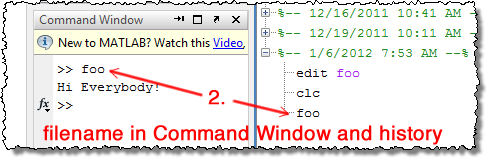
From a MATLAB interpreter/workspace view there is no change in behavior. In previous versions, when you pressed the run button, that file’s active Run Configuration would evaluated in the base workspace. If you had not created or modified the run configuration, this would the same as typing the file’s name at the command prompt (assuming that the file was top on the Path). The change in R2011b is that we now show the file name in the Command Window and History as if you had typed it at the prompt and pressed Enter.
We made this change for clarity and consistency. What we want is for you to have a record of what was evaluated and be able to understand why the workspace is in its current state. This way if a script updates some variables, you’ll know what was run to cause those updates.
This does get a little more confusing if you have a run configuration, as the file name is displayed before the run configuration is evaluated, so the recorded output might not be the same as if you just ran the file directly from the command line.
Unfortunately, for some editor-centric workflows, this may decrease readability, as the original Answers poster found. Fortunately our own Scott answered with a workaround:
As a workaround, you could use the “Evaluate entire file” button on the second row of the editor toolbar (along with the other buttons for evaluating one cell at a time). If this button doesn’t appear, you can right-click on the toolbar to customize it and add the button back.
You can also assign a keyboard shortcut to the “Evaluate Entire File” action from File -> Preferences -> Keybaord -> Shortcuts. You can even reassign F5 to this action from its default “Run or Continue Execution.”
- Category:
- Command Window,
- Editor




Comments
To leave a comment, please click here to sign in to your MathWorks Account or create a new one.