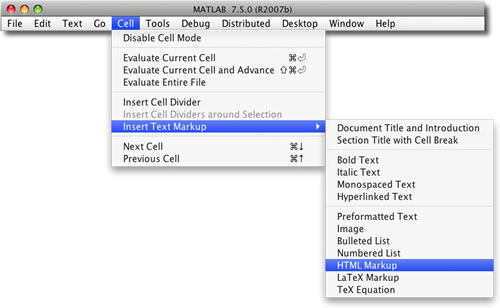
I thought I'd showcase the publish tool in MATLAB this time around. It's how both Steve Eddins and I produce our blog articles most of the time. I find it particularly handy when I use equations.
Contents
Titles
For the first title to appear as the document title, be sure to have no code in the first section, a practice I generally follow. Doing this means that all other titled cells will be named sections in the article's Contents.
Marking Up Cells
Marking up cells was a bit tricky for me at first as I got used to the formatting options. White space is very important for getting published document to look just right. I have repeatedly made the mistake of not surrounding lines containing bulleted lists with blank comment lines. These blank lines are important for preformatted text, bulleted lists, and equations.
Each new titled cell creates a section. For a new paragraph without a new section, omit the cell title as I have done here.
Markup Tips
- Bulleted item - on separate lines, each entry starts with % *
- Bold text - begins and ends with *
- Italic text - begins and ends with _
- Monospace text - begins and ends with |
The MATLAB documentation contains a great table for marking up text.
Equations
Math is so important to the content of work done in MATLAB that it's worth learning how to format equations using TeX. Here is a table showing the collection of available mathematical symbols. To embed an equation into a published document, sandwich the TeX express between $$. Here's one of my favorite identities:
because it contains the most interesting numbers I know, apart from 17.
Getting the Code
By default when publishing to html, the M-file code that generates the document is included and available, via grabcode. You won't be able to get it from this post, alas, because one of the steps in getting this to the web inserts char([13 10]) for newlines instead of just char(10).
Links
You can put in links directly.
- Here's one to my blog: http://blogs.mathworks.com/loren/
- This one is for this article: http://blogs.mathworks.com/loren/?p=40
- And this one is so you can respond to this post: http://blogs.mathworks.com/loren/?p=40/Respond
Do You publish Results or Documents?
Do you publish reports, results, documents? Who is your intended audience? What has been working well for you? And what else would you like to see? Let us know!
Published with MATLAB® 7.2


What I’m often missing are numbered lists. Bulleted lists only is not enough.
Thanks, Luc. I recommend you make your request here, since we keep track of customer requested enhancements.
Here’s an example of the output that publish can make using a customized stylesheet. Looks pretty neat i’d say:
http://www.pol.ac.uk/home/research/waveletcoherence/example.html
I got a t-shirt from mathworks because i gave some feedback on the feature. Excellent :-)
I like the publish function. Before it was introduced to MATLAB I used the notebook function for getting a documentation of my work. However, this was not very stable and gave sometimes unexpected behaviour, particular with graphics it was alittle bit tricky.
Publish is a good feature for getting the calculation, results and comments to paper.
What I would like is the possibility of changing between text, input and output within one cell. At the moment only the first text block of the section is formated as descriptive text. If you insert text after an input line it is formated as a comment. To get descriptive text format you have to insert a new section.
The same happens with multiple input lines. First all inputs and afterwards all outputs are printed. To me it would be better to print each output to the input from which it comes. Again you have to insert new sections with empty section titles. This leads to unnecessary big (long) m-files.
The last point is a connected with the M-Lint checker. If you want an output, the M-Lint checker complains about a missing semicolon. You can supress this warning with the comment %#ok, as you explained in the comments of another blog, but it makes the output not clearer. It would be fine if I could suppress special warnings in general.
Michael
PS: I know - give us a new feature and we soon start to complain about it :)
Aslak-
Nice web page!
Michael-
Thanks for the feedback. It will get back to the people working on the publish feature, though you can also always send requests to: http://www.mathworks.com/support/contact_us/ts/ebd/enhance_bug_doc_1.html
as well.
As for M-Lint, I think you can expect to see improvements there for user selections in an upcoming release.
–Loren
The power of publish is the main reason I occasionaly start matlab with java. One thing I miss though is the possibility to run publish on a function, and the (yes this is the second thing about it I miss) possibility to get figures ploted for each itteration in loops.
I use OCAMAWEB (quite difficult to configure, but works quite well and is a good balance between documentation and literate programming) to produce pdf structured code of my functions, and literateprograms.org to publish some of my codes as in:
http://en.literateprograms.org/Swiss_army_knife_Matlab_programs_for_quantitative_finance
For the ‘publish’ matlab feature, I wish I could include LaTeX code inside comments, like in $y=ax x + b$, and not only as paragraph. One of my problem and that publish seems to work only on scripts and not to document functions. To be able to document functions it should handle ‘nested sections’ which has to use different tags in the commment lines (as OCAMAWEB do).
My Matlab template engine is a more generic, though less out of the box solution.
http://xtargets.com/snippets/tag/template
You can use it to generate any type of text, be that XML, HTML, M Code or C code by embedding matlab commands within a textual document. Anybody familiar with other languages such as PHP, ERuby, Velocity or Smarty will get going quite quickly.
Currently I use it to generate interative reports for my Matlab unit testing tool whose interface is the matlab web browser. I guess you could, but I have never tried to, use it as a more powerfull content rendering solution for the Matlab Web server.
Cheers
Brad
How can I populate a Microsoft WORD “table” with the output of evaluated cells without having to have the input cell immediatly to the left in the table itself? Can I force the output of a cell to show up in a specific location in the table?
Sorry, please disregard the previous email. I found out how to use disp() in a cell then cut and paste the output scell into the table entry I would like to see the results. It seems to work!
This is a very useful quick reference.
Is it possible to control the size of the TeX equation output? The equations appear too small with my current setup (MATLAB R14sp3 on RH Enterprise Linux).
Many thanks,
Ged.
Ged-
There is no automatic way. The TeX equation is stored in an image file so you could try enlarging the image, perhaps by some percentage after the fact, if you knew what you wanted that to be. Depending on the amount of zoom, the image quality might not be so wonderful though.
–Loren
After some quick searches in Google, I found nothing about turning MATLAB generated html into a blog post.
The result HTML from MATLAB ‘publish’ function is a complete page, with the necessary header and and footer. It is greater for independent HTML publishing. However, the a blog post, like this one, only have the whatever between the ‘body’ tags.
How did you guys do integrating MATLAB publish function with CMS like WordPress, which I believe is what you are using?
Ivan-
I post-process the publish output. We have an enhancement request to make publish produce suitable output for blogging.
–Loren
The ability to publish m-files has been very useful and a big time saver for me in my signal processing courses. I particularly like being able to include TeX equations.
Is there any documentation on what TeX commands are supported by MATLAB? I have found that some commands work and some don’t, and it would be nice to have a good reference.
Jessee,
I’m glad publishing is working so well for you. For the TeX commands that MATLAB supports for equations within the M-file, see this page:
http://www.mathworks.com/access/helpdesk/help/techdoc/ref/text_props.html
–Loren
i am programming in matlab alot at my workplace, and I have to report my results.
since I found out about the publishing capabilities i started to use them and it is very helpfull.
first the documentation is not only in the report but also in the code , so if you hate documentation, this helps you to do it.
second , you don’t have to copy&paste the figures.
I use the html format for my own purposes and the doc format to share with others.
I have a few suggestions/questions:
1) is there a way to change the colors in doc format?
2) could you insert shortcuts for usefull html formatting?
3) is there a command like ‘dict’ which will give synonims or correct spelling errors (which I have probably made while writing this paragraph)?
Thanks,
Dani.
Dani-
None of the things you ask for are readily available right now. I will enter enhancement requests for them.
–Loren
Hi,
I would like to put an header and footer when i use publish in matlab for a word document.Is this possible?
Meena-
There is not currently a way to automate adding a header/footer for published docs. I’ve submitted that idea as an enhancement request.
–Loren
Hi,
I use the publish feature in my program ans it’s very helpfull, but I have a problem because I can’t compile it due to this feature. Is this possible to publish my results with another function?
Thank you.
Rek: As you’ve discovered, publish is not supported by the MATLAB Compiler. The alternative is to use the MATLAB Report Generator, which gives more control over report formats/output options and works with the Compiler.
Loren,
I’ve used Report Generator for a couple of years to create custom reports. I would like to include existing xhtml in my report, keeping the original formatting. Currently, the text/paragraph components do a great job of escaping the html tags. This results in a fantastic display of the raw html text, but I have not been able to get it to display the formatted output. I’ve tried creating my own component, but have not had any success there either. Since the report generator outputs XML DocBook, it seems like this would be easy. Any help you can provide would be greatly appreciated.
James-
I am not an expert of Report Generator so you probably should contact technical support for help with your issue. As an aside, you can now use html markup in published M-files by using the tags < h t m l > and < / h t m l > (without spaces, of course).
–loren
Hi,
I use the matlab function publish to create a Word-file with the content of my matlab computation. I would like to present matlab arrays in a Word table with annotation. Is it possible to do it with publish?
Thank’s a lot
Georg
Georg-
You might try this entry from MATLAB Central: http://www.mathworks.com/matlabcentral/fileexchange/14453
–Loren
Loren,
this is a very nice way Printing Variables to HTML Tables in Published Code. Thank’s a lot. It looks excellent.
But is there something similiar to create tables in Microsoft Word?
Georg
Georg-
Sorry but I don’t know of a tool for Word tables for publishing.
–Loren
Hi
very useful indeed
i tried to publish my code which include multiple files (functions) that is called by a main one, the thing is nothing of the figures that output from the called function appear it the published code, not even the comments in those functions, is that right? and is their a solution for that
Ahmed-
publish captures plots created in the main file being published and can’t detect the other ones.
–Loren
Hi Loren,
Just wanted to give a suggestion about the editor. I use the “find and replace” feature a lot if I want to search for or change a variable name throughout an m-file. Currently, we can find and replace in an entire file. It will be nice to have an option to find and replace only in a particular subfunction inside an m-file. For example, if we have a large GUI file with thousands of lines of code, and we want to find and replace a variable name only in a particular subfunction, then it will be very convenient if we can restrict the scope of the search only to that subfunction. Please see if you can add this feature in future versions.
Par-
Thanks for the suggestion. Please use the link in the right column to send this directly to our support team. It will then get registered as a customer request from you, and hav more priority than it gets from me alone. Thanks.
–loren
Hi,
I was wondering if there is a way to use publish for object oriented matlab i.e. a way to format properties and methods of a class with their corresponding descriptions (similar to javadoc and the java api)? If not, are there any other tools out there that make OO matlab documentation easier?
Peter-
Using a publish configuration, you can publish the class file, turning evaluate code off. I realize that’s not exactly what you are looking for. Could you please use the support link on the right to enter this as an enhancement request? I tried looking on the File Exchange and I didn’t look exhaustively.
–Loren
Thanks Loren. I am in the process of writing my own publisher. I have another question:
The comments that you put in for a function serve two purposes… they provide the source for the publish function, and allow the user to access the help for a function via the help command in the command window. This works for all cases, except abstract methods. Is there a way to comment an abstract method declaration that can be retrieved via the help command?
Peter
Peter-
As of R2009b, this is not possible. It’s on the enhancement list for a future release.
–Loren