
Brief History of Nonnegative Least Squares in MATLAB
In my first year at MathWorks (1987!), a professor I know got in touch with me. He was trying to solve a least squares problem with nonnegativity constraints. Having been raised properly, I knew immediately where to get a great algorithm
- Lawson and Hanson, "Solving Least Squares Problems", Prentice-Hall, 1974, Chapter 23, p. 161.
Contents
Fortran Code
The Fortran code is supplied in the book and the professor I spoke with did a fairly faithful translation, despite MATLAB not yet having a goto statement. Problem was, it wasn't working correctly. He asked me to take a look. I remember being excited, because I love nnls as L-H call the algorithm. However, pouring over someone else's translated Fortran loses its pizzazz quite quickly.
Let me give you some statistics on the Fortran code itself.
- 326 lines total
- ~150 lines of comments
- leaving ~175 lines of executable code
- main double while-loop, ~125 lines of executable code (lines 83-289)
A Eureka Moment
Procrastination can pay off sometimes. Instead of reading through the M-file code, comparing it to the Fortran line-by-line, I opened up the reference for the algorithm. Here's a glimpse of what I found.
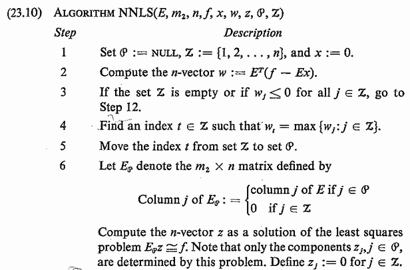
Do you see what I see? I see the problem being talked about in terms of matrices and vectors. Hmmm, maybe I can implement it straight from the algorithm description, bypassing the Fortran implementation. And so I did.
The MATLAB Code
MATLAB shipped with the function nnls, which ultimately was renamed to lsqnonneg and was updated to include some code to standardize it with our other optimization routines. I had the code written and running in less than half a day, including working correctly on the examples sent to me by the professor that were not working in his translated code.
The code statistics look like this for the M-file.
- 206 lines total
- ~80 blank and comment lines
- ~125 lines of executable code, of which ~55 dealing with the infrastructure common to our other optimization routines that don't appear in the Fortran
- ~50 lines for the main iteration loops (nested while-loops)
Lessons Learned
- I relearned from this experience that it is worth going back and thinking about code and the algorithm before diving in. I guess I had to learn this one a few times in the course of my progamming life! While the Fortran and both versions of the M-files were based on the same algorithm, I was able to bypass the code written and write a version using the matrix notation of the reference.
- The MATLAB code is shorter, though I am sure some will say that it is not that much shorter.
- The algorithm, when I wrote it, really sunk in for me, since instead of being mired in loops, I watched variables move in and out of the active set. It was very interesting to see the algorithm work from a less nitty-gritty level, yet still capturing all the details.
Care to share any of your experiences where thinking about an algorithm differently than the way it was posed help you out? Add your thoughts here.
- Category:
- Readability,
- Vectorization







Comments
To leave a comment, please click here to sign in to your MathWorks Account or create a new one.