Skip to Main Content Skip to Search
File Exchange
MATLAB Newsgroup
Link Exchange
  Blogs  
 Contest 
MathWorks.com

Loren on the Art of MATLAB

October 3rd, 2007

parfor the Course

Starting with release R2007b, there are multiple ways to take advantage of newer hardware in MATLAB. In MATLAB alone, you can benefit from using multithreading, depending on what kind of calculations you do. If you have access to Distributed Computing Toolbox, you have an additional set of possibilities.

Contents

Problem Set Up

Let's compute the rank of magic square matrices of various sizes. Each of these rank computations is independent of the others.

n = 400;
ranksSingle = zeros(1,n);

Because I want to compare some speeds, and I have a dual core laptop, I will run for now using a single processor using the new function maxNumCompThreads.

maxNumCompThreads(1);
tic
for ind = 1:n
    ranksSingle(ind) = rank(magic(ind));
end
toc
plot(1:n,ranksSingle, 'b-o', 1:n, 1:n, 'm--')
Elapsed time is 22.641646 seconds.
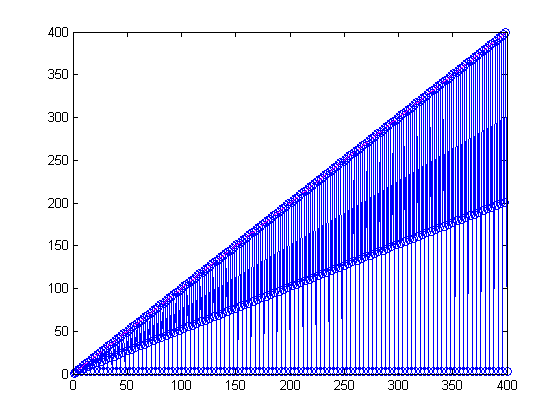
Zooming in, youI can see a pattern with the odd order magic squares having full rank.

axis([250 280 0 280])
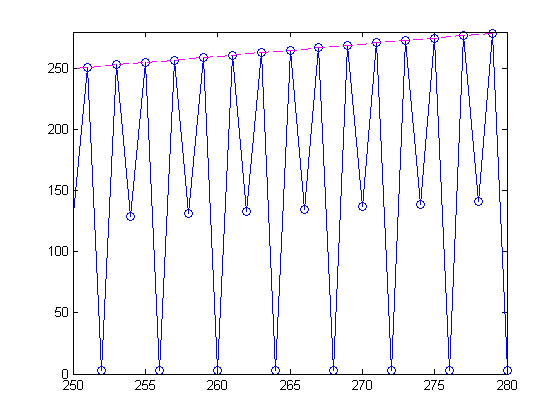
Since each of the rank calculations is independent from the others, we could have distributed these calculations to lots of processors all at once.

Parallel Version

With Distributed Computing Toolbox, you can use up to 4 local workers to prototype a parallel algorithm. Here's what the algorithm for the rank calculations. parMagic uses parfor, a new construct for executing independent passes through a loop. It is part of the MATLAB language, but behaves essentially like a regular for loop if you do not have access to Distributed Computing Toolbox.

dbtype parMagic
1     function ranks = parMagic(n)
2     
3     ranks = zeros(1,n);
4     parfor (ind = 1:n)
5         ranks(ind) = rank(magic(ind));  % last index could be ind,not n-ind+1
6     end

Run Parallel Algorithm and Compare

Let's run the parallel version of the algorithm from parMagic still using a single process and compare results with the original for loop version.

tic
   ranksSingle2 = parMagic(n);
toc
isequal(ranksSingle, ranksSingle2)
Elapsed time is 22.733663 seconds.
ans =
     1

Run in Parallel Locally

Now let's take advantage of the two cores in my laptop, by creating a pool of workers on which to do the calculations using the matlabpool command.

matlabpool local 2
tic
   ranksPar = parMagic(n);
toc
To learn more about the capabilities and limitations of matlabpool, distributed
arrays, and associated parallel algorithms, use   doc matlabpool

We are very interested in your feedback regarding these capabilities.
Please send it to parallel_feedback@mathworks.com.

Submitted parallel job to the scheduler, waiting for it to start.
Connected to a matlabpool session with 2 labs.
Elapsed time is 13.836088 seconds.

Comparison

Did we get the same answer?

isequal(ranksSingle, ranksPar)
ans =
     1

In fact, we did! And the wall clock time sped up pretty decently as well, though not a full factor of 2.

Let me close the matlabpool to finish off the example.

matlabpool close
Sending a stop signal to all the labs...
Waiting for parallel job to finish...
Performing parallel job cleanup...
Done.

Local Workers

With Distributed Computing Toolbox, I can use up to 4 local workers. So why did I choose to use just 2? Because on a dual-core machine, that just doesn't make lots of sense. However, running without a pool, then using a pool of size 1 perhaps, 2 and, and maybe 4 helps me ensure that my algorithm is ready to run in parallel, perhaps for a larger cluster next. To do so additionally requires MATLAB Distributed Computing Engine.

parfor and matlabpool

matlabpool started 2 local matlab workers in the background. parfor in the current "regular" matlab decided how to divide the parfor range among the 2 matlabpool workers as the workers performed the calculations. To learn a bit more about the constraints of code that works in a parfor loop, I recommend you read the portion of documentation on variable classifications.

Do You Have Access to a Cluster?

I wonder if you have access to a cluster. Can you see places in your code that could take advantage of some parallelism if you had access to the right hardware? Let me know here.


Get the MATLAB code

Published with MATLAB® 7.5

19 Responses to “parfor the Course”

  1. Dan K replied on :

    Loren,
    One area on which I am unclear is whether one benefits from multiple cores when one doesn’t have the distributed computing toolbox. I have read the Cleve’s corner on the subject of multi-threading, but I find it difficult to determine how much benefit is achieved without the toolbox. The other question which I have is whether running 64 bit MatLab actually accelerates any computations significantly, or it the primary difference is in the increased memory space?

    Thanks,
    Dan

  2. Loren replied on :

    Dan-

    You can turn multithreading on in the preferences panel starting in R2007a. If you have a multicore machine, multithreading should affect pointwise calculations (but some will not improve over the JIT performance MATLAB already has) and those using the BLAS. You might try running the demo entitled “Multithreaded Computation” (multithreadedcomputations.m) to get more of a feel for that on your system.

    I think 64-bit performance depends on the details of what you are doing, but the main benefit is the increased memory space and size of arrays that can be used.

    –Loren

  3. StephenLL replied on :

    Many of our computers as well as the computers of our customers are either multi-core or multi-processors with multi-cores.

    For our specific situation, if we were able to compile this ability with the MATLAB compiler, I would purchase the toolbox. Given the developers this ability would not benefit us since ultimately we need to distribute our software developed with MATLAB.

    - Stephen

  4. Abel Brown replied on :

    Shouldn’t the start up time of the matlabpool be included?
    Ignoring the overhead is almost like cheating?

    Should be:

    tic;
    matlabpool local 2
    ranksPar = parMagic(n);
    toc

  5. Steve Eddins replied on :

    Abel—I think a short-running, one-time-only calculation is not a very interesting application of parallel or cluster computing. Ignoring the pool startup time gives you a better idea of the potential benefit for long-running calculations, or for running many calculations over the course of a single session.

  6. Andrew Jackson replied on :

    Hi,

    I have the Distributed Computing Toolbox up and running on my quad-core machine. For the moment this is all the parallel or distributed computing power i require. I will however be looking to up my computation and will be getting a dual quad-core machine sometime in the near future. The local scheduler bundled with the toolbox can handle up to 4 local workers. How can I take advantage of the other 4 processors in a dual quad-core system?

    Do i need the MATLAB Distributed Computing Engine and will this then automatically recognise the 8 processors?

    Or is this something that will come in an update to the distribution?

    My current set-up
    MATLAB Version 7.5 (R2007b)
    Distributed Computing Toolbox Version 3.2 (R2007b)
    Optimization Toolbox Version 3.1.2 (R2007b)
    Statistics Toolbox Version 6.1 (R2007b)

    System:
    Intel core 2 quad Q6600 @ 2.40 GHz
    4 GB RAM

    many thanks in advance

    Andrew

  7. Loren replied on :

    Andrew,

    To access the additional 4 cores, you will need the MATLAB Distributed Computing Engine. You will have to set up a configuration file for the extra cores to be used. The documentation for setting things up should be enough to get you going, though you can certainly contact technical support if you have issues. Once you set things up, you won’t need to repeat that task again.

    –Loren

  8. haoz replied on :

    Instead of MATLAB Distributed Computing Engine, can one use “MPI” to take advantage of 8 cores on a single machine?

    On that note, I found some coverage on MPI as a scheduler on mathworks.com. Wonder what’s the difference between “parallel” and “distributed” jobs as in the following?

    “The mpiexec scheduler is intended as a launcher for parallel jobs and supports only parallel jobs. It does not support distributed jobs.”
    http://www.mathworks.com/products/distribtb/supported/sched/mpiexec.html

  9. Narfi replied on :

    Haoz,

    The Distributed Computing Toolbox uses MPI for some of its functionality, such as the parallel math, and it also exposes MPI-like operations: labindex, numlabs, labSend, labReceive, labSendReceive, labBroadcast and labProbe. As Loren explained in the article, the toolbox allows one to use these operations with up to 4 MATLAB workers on a single machine.

    The MATLAB Distributed Computing Engine allows one to scale higher than just 4 workers, and allows the use of more than just one machine. It also supports multiple schedulers, including what might better be called “process launchers”, such as the mpiexec command.

    Your conjecture is correct: You could use MPI directly to take advantage of 8 cores on a single machine without using either the Toolbox or the Engine, but then you would have to write a lot of parallel C or Fortran code from scratch. If you want to use any of the higher level constructs such as parfor, distributed arrays, or labSend/labReceive, you need to use the Toolbox, optionally with the Engine.

    The difference between “distributed” vs “parallel” jobs has also been described as “embarrassingly parallel” vs “parallel”. I.e. the former consists of multiple tasks that have no dependencies between them and can be executed in any order. The latter require inter-process communication.

    Narfi

  10. haoz replied on :

    Thanks, Narfi. Following up..
    Is it possible to use MPI with Distributed Toolbox (but not Engine) to distribute jobs to (a) more than 4 cores on a single machine (b) more than 1 machines?

  11. Narfi replied on :

    Haoz,

    No, neither is possible without the use of the engine. Do you have a desktop machine with more than 4 cores?

    Narfi

  12. Than Atol replied on :

    I’m newcomer on the parallel computing. I develop matlab codes with a lot of for loops (> 1000 triple fors with matrice interelations within loops and functions). I optimised - vetorised the code as better as i could…no more. The code is really complicated and requires (in an old 3.4GHz Intel single core) almost 15 hours to complete so my productivity is low. Would it be wise to purchase a Core 2 quad and see significant runtime improovement [due to multicore] without totaly altering my code? At least some minor changes to import parallelisation would be ok, but that’s all. What matlab version and toolboxes should i purchase to take advantage of the new hardware? Realy thank in advance for your help!
    Than

  13. Loren replied on :

    Than-

    Without the details of YOUR code, it is impossible to give good advice. A core 2 quad will help some operations and not others. I mention the products above in the article. In addition, you might read this portion of the documentation:

    http://www.mathworks.com/access/helpdesk/help/techdoc/rn/bq08o1n-1.html

    and this portion:

    http://www.mathworks.com/access/helpdesk/help/techdoc/matlab_prog/brdo29n-1.html

    After that, you might contact technical support.

    –Loren

  14. jiangming zhang replied on :

    I am very interested in parallel matlab. Parfor is very beautiful and handy! I hope you can give us more instructions on the use of the parallel toolbox 3.2.

    By the way, could you make the articles on your blog in pad files? Then we can download them and print out for careful study.

    Thanks for your parallel matlab!

  15. Loren replied on :

    Jiangming-

    Thanks for the comments. There are not plans to make the blog available in other formats.

    –Loren

  16. Juan replied on :

    I was wondering how MATLAB’s new parallel capabilities interact with external programming interfaces.
    Suppose I am running a loop in matlab and inside the loop I call a mex file containing some C code.
    Would I be able to do this if I paralelize the matlab loop with matlabpool+parfor in a multicore computer or cluster?

    Thnaks for your insights.

  17. Narfi replied on :

    Juan,

    There is no difference between the constraints that parfor puts on MATLAB files and MEX files. The only thing to be aware of is that the MEX file needs to be compiled for the OS type of the workers.

    In particular, if the MATLAB client and workers are running the same OS, there is no difference between calling regular MATLAB code and MEX files inside parfor.

    Best,

    Narfi

  18. Ingvar S replied on :

    I am interested in the issue of separating i) parfor overhead from ii) network costs. Let me first state that my initial experience with the parallel toolbox is quite positive. However it is clear that fine-grained problems are unsuitable for parfor implementation.

    I have a data-parallel algorithm for which the maximum theoretical speedup (call this MTS) can easily be calculated for a well-defined test problem. I run this on a Intel Xeon+Infiniband cluster with a Fortran and MPI implementation and the observed speedup is close to the MTS.

    Next, I implement this in Matlab. The algorithm is quite simple and essentially requires one parfor loop. I run it on an Opteron 275 with 4 cores. It turns out that there is essentially no speedup. Next I therefore increase the problem size, i.e. the problem more coarse-grained (the work inside the parfor loop). Now the Matlab implementation can reach the MTS.

    Playing around with the code I get that parfor overhead can be measured in hundreds of a second (somewhere between 0.05-0.15 seconds). Does this appear reasonable?

    Now, first I am interested in separating the parfor and Opteron/network effects on scalability. Is there anything written on the issue of parfor overhead? Or benchmark code for testing the system performance?

    Second, is there an alternative way to do this in Matlab, e.g. using MPI instead of parfor and would it help? Clearly if parfor can be used MPI can as well, but does it help performance?

    Best regards,
    Ingvar

  19. Jos replied on :

    Ingvar,

    Your quoted overhead numbers of between 50ms and 150ms for a parfor loop seem reasonable. Given the code analysis and data transfer that needs to happen we felt this was a reasonable trade-off for loops that we expected to take between seconds and hours to run.

    To separate the parfor overhead from the network overhead you can try a few different things. Firstly, run the code with no matlabpool open, which will run the code in the local MATLAB session. Next run the same parfor with a matlabpool of size 1 on the local machine. The difference between these 2 times will be the parfor overhead. If you are on a multi-cored machine, you can try the same parfor on local matlabpools of sizes 2 - 4. This will show the best possible scaling for the particular parfor. Next you should move to using a remote matlabpool with varying sizes, which will give you the overheads for parfor and the network.

    I’m afraid there isn’t a document on the overheads of parfor as the numbers vary wildly depending on the hardware and network behaviour.

    To answer your question about doing this another way, I need to know if the individual iterates in the parfor loop are all of similar computational complexity. It should be noted that the parfor language construct is designed to deal with varying complexity loops and it thus a dynamic task sharing loop. There is another construct written for i = drange(1,N),…,end which when run inside a parallel job will partition the iterates 1:N statically between the available labs in the parallel job. There is no communication needed to carry out this loop, and each lab in the parallel job will end up with its particular set of iterates filled in. If used in conjunction with distributed arrays this construct can be used to carry out this sort of parallel programming.

Leave a Reply


Loren Shure works on design of the MATLAB language at The MathWorks. She writes here about once a week on MATLAB programming and related topics.

  • Loren: Steve- Nice reply to Tony’s challenge. You can use end’s in the expressions of your first...
  • Steve L: Tony, With regard to removing rows R and columns C from a matrix, you can use: A = reshape(1:49, 7, 7); B =...
  • Loren: Neill- Use clear variables or clearvars with names, and then separately clear the functions you want to clear...
  • Neill Smith: Loren, So how does one clear “everything 221; (particularly variables and functions) except...
  • Tristan: yeah you are right, one example dont prove anything. It just shows that, in some cases, there might be some...
  • Dan K: For myself, generally the answer to my preference depends on what I’m going to do with the selected...
  • Tony Booer: Actually, to answer Loren’s original question “Which Method(s) Do You Prefer?”, I have...
  • Tony Booer: I’ve always enjoyed using array indexing of all sorts (logical or otherwise) because it can be a...
  • Roland: Hi, I’m a newbie in Matlab (R 2007b, Win XP) and tried to implement the way of assembly shown in...
  • Ed L.: I started using logical arrays a LOT more often after heeding the warnings and recommendations issued by...

These postings are the author's and don't necessarily represent the opinions of The MathWorks.

Related Topics
