 Cleve’s Corner: Cleve Moler on Mathematics and Computing
 The MATLAB Blog
 Guy on Simulink
 MATLAB Community
 Artificial Intelligence
 Developer Zone
 Stuart’s MATLAB Videos
 Behind the Headlines
 File Exchange Pick of the Week
 Hans on IoT
 Student Lounge
 MATLAB ユーザーコミュニティー
 Startups, Accelerators, & Entrepreneurs
 Autonomous Systems
 Quantitative Finance
 MATLAB Graphics and App Building
Rooting Around in MATLAB – Part 2
In a recent post, I started a series of posts about finding roots of equations, and how you might use MATLAB to teach some of this topic. In particular, I will introduce the idea of fixed point iteration.
Contents
Set Up
clear all
close all
Example
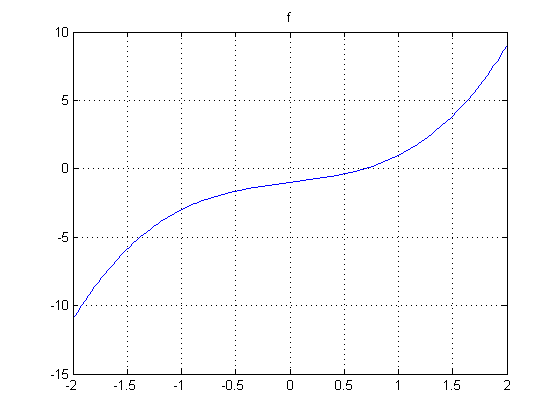
Let me restate the example function. We'll start with a simple cubic polynomial f

which I define as an anonymous function.
f = @(x) x.^3 + x - 1;
fplot(f,[-2 2])
title f
grid on
Fixed Point Algorithm
One way to find a solution to f(x) = 0 is to define another function, g such that g(x) = x where the function g is related to f. If we can find a value x that solves the equation with g, this fixed point is also the zero of the function f. How do we define such a suitable g? Looking at the equation for f and setting its value to zero, we can derive an equation for x.
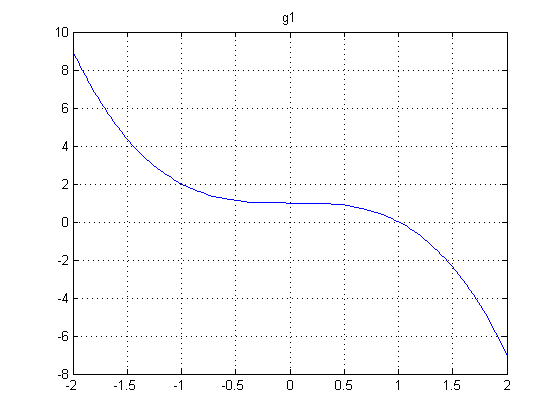
Here's one way we can rewrite f(x) = 0 so that x is alone on one side of the equation.

Let's call this function g1.
g1 = @(x) 1 - x.^3;
fplot(g1,[-2 2]);
g1str = '1-x^3';
title g1
grid on
Now let's add a straight line to represent

straightLine = @(x) x;
title ''
hold on
fplot(straightLine, [-2 2], 'g')
legend(g1str,'x','Location','SouthEast')

axis([-2 2 -2 2]), axis equal
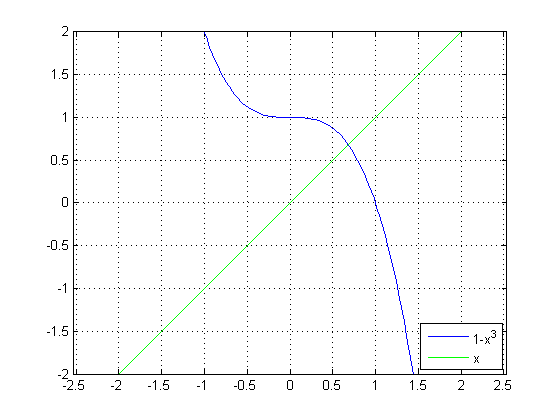
The intersection of these 2 curves is a fixed point of g1(x), and therefore a zero of f(x). Let's zoom in a bit.
axis([0 1 0 1])
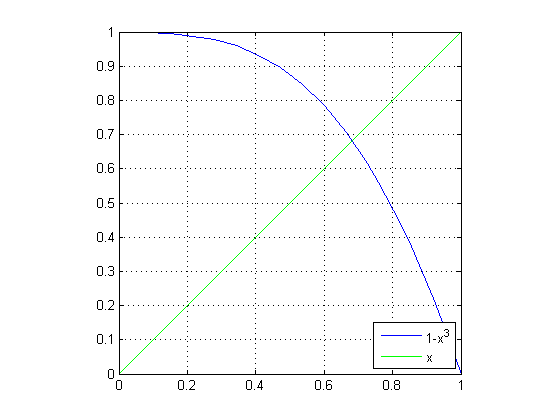
That intersection looks like it happens around the same location as the answers we got from using roots and fzero in the previous post.
fzsolution = fzero(f,0.5)
fzsolution =
      0.68233
plot(fzsolution, g1(fzsolution),'b*')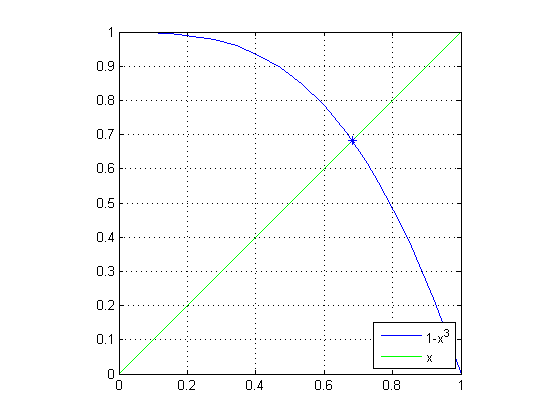
Let's Try to "Zero" in on the Solution
First, we'll select the same starting value that we used when we called fzero. The starting point is then (0.5,0.5). And then we can easily calculate the next value of g1.
x(1) = 0.5;
y(1) = x(1);
x(2) = x(1);
y(2) = g1(x(2));
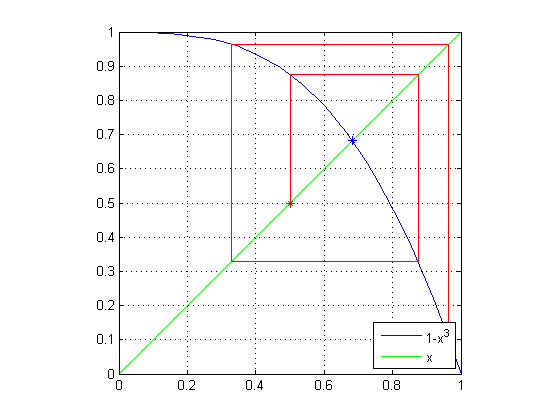
Let's plot the trajectory of the solutions, noting the first point with a red star.
plot(x,y,'r',x(1),y(1),'r*')
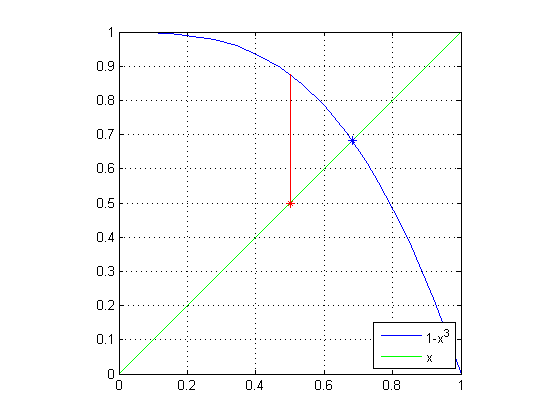
First Iteration
Now let's get the next estimate. We'll set the current value of g1 to the new x value, sliding onto the straight line, and then calculate the next value of g1 from this new value for x. And plot it.
x(3) = y(2);
y(3) = y(2);
x(4) = x(3);
y(4) = g1(x(4));
plot(x,y,'r')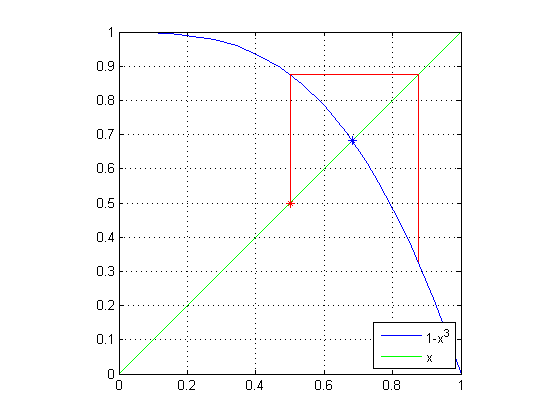
Second Iteration
Let's do the same set of steps again.
n = 5;
x(n) = y(n-1);
y(n) = y(n-1);
x(n+1) = x(n);
y(n+1) = g1(x(n+1));
plot(x,y,'r')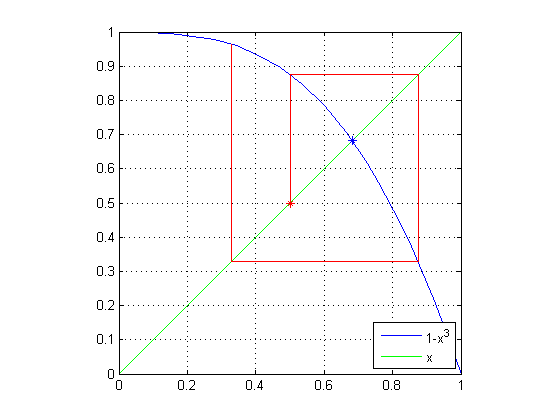
Third Iteration
And again.
n = 7;
x(n) = y(n-1);
y(n) = y(n-1);
x(n+1) = x(n);
y(n+1) = g1(x(n+1));
plot(x,y,'r')
hold off
The Conundrum
By now, you have surely noticed that instead of spiraling into the solution we found with fzero, our estimates are spiraling out! In the next post, we'll explore another definition for g(x) = x and see what happens from there.
Confession
Yes, I know in this post I kept overplotting lines successively. But I didn't want us to get distracted by managing the plots.
The Series of Posts
In addition to this post and the previous one, there will be one more. Until it is published, the 3rd link will not be useful.
- Category:
- Education,
- Solving Equations




Comments
To leave a comment, please click here to sign in to your MathWorks Account or create a new one.