Loren on the Art of MATLAB

July 22nd, 2010

Graphical Display Techniques – Part 1

I've recently been working with some customers who need to display extra information on top of a plot. Steve showed some examples for superimposing lines on images in such a way so they are visible despite what's going on in the picture. Today I'll show you a few such techniques here.

Contents

Making Lines Visible

I'll start with two techniques for making sure lines show up on a background of other information. These are

  • two lines, with different color and linewidth
  • two lines, with different linestyle

First let's see what happens with a single line.

load clown
image(X),colormap(map)
axis off
hold on
rect  = [ 150 40 80 70]
h = rectangle('position',rect);
rect =
   150    40    80    70
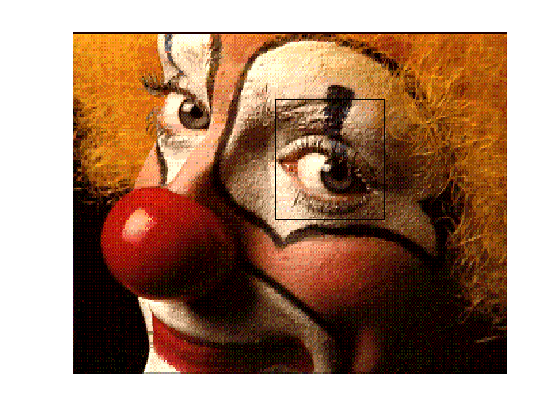
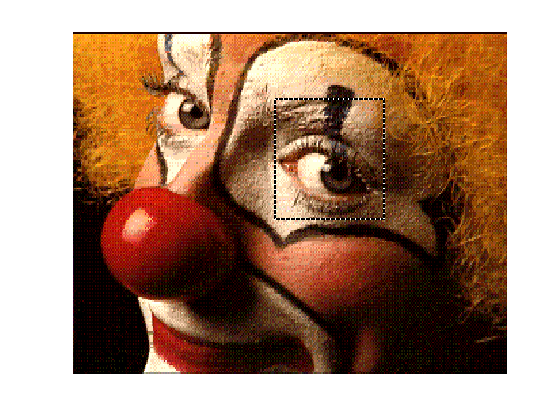
It's kind of hard to see this black edge of the rectangle outlining the eye on the right. Let me make it more visible by thickening it, and placing a thinner line inside.

set(h,'LineWidth',5)
h2 = rectangle('position',rect);
set(h2,'EdgeColor','w','LineWidth',2)
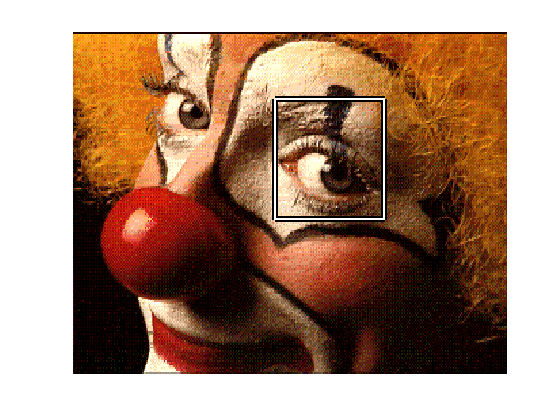
Let me adjust the linestyle instead of the width.

set(h,'LineWidth',2,'LineStyle','-')
set(h2,'LineStyle',':')
Making Markers Visible

Similarly, you can ensure that markers are visible on your plots by exploiting the separable colors for the face and edge.

delete([h h2])
hm = plot(60,125,'s')
set(hm,'MarkerSize',10,'MarkerEdgeColor','w','MarkerFaceColor','m')
hold off
hm =
          177

What Techniques Do You Use?

Do you have some other graphical techniques to ensure all the elements are clearly visible? Let me know here.


Get the MATLAB code

Published with MATLAB® 7.10

9 Responses to “Graphical Display Techniques – Part 1”

  1. Christian Wolf replied on :

    What is crucially missing in matlab is functionality which allows to draw primitives (lines, boxes, circles, text etc.) directly into the image, such that the enriched contents is not just visible in the figure but finds its way into the image (matrix) itself.

    I help myself with cumbersome code using getframe(), which is really tiring. A short snippet of a 100+ lines function drawing text into an image:

    imshow(tmpim);           r=text(1,txth,used_letters(k),'FontSize',14);
    fr = getframe(gca,[1 1 size(tmpim,2) size(tmpim,1)]);
    frinv = 255-fr.cdata(:,:,1);
    

    More Matlab support for this would be cool, especially since Matlab is very much used by the image processing & Vision community.

    Christian

  2. Witek Jachimczyk replied on :

    Hi Christian,

    That exact functionality is available as part of the Video and Image Processing Blockset, which as of 10b release is also available for MATLAB. Have a look at the following functionality to see if it meets your needs:

    http://www.mathworks.com/access/helpdesk/help/toolbox/vipblks/ref/video.shapeinserterclass.html

    and

    http://www.mathworks.cn/access/helpdesk/help/toolbox/vipblks/ref/video.markerinserterclass.html

    Witek

    Developer of Video and Image Processing Blockset
    witek@mathworks.com

  3. Witek Jachimczyk replied on :

    Oops, I meant 10a.

  4. Geoff Dutton replied on :

    FYI, the MATLAB Graphics User Guide has a section called “Adding Text to Images” (http://www.mathworks.com/access/helpdesk/help/techdoc/creating_plots/f2-14242.html#f2-20036) that provides an example of embedding text in an image. It uses GETFRAME as well. I think that’s the state of the art in core MATLAB. VIP Blockset is great, but you need Simulink.

  5. Witek Jachimczyk replied on :

    Geoff,

    Like I mentioned in my post, Video blockset is available in MATLAB since 10a release. I guess my statement should have been move explicit:

    It DOES NOT require Simulink.

    Witek

  6. Christian Wolf replied on :

    Hi Witek,

    thank you for the link, that is indeed interesting. However, I do not understand why this functionality is not part of the image processing toolbox.

    Best regards,

    Christian

  7. Alex Taylor replied on :

    The ability to “burn” geometric shapes into images is also provided by the ROI tools in the Image Processing Toolbox.

    im = imread('pout.tif');
    h_line = imline(gca,[10 10; 100 100]);
    mask = h_line.createMask();
    im(mask) = 255;
    imshow(im)
    

    http://www.mathworks.com/access/helpdesk/help/toolbox/images/imroi.html#imroi-createMask

    Alex

  8. Arjun Raj replied on :

    True, you may not need Simulink, but it seems sort of crazy to have to get an entire toolbox for something that seems like it could easily belong (in limited form, at least) in the Image Processing Toolbox…

  9. Witek Jachimczyk replied on :

    Christian and Arjun,

    I see your point. You can use the technique described by Alex. That’s already in Image Processing toolbox and it will not require a purchase of a new product.

    Other people may care more about other functionality that’s in Video blockset and for them using the previously mentioned functions (System objects) may make more sense.

    BTW. Additional benefits of the aforementioned objects include ANSI C code generation, i.e. they can generate C code that can be used independently of the MathWorks products. You may care about that. Video blockset also has other CV functionality such as Optical Flow, estimation of the fundamental matrix, etc.

    HTH,

    Witek


MathWorks
Loren Shure works on design of the MATLAB language at MathWorks. She writes here about once a week on MATLAB programming and related topics.

These postings are the author's and don't necessarily represent the opinions of The MathWorks.