 Cleve’s Corner: Cleve Moler on Mathematics and Computing
 The MATLAB Blog
 Guy on Simulink
 MATLAB Community
 Artificial Intelligence
 Developer Zone
 Stuart’s MATLAB Videos
 Behind the Headlines
 File Exchange Pick of the Week
 Hans on IoT
 Student Lounge
 MATLAB ユーザーコミュニティー
 Startups, Accelerators, & Entrepreneurs
 Autonomous Systems
 Quantitative Finance
 MATLAB Graphics and App Building
WHATS
Aldo Caraceto, one of our Application Engineers from Italy, recently wrote to tell us about a new post on the File Exchange. He noted that
this file was particularly cool because "it offers a feature which I would like to see natively in MATLAB," it has an easy-to-use
syntax, and the code is tightly implemented. I agree on all counts!
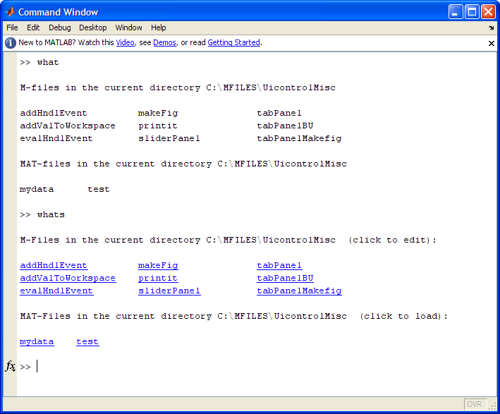
This week's Pick of the Week is from repeat-offender Matt Fig. Matt's WHATS file works just like the built-in MATLAB command WHAT--it lists MATLAB files in the current directory. But the output of
WHATS differs from that of WHAT in an important way: all of the returned strings are hyperlinked to the files they refer to.
Click on a link to an MFile, and the MFILE opens in the MATLAB editor. Click on a link to a MAT file, and data contained in
the file is automatically loaded:
 Alternatives are always good. WHATS gives users a nice Command-Window alternative to using the Current Directory Browser.
Old-school MATLABbers who like to show only the command window (remember that the MATLAB environment is completely customizable!) will particularly appreciate this file. Thanks for sharing it, Matt!
We'd love to hear your thoughts about Matt's file, or about things you've done to customize your experience with MATLAB. Use
this Comments section to share your ideas on the topic!
Published with MATLAB® 7.7
Alternatives are always good. WHATS gives users a nice Command-Window alternative to using the Current Directory Browser.
Old-school MATLABbers who like to show only the command window (remember that the MATLAB environment is completely customizable!) will particularly appreciate this file. Thanks for sharing it, Matt!
We'd love to hear your thoughts about Matt's file, or about things you've done to customize your experience with MATLAB. Use
this Comments section to share your ideas on the topic!
Published with MATLAB® 7.7
Alternatives are always good. WHATS gives users a nice Command-Window alternative to using the Current Directory Browser.
Old-school MATLABbers who like to show only the command window (remember that the MATLAB environment is completely customizable!) will particularly appreciate this file. Thanks for sharing it, Matt!
We'd love to hear your thoughts about Matt's file, or about things you've done to customize your experience with MATLAB. Use
this Comments section to share your ideas on the topic!
Published with MATLAB® 7.7
- Category:
- Picks




Comments
To leave a comment, please click here to sign in to your MathWorks Account or create a new one.