 Cleve’s Corner: Cleve Moler on Mathematics and Computing
 The MATLAB Blog
 Guy on Simulink
 MATLAB Community
 Artificial Intelligence
 Developer Zone
 Stuart’s MATLAB Videos
 Behind the Headlines
 File Exchange Pick of the Week
 Hans on IoT
 Student Lounge
 MATLAB ユーザーコミュニティー
 Startups, Accelerators, & Entrepreneurs
 Autonomous Systems
 Quantitative Finance
 MATLAB Graphics and App Building
A great utility for debugging
Brett's Pick this week is dbmute and unmute, companion functions that facilitate code tweaking and debugging.
Those of you who read my colleagues' blog Ken & Mike on the MATLAB Desktop may have already been introduced to today's pick; it comes to us from fellow MathWorker and blogger Ken Orr (his first official submission--welcome to the File Exchange, Ken!).
Back in mid-July, Ken wrote a blog post on Muting Breakpoints. He described how he uses breakpoints to help him debug his code, and he wrote that he wanted the ability to quickly disable (and re-enable) those breaks. To solve the problem, Ken wrote, and showed the code for, dbmute and dbunmute. I adopted the functions immediately--they've quickly become an integral part of my own code development workflow. I also commented on that post, suggesting that these functions belong on the MATLAB Central File Exchange, and hinting about their destiny as "Picks of the Week." Good to my word, today's Pick honors Ken's submission.
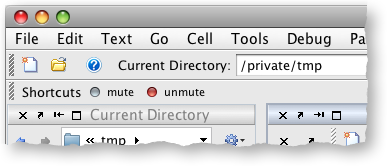
One side note: Ken suggested in a final thought that it might be useful to create shortcuts to the functions:
I took it one step farther, and implemented a single shortcut that toggles my breakpoints:
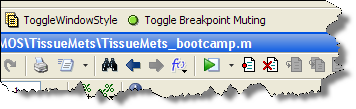
Anyone care to venture a guess how I did that?
- Category:
- Picks






Comments
To leave a comment, please click here to sign in to your MathWorks Account or create a new one.