
Quickly Create Simulink “From” Blocks
Will's pick this week is the Create From Blocks by Giacomo Faggiani.
When I first began using Simulink, I was averse to the From and Goto blocks in the Signal Routing library. Years of writing Fortran (yes Fortran) had ingrained in me a deep aversion to "Goto." But I soon realized that the block had little to do with the questionable coding practice.
Under the proper circumstances, From/Goto combinations can be quite powerful in Simulink. They serve as invisible shortcuts for signals within the model. This enables the user to avoid signals crossing one another, a stylistic choice that can make a model harder to decipher. Of course you wouldn't want to exclusively use Froms/Gotos; that would also make for a cryptic diagram.
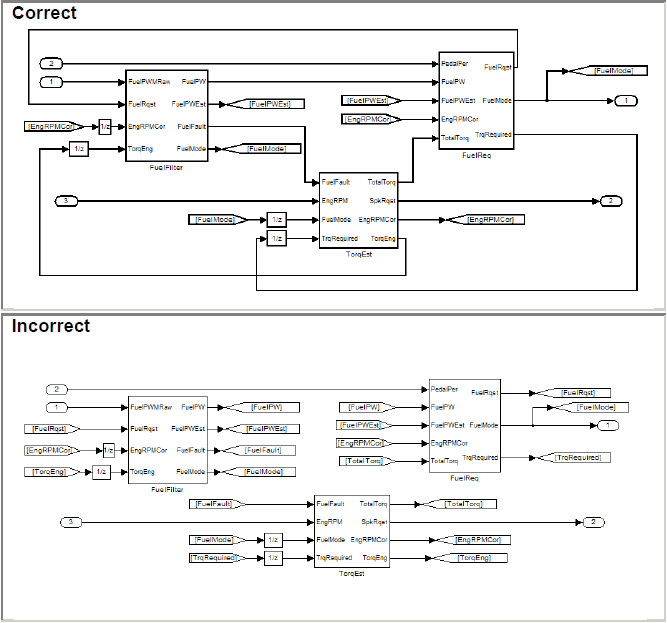
If you're looking for a good rule of thumb on when to use these blocks, the MathWorks Automotive Advisory Board (MAAB) produced a style guide that includes rules for From and Goto. Check out sections 6.1.14 and 6.3.5 for more information. Below is a screenshot of proper usage according to MAAB.
Once you get in the habit of using these blocks, you'll probably discover that management of them isn't quite as efficient as it could be. When you add a Goto block to your model, you invariably want a corresponding From block. That means you have to go to the Library Browser, find the From block, add it to the model, double-click on it to open the dialog, and associate it with the proper Goto tag. You may also want to color code the blocks to match one another.
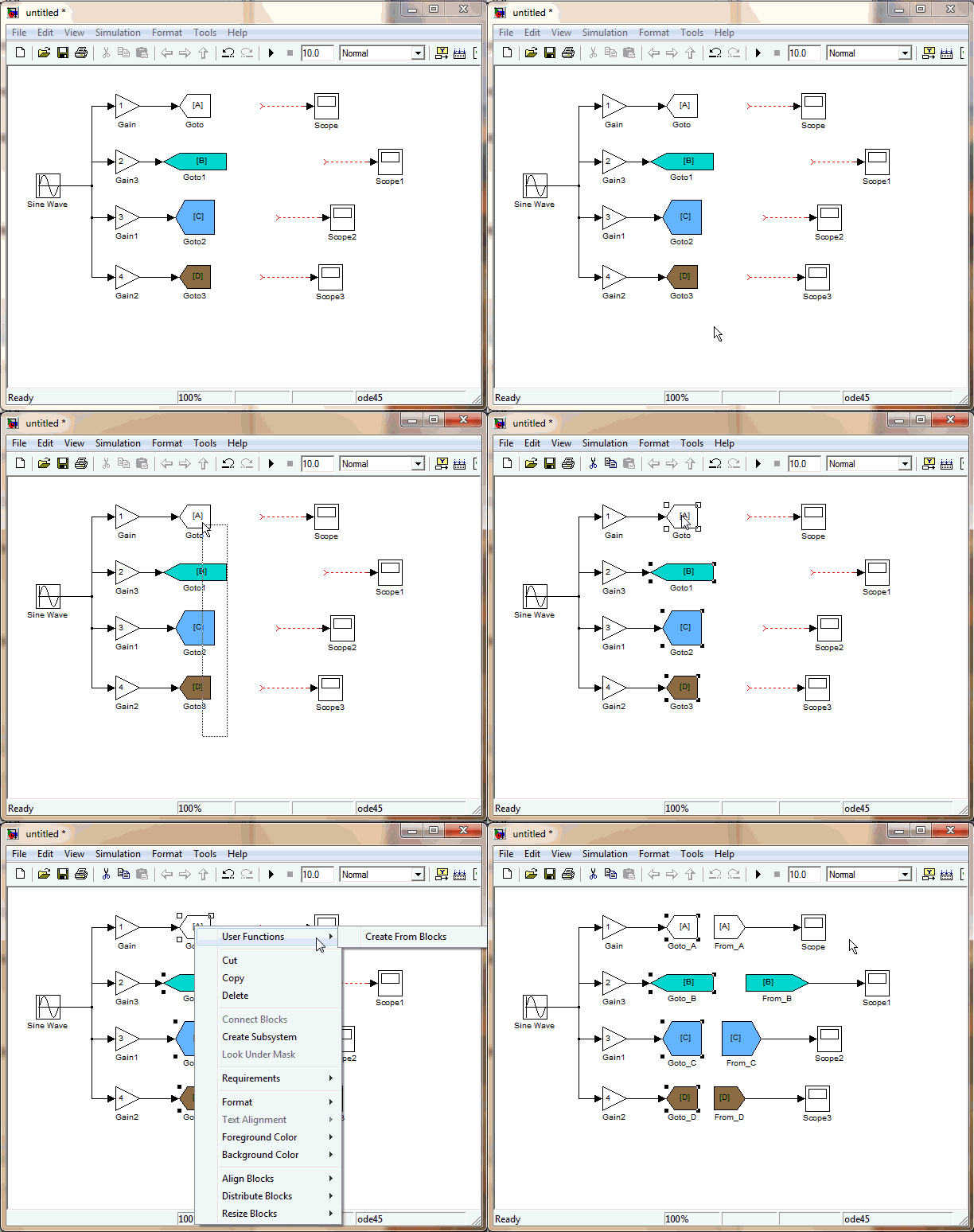
Giacomo's contribution streamlines this entire process by adding an option to the menu when right-clicking on a Goto block. Selecting the menu option will create a corresponding From block with the appropriate tag. It will even make the aesthetics of the block (font, background color, size, etc) match its Goto partner. Now we can all be that much more productive!
Comments
Let us know what you think here or leave a comment for Giacomo.
When I first began using Simulink, I was averse to the From and Goto blocks in the Signal Routing library. Years of writing Fortran (yes Fortran) had ingrained in me a deep aversion to "Goto." But I soon realized that the block had little to do with the questionable coding practice.
Under the proper circumstances, From/Goto combinations can be quite powerful in Simulink. They serve as invisible shortcuts for signals within the model. This enables the user to avoid signals crossing one another, a stylistic choice that can make a model harder to decipher. Of course you wouldn't want to exclusively use Froms/Gotos; that would also make for a cryptic diagram.
If you're looking for a good rule of thumb on when to use these blocks, the MathWorks Automotive Advisory Board (MAAB) produced a style guide that includes rules for From and Goto. Check out sections 6.1.14 and 6.3.5 for more information. Below is a screenshot of proper usage according to MAAB.
Once you get in the habit of using these blocks, you'll probably discover that management of them isn't quite as efficient as it could be. When you add a Goto block to your model, you invariably want a corresponding From block. That means you have to go to the Library Browser, find the From block, add it to the model, double-click on it to open the dialog, and associate it with the proper Goto tag. You may also want to color code the blocks to match one another.
Giacomo's contribution streamlines this entire process by adding an option to the menu when right-clicking on a Goto block. Selecting the menu option will create a corresponding From block with the appropriate tag. It will even make the aesthetics of the block (font, background color, size, etc) match its Goto partner. Now we can all be that much more productive!
Comments
Let us know what you think here or leave a comment for Giacomo.




Comments
To leave a comment, please click here to sign in to your MathWorks Account or create a new one.