Guy and Seth on Simulink

February 26th, 2008

Welcome!

Welcome to the MATLAB Central Simulink blog! The purpose of this blog is twofold: First, I want to share Simulink tips and tricks that I've learned over the years. At the same time, I hope to learn from you about your experiences with Simulink. Where is it good? How can we improve it?

I've been using Simulink for 9 years, first as a member of our technical support team, and then as a trainer. I still remember when I first learned about the power of Simulink as a newly hired support engineer back in 1998. During a training class I saw differential equations drawn on a whiteboard and then simulated with a few clicks of the mouse. I got excited by how clearly it all worked. Simulink provided me with a framework for thinking about systems and the relationships between their basic components.

Of course, Simulink is much more than a simple tool for solving differential equations. It has a richness and depth that will give me plenty of material to draw on. What kind of topics can you expect to read about here? We'll talk about applications of Simulink in controls, signal processing and communications system design. With your help, we'll talk about how Simulink is used in areas I don't even know about yet. We'll talk about Model-Based Design in general, and we'll get a peek at some of the internal machinery of Simulink. I look forward to posts about all of these:

  • solvers
  • sample times
  • modeling
  • hacks
  • blocks
  • model reference
  • libraries
  • masking
  • custom code

An example: batch simulation

Let me start off with a specific example about running simulations. Simulink models are built using block diagrams, and once they've been created most everyone runs them by clicking the run button on the toolbar.
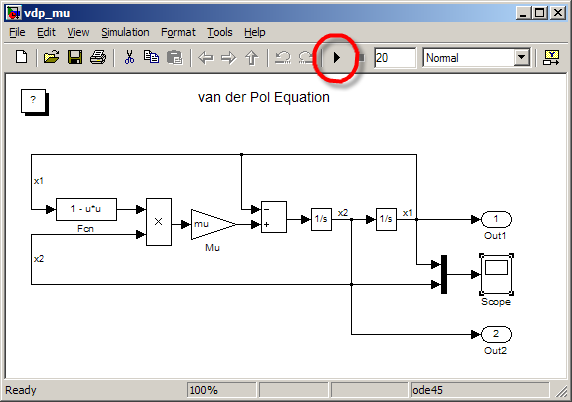
If you have to run a sweep of parameters you might change the parameter and then click run, change it again and click run. But if you have to run hundreds or thousands of simulations while modifying a parameter you will want to write a script for batch simulation. You can run simulations directly from MATLAB with the sim command like so.

>> [t,x,y] = sim(sys);

This returns the root level outputs (y) and the internal states of the model (x) at each recorded time step (t). A batch script might look like this:

open_system('vdp_mu')
muSweep = .5:.1:1.5;
for i = 1:length(muSweep)
    mu = muSweep(i);
    [t,x,y] = sim('vdp_mu');
    plot(t,y); hold on;
end
title('VDP States for mu=.5 to 1.5')
xlabel('Time'); legend('x1','x2')
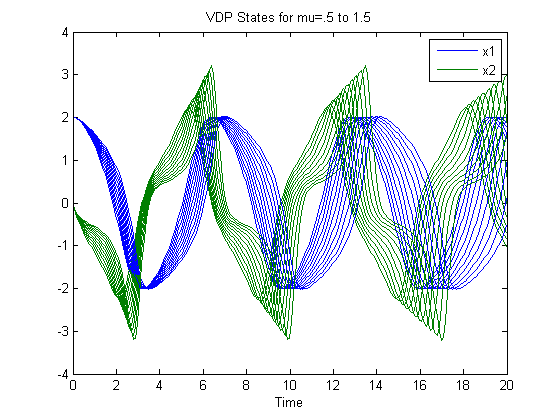
If you are already familiar with the sim command, then you probably know that some times you are only interested in the outputs (y) of the model, and not the states (x). For large models, or long simulations, those state variable outputs could be a waste of valuable memory. Using simset you can provide additional options to the sim command to specify that you only want time (t) and outputs (y). The state variable returned from sim will be empty.

[t,x,y] = sim('vdp_mu',[],simset('OutputVariables','ty'));
whos t x y
  Name        Size            Bytes  Class     Attributes

  t         206x1              1648  double              
  x           0x0                 0  double              
  y         206x2              3296  double              

You can learn more about sim and simset in the Simulink documentation.

What do you think?

That's your first Simulink tip. Now it's your turn. What do you like about Simulink? What would you like to talk about in future posts? Please leave a comment below. I have learned from Doug that t-shirts get comments on your blog, so I'll be randomly selecting five commenters on this post to receive a MathWorks t-shirt!


Get the MATLAB code

Published with MATLAB® 7.5

123 Responses to “Welcome!”

  1. Eric S. replied on :

    Hey Seth, congratulations on the new blog! Took a while to get the first one published ;)

    For people unfamiliar with the interaction of Simulink and workspace variables, could you discuss how changing the variable ‘mu’ in the base MATLAB workspace ends up affecting the simulation?

    A convention that Loren uses that I appreciate is to hyperlink the first mention of any new function to its online documentation. I nearly missed the link to SIM and SIMSET because it was located a long ways after you started talking about the functions.

    Cheers,
    Eric

  2. Seth replied on :

    Eric S – Thanks for being my first commenter! That is a great suggestion. For those of you who don’t know, workspace variables can be used as the parameters in your blocks. In my example, the gain block used the workspace variable mu.

    The batch script assigns a new value to mu before calling sim, and on each iteration of the loop the simulation picked up the latest value.

  3. Michael Katz replied on :

    Seth, welcome to the “blog-o-sphere”! Excellent first post, and great use of publish.

  4. Kwadwo Dompreh replied on :

    Hey seth, you welcome too and thanks for the blog on Simulink. Believe me it is a smart move. I was wondering why there is no such things in the mathworks site. well I will be proud to wear the mathworks t-shirt in class with Simulink engraved at the lower side. Once more good job and keep it up.

  5. Seth replied on :

    Kwadwo D – Thanks for your support. Many people have asked for a Simulink blog over the years, and I am happy to be writing it.

  6. James Myatt replied on :

    I almost always use SIM to run Simulink. In addition, I almost always call SIM from a function, so I have to use the ‘SrcWorkspace’ option every time as my model parameters are in the current workspace. As it is, SIM is peculiar in that it looks like a function, but it doesn’t behave in the same way and maybe there should be a version which runs in its own workspace with input and output variables passed as fields in structures.

  7. Seth replied on :

    James M – Your comment is a very important one. The interaction between Simulink and the workspace can be tricky one to manage if you run your model from inside functions. I ran into this exact problem while writing a function for benchmarking model performance. SrcWorkspace and DstWorkspace are a topic I will talk about in the near future.

  8. song replied on :

    Hi Seth,

    I have just learned Simulink for two months and before I was alsways Matlab user. Recently I try to place my algorithm written in Matlab into Simulink because of its beautiful and clear organisation of blocks. Also it provides me a better examination of the interface signals and the real-time ability of the algorithm. I am very excited about Simulink and also your new Blog, and hopefully it will also be useful like other Blogs in Matlab websites (like it from Doug) ^^

    best wishes

    song

  9. Seth replied on :

    Song – I agree that Simulink diagrams provide a beautiful way to express your algorithm, and you get the added benefit of seeing the data flow in your model. Did you see Doug’s latest video post plugging this blog? Thanks for the comment.

  10. Qaun replied on :

    Great to see a blog dedicated to simulink! Greaet first post. Keep it up!

  11. Tom replied on :

    > What would you like to talk about in future posts?

    I would be very interested in some more advanced stuff such as automatic code generation, fixed-point modelling, the handling of very large model hierarchies, model-driven testing, and the use of modeling patterns.

  12. Seth replied on :

    Tom – The topics you have suggested are great ones indeed. Thanks for the ideas. Stay tuned.

  13. Truong Nghiem replied on :

    I’d like to read advanced topics such as: code generation, linking Simulink and other tools, advanced programming for Simulink. Also, I’d like to hear about experience in dealing with errors (for example the annoying algebraic loop error).

  14. Seth replied on :

    Truong N – Thanks for bringing up the subject of algebraic loops. There are some very interesting things to be said about how Simulink works with algebraic loops and what it means if your system has them.

  15. Daisuke replied on :

    I use Simulink + xPC for robot control. It would be great if you can cover the issue of handling multiple sampling rates in a single system. I’ve used Unit Delay, Rate Transition and etc. , but the inner workings are not quite clear to me, and sometimes I don’t understand the error messages.

  16. Seth replied on :

    Daisuke – Sample times and multi-tasking real time execution are great topics to talk about. I recommend the Real-Time Workshop documentation on Models with Multiple Sample Rates for an overview. Thanks for the ideas.

  17. Daniel Cornelius replied on :

    I’d like to see a post on the differences between embedded MATLAB and regular MATLAB coding, as well as the limitations on embedded code.

  18. Seth replied on :

    Daniel C – Thanks for the topic idea. Loren touched on this topic briefly last year in this post. Maybe I can team up with her to write about Embedded MATLAB.

  19. Bob replied on :

    I’d second the calls for advanced Simulink topics. I’ve always preferred the advanced Matlab topics on Doug’s blog.

    The demos that ship in the help are great for the basics. The blog lets me see some advanced topics and then read comments from other users about how they’ve found even better ways to do it.

  20. Seth replied on :

    Bob – You have brought up a valuable point about reading the comments of other users. We (the Simulink community) can all learn from each other about how to best use these tools for our work. I look forward to your continued contribution to the discussion.

  21. christian replied on :

    At last! simulink. i have some time using this environment, i’m student of electrical engeenering and i discovered that simulation made under simulink are more fast than those using matlab function like ode45(). Even more, we can use vector and all your brief sintaxis.

    thanks

  22. Seth replied on :

    Christian – Great observation about performance. Have you ever tried Accelerator mode or Rapid Accelerator mode in your Simulink model? That can make your simulation run even faster! Those modes became part of core Simulink in R2007b.

  23. Raj replied on :

    Hi Seth,

    Congratulations and thanks for new blog on Simulink topics. I would also like to see the advanced topics on code generation. And some info if Simulink can be used in conjunction with AccelDSP synthesizer.

    thanks,

  24. Seth replied on :

    Raj – I am sensing a lot of interest in code generation. Thanks for your ideas. I’ll have to get some help to talk about AccelDSP synthesizer.

  25. christian replied on :

    Interesting option Accelerator mode or Rapid Accelerator mode. i will try to use them, because sometimes i work with system that take a long time of simulation, because have signals highly abrupt, for example a PWM signal, or another type of modulated signal.

  26. Jeremy replied on :

    Seth,

    Can you help me with if-then statements, I want to use a pulse generator to determine if data is to be passed along. In the basic case, I want half of the data passed along and the rest stopped, but I seem to always get zeros instead of empty cells. Is there another way of solving this. I’ve tried multiplying by an empty cell and switching to an empty input but no joy. Any suggestions?

  27. Sia replied on :

    I’m here only for the t-shirt :) (Just Kidding)

    When I do controller design I use Simulink but most of the times I just use plain Matlab. What I’d like to see in a Simulink blog is, how I should connect Simulink and LabVIEW, I’ve been always wondering if there is a legitimate way of doing this

  28. Seth replied on :

    Jeremy – I’m not sure I know what you mean when you say “multiplying by an empty cell”. The if-then-else construct usually takes the outputs from the conditionally executed systems and merges them. Have you tried using a merge block?

    Switching is another alternative, but in that case, the logic should feed the control port on the switch.

  29. Seth replied on :

    Sia – Can you elaborate on what you mean by “connect Simulink and LabVIEW”? Are you trying to access data from instruments or acquisition hardware?

  30. tami replied on :

    hi there,
    glad to see that a simulink related blog is up and running. would this be a forum to ask specific simulink questions? i am having difficulties with a costas loop i am working on.
    thanks
    -t

  31. Jeremy replied on :

    Seth,

    What I am trying to do is have a simulation running for 10 seconds and get 5 seconds worth of data plotted, sampled from every second point. I don’t want every second value to be zero. Thus if I attach a scope to the input it will have 10 seconds woth of data, but a scope attached to the output of the sampled data will have only 5 seconds worth of data on it. A decimate vector applcation would do it for me, but simulink seems to combine data well, but not strip data.

    Cheers,

    Jermy

  32. Seth replied on :

    @Tami – You have found a good place to ask questions, but I have to warn you that I might not have the answers. :-)
    You may want to post on CSSM, or if it is a technical support question create a service request.

    @Jeremy – If you are looking at the data, set your scope parameters so the Sampling Decimation is 2. Then you can just look at the decimated data.

    If you are trying to log data like that, try the To Workspace block. It also has a decimation parameter. The other option is to change the sample time by 2. For this, a Rate Transition block might be your best bet.

  33. Aurélien Queffurust replied on :

    Waoouh the SL Seth Blog is alive!!!
    Congratulations Seth!

    It was time to have a Simulink blog.
    As a moderator on the French MATLAB Central:, I have already promoted your blog.
    You cAn find my post:
    http://www.developpez.net/forums/showthread.php?t=500449
    and the francophone MATLAB Central:
    http://www.developpez.net/forums/forumdisplay.php?f=148

    I am looking forward to reading your next post soon!

    Aurélien

  34. Rick Rosson replied on :

    Seth –

    This blog is a great idea, and the first article is right on target. Congratulations! I am looking forward to your future posts.

    – Rick

  35. wei replied on :

    Seth,
    1. This is a matlab comment. The two lines
    for i = 1:length(muSweep)
    mu = muSweep(i);
    could be simply,
    for mu = muSweep

    2. Simulink is diagram focused. How do others insert graph in comment (as you did in #32)?

    Great start!

  36. Jeremy replied on :

    Seth,

    I have a signal generator creating a data stream. I want to average two or three of the values of the data stream at a time, and hence reduce the size of the data stream. The classic way of incrementing a counter and an if-then statement doesn’t work unless I can get access to the system clock. Is there another way that Simulink can average data, rather than decimation and losing the data?

    Thanks,

    Jeremy

  37. Seth replied on :

    @Wei – Thanks for pointing out that MATLAB Tip. Doug and Loren will be pleased that we can learn MATLAB while reading a Simulink blog.
    If you would like to include HTML in your comments, you may, however some types of markup may be held for moderation, and it will not display immediately. You could also e-mail me with the images you would included in your comment, and I can add them later.

    @Jeremy – Could you write out the expression for the type of averaging you are doing? Do you mean something like this:

    Y(n) = (U(n-2)+U(n-1)+U(n))/3

  38. Jeremy replied on :

    Seth,

    That would work, but while doing this I would like to reduce the number of data points in the output stream by the denominator value.

    - Jeremy

  39. Seth replied on :

    @Jeremy – This can be done using a ZOH rate transition from the fast to slow rate. You will need to set the output sample time of the Rate Transition block to the slower rate, and that will reduce the number of points.

    To achieve this, I set the FIR Filter block with numerator of [1 1 1]/3. Try it out and let us know how it works.

  40. Jeremy replied on :

    Seth,

    Thanks for that it works fine with a divide by 3 at the end. Other questions, is it possible to append to a file rather than write over a file with the same variable? How do I guarantee tasks are completed sequentially, do I need to put a counter through subsystems?

    - Jeremy

  41. wuchen replied on :

    Dear Seth,
    I want to measure the power factor of a boost converter in the simulink, which equipment in the library I can use?

  42. Tony replied on :

    Your blog is great, I’ll come many time.

  43. Tony replied on :

    Hi Seth, I’ve a little question about ToWorkspace blocs :
    Is it possible to create variable name including an index ?
    Like : [ varName num2str(i) ]
    So I can create many time the same masked subsystem whith different values of i, in order to be able use the different vector ( varName1, varName2, … ) on Matlab.

  44. Ron replied on :

    Hi Seth,

    I have a Simulink/xPC target question. I have a Simulink controller model and would like to bring data in from a CAN link. I would like to put this data into an array, (a circular buffer), and then in my controller I would like to grab elements of the array and perform calculations. Are there Simulink blocks for handling array elements? I know that “Data Store Memory” exists and that they can be arrays but I do not see a way to write in new elements of an array. You can only write to the whole array.

    Thanks,

    Ron

  45. Jim Biggs replied on :

    Hi Seth

    I have been using Simulink for about 6 months. I know that you can perform backward integration in Matlab but it does not seem to like it in Simulink, any ideas??? in matlab you simply reverse the time limits and make the time-step negative but simulink does not appear to like this….

    any help would be greatly appreciated!!
    Thanks
    James

  46. Ezt replied on :

    I have been sent here by: Doug Hull.

    I like your both, ” seth and Dour ” admirabel work. And I need a running, executable m-file for aircraft and helicopter performance and landing controller. Include some explanation

    Thank you

    ezt

  47. Vijay Swaminathan replied on :

    @Jim,

    Simulink goes from time =0 to time = Tfinal. If I understand your questions correctly, the easiest way to do this is Simulink would be to simple reverse the data you are integrating. When you import data into Simulink (from say the MATLAB workspace) you provide along with the Data (say 1 column), a time vector ( which should actually be the first column of you data matrix). Now you can simply flip your data (check out the function FLIPUD) and not flip your time vector. Simuink will happily integrate forward in time , but you can always keep at the back of your mind that if the Simulink scope indicates a time of lets say 5.6 sec’s, in your case that would correspond to a time of (Tfinal-5.6) secs ..going backwards.

    I am sure there are more elegant ways to do this and I am eager to hear Seth’s take on it, but here is a quick and dirty way to get it done.

  48. Jeremy replied on :

    Hi Seth,

    I am trying to build a matrix with random elements of size a,b using the embedded matlab function. It works if I use y = rand(5,3) in the function, but not y = rand(a,b). What am I missing?

    Thanks,

    Jeremy

  49. Allan Baker replied on :

    Hi Seth,

    Are there any differences in memory usage if you just used the “sim” command without output arguments and used the default save to workspace variables of tout and yout? If you don’t have xout checked in “Configuration Parameters/Data Import/Export” to enable its output we shouldn’t see a performance hit, correct?

    Is this alternate method not a preferred method of doing things?

    Thanks,
    Allan

  50. Ahmed H Hussein replied on :

    I realy admire working with simulink for various mechanical simulations
    but the published books are very rare
    and the no of simulink users is very small compared to those using matlab m files
    thnk you

  51. Shivaram replied on :

    A dedicated blog for Simulink is a great idea!
    I work with conversion of legacy C code to Simulink model for control algorithms. I do not have a clue how to implement the pointers in C program into mdl. Is there an easy way?

  52. Vijay Swaminathan replied on :

    @Jeremy,

    The error you would have got should point you in the right direction. The issue is simple this:

    Embedded MATLAB block generates C-code for the block before executing. The fundamental limitation being that dynamic sizing (allowed in MATLAB but not in C ) is not supported.

    Therefore, rand(5,4) works because at the time of compilation because the size is defined. rand(a,b) will not work because a and b are only known at runtime. You might have to fall back on the old C trick of declaring a huge random matrix and “selecting” the required dynamic size from that matrix ( there are plenty of Simulink blocks available for this selection operation).

    That being said , if you declaring a and b explicitly inside the EML fcn (i.e the values of a and b are not altered by inputs to the block), there should be no issues.

    i.e this should work just fine:

    function y = fcn()
    % This block supports the Embedded MATLAB subset.
    % See the help menu for details.
    a=2;
    b=4;
    y = rand(a,b);

  53. Yael replied on :

    Hi Seth,
    Congratulations on the new blog. I have been using Simulink for a few years, but I am sure I will learn a lot from this blog.
    Future topics that you should consider posting:
    1) Incorporating external code within Simulink
    2) Creating your own libraries and incorporating them in the Simulink library browser.
    BTW – is it a coincidence that you chose to write about a function that rhymes with your name?
    :)

  54. Paulo replied on :

    Hi Seth, how are you?
    I have a doubt about simulink, I don’t know if you can help me, but I’ll say what I need to do…
    I want to use the HH:MM block of the Numeric Displays from Gauges library. But when I put this block with some input in it, an error occurs saying that the input have to be an string one. I have no idea on how to work with strings within the simulink. I looked for it in the help, in the internet, in the demos, but I didn’t find how to do it. How can I convert a number to a string in simulink?
    I’m modeling a Trip Computer of a vehicle and in somewhere in the model, I have to show the time of the trip based in some clock. I have to show this data in the HH:MM block or similar one.
    I would apreciate any help.
    Thank you in advance.

    Best regards,
    Paulo

  55. Seth replied on :

    @Yael – Thank you for suggesting ideas for future posts. Incorporating external code is an important topic many Simulink users need. SET_PARAM… I think you are on to me!

    @Paulo – I am not familiar with the Gauges Blockset. I’ll have to ask a colleague about this.

  56. Alex replied on :

    I’m new to Simulink (about 2 weeks into it) and I’ve gotten an assignment that requires me to write a program that will read in a list of signal names and will modify an existing simulink model (using a bus selector going to a mux that outputs a logged signal) to the appropriate values using code. The reason why it needs to be coded is because there are about 7,000 signals coming in and we need to be able to check any given signal to make sure it’s behaving as it should.

    I use find_system, get_param, and set_param functions to make the necessary changes. The trouble I’m having is in connecting the bus selector and the mux. I’ve gone in and changed all the port destinations and sources in the ‘PortConnectivity’ block parameter to reflect where the actual lines should be going/coming from but haven’t gotten any results with it. No lines appear in the Simulink model to reflect the changes that are shown in the parameters of the blocks.

    Is there a way to create lines using code to connect these two blocks? Is there a better way to take in a huge number of inputs and output a variable number of desired signals to be logged?

  57. Paulo replied on :

    Hi Seth.
    Thank you for replying.
    I already learned that by myself. It’s so easy, but the problem is that the MATLAB documentation does not explain clearly how to do that.
    Thank you very much.

  58. iera replied on :

    hello..
    i want to ask how to design serial to parallel block and parallel to serial block in simulink communication blockset for mimo-cdma system?
    and also how to plot the bit error rate for mimo-cdma system?tq..

  59. usman replied on :

    HI!

    i am doing work on SIMULINK, let me know if i draw a system model in SIMULINK, it is possible to get the hidden code generated by SIMULINK , because i want to get this code once and want to regenerate a C code form it using REAL TIME WORK SHOP for my final implemetation…..
    If you have done some work regarding this …then let me know how it is possible?

  60. Vijay Swaminathan replied on :

    @usman,

    Real Time Workshop integrates seamlessly with Simulink to produce C code from Simulink models. You really dont have to jump through any hoops (like you describe above)to do this. As long as you have Real Time Workshop installed, you should simply be able to follow the steps listed below to generate code:

    1. Open you model in Simulink.
    2. Go to Simulation -> Configuration Parameters
    3. Under Solver, ensure that you have a fixed step
    solver selected.
    4. Under Real Time Workshop , click “Build” and watch the
    magic happen.

  61. tom replied on :

    Dear Seth,
    Thanks for starting a blog. I barely know how to use Simulink and Matlab, can you point me to a site(s) that could show me some very basic modeling? I want to model some vacuum producing equipment, its just a few simple diff equations, and I need a jump start.
    Good job!

  62. Seth replied on :

    @tom – I recommend Vinod’s Getting Started with Simulink Demo Video. This will give you a good overview of the basics of Simulink. There are other web demos to look at on the Simulink demos page. Good luck! Welcome to the blog!

  63. m. omar replied on :

    i am using matlab and its image processing tool box since Nov 2005. I want to start work on simulink. This blog is great thing for learners and reseachers. Keep it up.

  64. Chunli Zhang replied on :

    I can’t understand this tool perfectly.

  65. Mriya replied on :

    Hey Seth
    I want to implement a limiter for FM demodulation in simulink.dun know how to do it.It is basically limiting from 0 to 1 and a band pass limiter.

  66. dennis replied on :

    Holle sir/miss
    i come from Taiwan.
    I have a question. I am planning to make the experiment. While needing to join simulink and XPC. A mistake has appeared, it seems to be when real-time workshop, have not supported matlat function ,Can it solved that full of ideas?
    http://img244.imageshack.us/img244/3962/l0437f6xd7.jpg

    I want to ask, how to utilize simulink to set up charts, and the parameter inside the chart can be kept changing with time?

    Thank you!!

  67. Gautam replied on :

    hey Seth,
    how can i calculate the average of a continous periodic signal , like an output voltage waveform, is there any way i can calculate moving averages as in average for a certain interval each time

  68. nassim replied on :

    Hi Seth,
    I am using the While loop(with memory block) to compute the sum of sinusoids, and the results is an input to a state space system. When i run the while loop alone, it runs fast, same as the state space block, but when i combine them i get a terribly slow run. Any tips to make the system faster? Is there any fast alternative to use instead of the while loop?

  69. Ashish Gupta replied on :

    Hi Seth,

    I have landed up in a strange problem. “Parfor” statement for parallel computing toolbox doesnot work inside simulink. I have tried to modify one of my m file s funtion block and it threw this error on my face

    Error evaluating registered method ‘Outputs’ of M-S-Function ‘test1′ in ‘test/Level-2 M-file S-Function’. Error using ==> parallel_function>make_general_channel/channel_general at 858
    Undefined function handle. The following is the MATLAB call stack (file names and line numbers) that produced this error:
    ['C:\Program Files\MATLAB1\R2008a\toolbox\matlab\lang\parallel_function.m'] [752]
    ['C:\Program Files\MATLAB1\R2008a\toolbox\matlab\lang\parallel_function.m'] [564]
    ['C:\Program Files\MATLAB1\R2008a\work\test1.m'] [354].

  70. Kusum replied on :

    I am looking for the interaction between Matlab workspace and Simulink during simulation and after simulation.
    Can you please help in understanding the interaction between the two.

    Thanks,
    -Kusum

  71. zh replied on :

    hello i want use serial block in simulink of matlab it dosent work and this error is detected how can solve this problem.
    please help me
    error is:
    Error evaluating registered method ‘Start’ of M-S-Function ‘sserialsb’ in ‘ode/Subsystem/Serial Send’. Error using ==> sserialsb>Start at 100
    The block ‘Serial Send’ cannot be assigned a continuous sample time.

  72. Vidya replied on :

    I have a question regarding ‘add_block’ command.
    In the help document, it is mentioned that for gain block, the source block’s path is ‘built-in/Gain’ – which works fine.
    Could you please let me know the path for the ‘Bitwise Logical Operator’ block from the Simulink library?

  73. resodad replied on :

    Hi Seth,
    I would like to use gumstix or robostix (www.gumstix.com) for a real time target. They are small and have the right IO. This is a linux machine. Have you ever heard of anyone doing this? What would it take?
    Thanks, John

  74. FM demodulator diagram replied on :

    i got the simulink model for FM model. but i want FM demodulator diagram.itis very rgent to me.

    i will more appreciate after getting my reqirement

  75. Elbha replied on :

    I have a question on “scope” block in simulink.How to get the name of X,Y variable in the graph.

  76. Shajila replied on :

    how to implement the following sample rule base in fuzzy

    If z1(k)=M1 and z2(k)=M2 then est(x(k/k-1))=P(est(x(k-1/k-
    1))-x)+G(u(k-1)-u)

  77. Jun replied on :

    Hi Seth,

    I used ‘sim’ command to run simulink simulations quite often before. But this time, it kept giving me error. The message was:
    “??? Index exceeds matrix dimensions.

    Error in ==> sim_batch_test_m at 2
    sim(‘sim_batch_test’)”

    Even if when i tried a simple model sim_batch_test.mdl with a PN sequence block connected to an output to workspace block. I wonder if you know why I got this error.

    Thanks,
    Jun

  78. David Vargas replied on :

    Hi, I need help with Simulink.

    I’m trying to make a model of an object falling from the sky.

    It drops(free fall) @ 2000 meter from the ground. The drag force constant (P) is 10. I want to know what will be the velocity just before it hits the ground.

    mass = 60kg
    Initial Veloc. = 0m/s
    Final Veloc. = ?
    y = 2000meters
    g= 9.8
    P= 10
    Drag Force = P(Veloc.)
    Assuming possitive direction down(this means Fgravity = +mg)

    I will appreciate your help,
    -David

  79. Prasad replied on :

    Hi
    I am trying to generate bode plot of system through simulink.

    I am sweeping a transfer function with a sinusoidal signal of amplitude 1 and frequency within some band. Say 1 rad/s to 1000 rad/s. I set the frequency as variable and run simulation for 10 cycles for each frequency. Then, I compare the input and output peaks for last cycle. The peaks ratio gives me gain and the timing difference between peaks gives me phase lag of the system. Taking log10 of gain gives me magnitude plot.

    I compared this bode plot with the one generated by matlab command. They donot match beyond very small frequency range. Please comment on correctness of this method and also on, whether such technique can be used for simulink based systems.

    I dont know, whether such topic was already discussed earlier, if yes plz give me the link.

    Thanks
    Prasad

  80. Danny replied on :

    I have a large Simulink model (about 100 inports). I am developing a Matlab script that will allow me and my coworkers to run this simulation. The problem I’m trying to overcome is in importing variables from Matlab into the Simulink model.

    To keep it straight, I use the same variable names in Matlab as are used in the Simulink model. However, when the variables are transferred to Simulink, the variable names don’t matter – it’s the order in which they’re listed.

    I can take the time to make sure every input is in the right order, but that won’t solve my problem. There are about a half dozen people (around the world) who can add, remove, or renumber the inports. If they change something I’m unaware of, my script will send variable values to the wrong locations in the Simulink model.

    Do you have a work around that will match the variables between Matlab and Simulink by name instead of order?

  81. Leonardo replied on :

    Hello I was working with simulink trying to show some data from a process, I wanted to use a gauge block but It doesn´t appear on my simulink model, just appear a block with the word “ActiveX” on it. How I can do to see it correctly?

  82. Leonardo replied on :

    I don`t really get how to use the variable q in the ARX or ARMAX models, when I correlate data in the toolbox Identification System.

  83. gustavo pinheiro replied on :

    i want use serial block in simulink of matlab it dosent work and this error is detected how can solve this problem.
    please help me
    error is:
    Error evaluating registered method ‘Start’ of M-S-Function ’sserialsb’ in ‘ode/Subsystem/Serial Send’. Error using ==> sserialsb>Start at 100
    The block ‘Serial Send’ cannot be assigned a continuous sample time.
    Please help me

  84. con replied on :

    hi, i am generating parallel data which size will not be predetermined. eg. value = start,end,increment. these three values are coming from outside. so the size(value) is varied depends on starts,end and increment. now i want FIFO value.how cme i can convert parallel data(which is depend on input) to serial data by using simulink?

  85. chris wilkins replied on :

    In Simulink, I can not easily pass a an array or vector into a transfer function block. At least I don’t think I can. I imagine that this basic utility must be addressed somehow. Am I missing something?

  86. Matty Holmes replied on :

    Hi Seth.
    Im running Matlab r2008b on Windows Vista, and when I run a basic simulation such as the sin wave/integrator one in the help, I do not get a graph outputted. It simply seems to run for a small time-frame and nothing happens,
    Thanks in advance

  87. yiyi replied on :

    hi seth,
    i saw previous comment that mention about fm demodulation
    i need to model fm demodulation using simulink for my project but i have no idea how to proceed
    i will appreciate if u could reply me
    tq in advance :)

  88. Bindu replied on :

    sir please help me to get the sampling time of a signal using ode 45 algorithm

  89. Roger Jacks replied on :

    Hi Seth
    Recently have discovered the hidden world of s-functions.
    Currently I’m building a model which from several blocks constructed from s-functions, and wish to obtain the initial values for the ode’s in the final block from the output of the previous block.
    It seems the only way to specify the initial values is by providing them in the block parameter window?
    Can they be updated dynamically?

    Thanks for your comments with this problem

    Roger

  90. chetan replied on :

    Dear Sir,

    In the simulink demo of “Wind Farm (DFIG Phasor Model)”, the wind turbine is modelled using pitch control. As per the wind turbine aerodynamics used, for a wind speed of 14 m/s, the unregulated rotor speed must be 1.4 pu. In that model the DFIG speed is maintained at 1.21 pu by using the pitch control. My observation is that if the pitch control is disabled, the rotor speed is not maintained at 1.4 pu, and it keep on changing as time passes.

    I am working with a model in which I need to get the maximum rotor speed corresponding to the wind speed. I tried to maintain the rotor speed steady by changing rotor inertia (H), friction factor (F), stator and rotor resistances, but without any result.

    Can you help me to stabile the unregulated rotor speed of the DFIG (without pitch control) for each wind speed?

    Thanks,

    Chetan
    chetankv01@gmail.com

  91. mohammad replied on :

    hi man. ihave aquestion iwant to pass asine wave through
    a designed filter. but sine wave is continous and filter isnt. so i shoud have a block for sampling and have a descrete signal as the input of filter. i cant find such block .
    thanks

  92. Kalyan replied on :

    Hi Seth,
    Thanks for the discussion. I want a little more specific help for my problem. I have extremely long simulations, around 2500 secs. It takes around 30 mins for the completion of the simulation. I want to know if using sim command lets me examine the simulation results at specified time points without running the entire simulation at specified time points? If yes how should I go about doing this this.
    Thanks once again.

  93. ponmani replied on :

    Respected sir,
    i am working simulink for the past 6 months. i am trying to place my control algorithm written in m-file into simulink. kindly lead me with some examples to proceed.
    Regards
    ponmani.

  94. Bindu replied on :

    sir,
    I have a simulink model from which some datas are taken into a matlab file.so when this file is executed i will get some estimated parameters which are to be taken again into the same model .This type of online simulation is it possible sir? It is apeed control problem .Motor is simulated in simulink.The speed estimation is done with matlab program .Finally I want to control the speed in simulink.Idont know how to tackle this?How can i load the data from matlab to simulink?
    I expect a reply from you sir. Your advise was very much helpful for me before also.
    Thanks in advance
    Bindu

  95. aayesha replied on :

    hi seth sir,
    i would like to ask the following,
    ‘Generate noise corrupted in Simulink and pass it through the matched filter block.Observe the output of the filter. It should be clean noise free signal’.
    please tell me how to do this?i tried but i am not getting that.please help me.

  96. Mike B replied on :

    Please forgive if I am not in the right section of this blog. I have purchased a R2009a student version for about $100 through my school bookstore. I want to do the work at home my prof is asking of me. Does this student version support SimPower Systems? I am having finding any documentation that says whether it does or does not. If it doesn’t, then this version right now has no benefit to me. Please help, thanks
    Mike

  97. Bindu replied on :

    Sir,
    I have a column vector x discrete variable)stored in a data memory and I want to form another matrix whose elemnts are functions of x .Is there any block in simulink which support this? How we can have a variable matrix in simulink?
    Bindu

  98. Vipul replied on :

    Hi Seth,
    I have made the simulink model exactly as you have shown on you blog. I have also copied the m file and try to run the simulink model by calling into matlab script. Unfortunately I couldnt get x1, x2 to change, they are 0 throught the simulation. Would you suggest anything that I might not have done right?
    I have Matlab ver-7.5, simulink ver-7.0.1.

    Thanks,

  99. Guy replied on :

    Hi Vipul,

    My first guess is that you did not set the initial condition of the second integrator block (the one generating x1) to a value of 2.

    You can compare the model you created with the model “vdp.mdl” shipped with Simulink. Type “vdp” at the MATLAB command prompt to open it. Since the model is small, you can compare the dialog parameters of all blocks.

    As a side note, to compare larger models I recommend using the XML comparaison included with Simulink Report Generator.

    http://www.mathworks.com/access/helpdesk/help/toolbox/rptgenext/ug/bqnd199.html

    I hope this helps.

    Guy

  100. Vipul replied on :

    Hi Guy,

    You are right. I havent set the initial condition for second integrator block. After I set it to 2 it worked.

    Thanks, I really appreciate your reply.

  101. andi replied on :

    I am building a simulink model to read sensor value from arduino board through serial port. how can I separate signals from each sensor pins given that serial port sending data in serial way?
    Thank you for your help

  102. velma replied on :

    hi,

    I am wondering if ARMAX could derive a transfer function that has 2 zeros(not include zeros at 0) and 2 poles.

    since the equation (in the help of ARMAX):y(t)+a1y(t-1)+…=b1u(t-1)+b2u(t-2)…+c1u(t-1)+…. lack of u(t) in the right side, I could not get a transfer function with a 2 zeros. I tried lots of different orders for the [na nb nc nk] of ARMAX, can get the right form of transfer function. Do not know why?

  103. travis replied on :

    Hi, I was just wondering in the first bit of code you posted with the for loop, what is muSweep for? The code doesn’t appear to use mu at all.
    Thanks!
    travis

  104. Guy replied on :

    @Travis, look at the second response by Seth. The script sets the value of “mu” in the base workspace so it can be used by the Simulink model.

    Guy

  105. minishma replied on :

    sir,

    working on simulink based implementation of a wind energy conversion system,how can i get the data?

  106. tharini replied on :

    sir,
    i need to use pwm genarator in inverter …. s there any tutorials regarding this …. how can i implement triangular wave as the carrier wave

  107. tharini replied on :

    hi sir,,
    how can i use double carrier signal foe pwm generation on matlab

  108. satheesh kumar replied on :

    hi how can display string in simulink? any one can help me please..

  109. satheesh kumar replied on :

    Hi,How can i use for loop subsystem in simulink…

  110. satheesh kumar replied on :

    when i run demos in matlab, automatically scope viewer opens. can any one tell how it works?and what code i have to use for that?

  111. D replied on :

    Error, a simulation of block diagram ‘Acrobot_nonlinear_LQR_Student’ is currently running. A second simulation cannot be started.

    that’s the error i get when i try to run simulink. what could be the problem and how do i fix it?

  112. Mark replied on :

    Hello,

    I am trying to call sim() from a Matlab function.

    I can do it from a Matlab script just fine, but when I try it from a function, Simulink doesn’t seem to know the values of the simulation variables that I define in the function where I call sim(). When I step through to debug these variables are being defined in the work-space just prior to the call to sim().

    Is it possible to call sim() from a Matlab function? Or, does this have to be done from a script\?

    THanks,

    Mark

  113. subashini replied on :

    hai i want to do serial to parallel converter using flip flops how can i do it? if my input data s 10 bit receivin wit some clock.. i want to divide the clock by 10 n get my parallel data how can i do it? pls help

  114. naresh replied on :

    how to type Parallel to Serial Conversion in matlab simulink

  115. naresh replied on :

    i need serial to parallel and parallel to serial converter blocks for
    my project but i cant find them in simulink so what’s their name in
    simulink ? plz help me

  116. Sagar replied on :
    Hi friends i m working on project in which we are controlling the water levels of the tanks for that purpose we calculate the error between actual level and desired level and we are interested to optmie this error by using our own Genetic code which is ready with us.
    GA code in matlab is having 3 files i.e.simu_ga.m(main script file),[testfunction.m and gacode.m  are the sub function calls]
    we have to excute this matlab code into simulink models
    so frnds which simulink block is preferable and how we can give  input to this code and send output of the code execution is sent to next simulink block.
    so frns plz help us !!
    Thanks!!!!!
    
  117. aakanksha vats replied on :

    hello sir!
    i am designing a GUI for analog filters using simulink.i am unable to attacj my sim files to the GUI program. can u guide or show some steps on how to design a GUI using simulink. my matlab version is 7.6.0(R2008a)

  118. aakanksha vats replied on :

    1 more request, can u help as soon as possible, its urgent

  119. sameechee replied on :

    hey guys m working on a project and would like to get some help on designing a serial to parallel converter using simulink model in matlab plz do reply.

  120. Nilesh replied on :

    Hello fellow researchers,

    How to extract a channel from MIMO model? I have a MIMO model which has few channels with “same names” (Do not want to change it manually).

    How to extract only one particular channel from it? A simple command
    subsys=sys(‘Out Channel’,'In Channel’) is not helping

    Thanks

  121. Ja Ted replied on :

    Hello, I am a user-leaner. This is typically great example for me. But I met some problem, could you give a help?
    I try to run the ‘vdp_mu.mdl’, which is built according your figure. But the results of x1 and x2 of my mdl are just 0 during 20seconds. I can not figure out where I made a mistaken. It seems that the initial condition is not enforced in this mdl.
    Could you give me some help? Thank you.

  122. Ja Ted replied on :

    Hi Seth,
    I am sorry for troubling. I am fresh learner. The simple problem is solved. Thank you for providing such an useful example about how to use “sim”.

  123. Sagar Mehta replied on :

    hello,
    Can i use character/string of characters as lookup table input in simulink ??


MathWorks
Guy Rouleau and Seth Popinchalk are Application Engineers for MathWorks. They write here about Simulink and other MathWorks tools used in Model-Based Design.

These postings are the author's and don't necessarily represent the opinions of MathWorks.