
R2007b+ Now Available: Simulink Bug Fixes
Have you ever been in this situation: You run into a software bug, and you verify that the bug has been fixed in the latest version, but you can't install the latest version to get the bug fix. Why not? Because your team has a coordinated upgrade policy.
I often work with teams who have standardized on a specific release of Simulink. For them, rapid upgrading is not an option. With that in mind, if you can't upgrade to R2008a, I want to let you know that bug fixes to the R2007b versions of eight core Simulink family products are now available online.
Who can't upgrade?
While we always recommend that people upgrade to the latest version of Simulink, we realize this isn't possible for everyone. People in this situation are often part of large, extended teams, or they may be required to deliver models in a specific version to another company. While this is a nuisance in some ways, it can save a lot of trouble. For example, if people in the Widget Drive Train team take advantage of a brand new Simulink feature, then their colleagues in the Widget Engine Control Team who didn't install the new release may not be able to share work or integrate their models. This is why guidelines as simple as the specific version to use for a project are so important.
How do I find out when a bug is fixed?
MathWorks publishes bug reports (requires login) for all customer reported bugs.
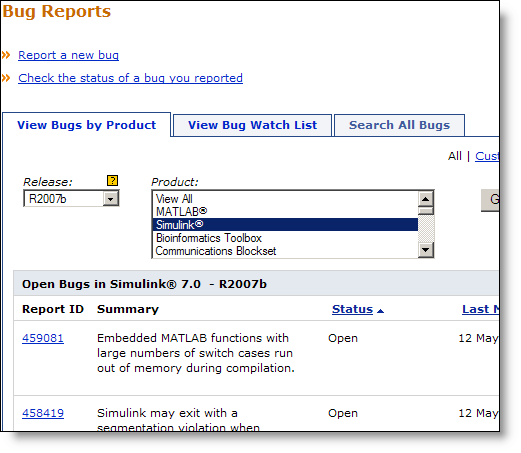
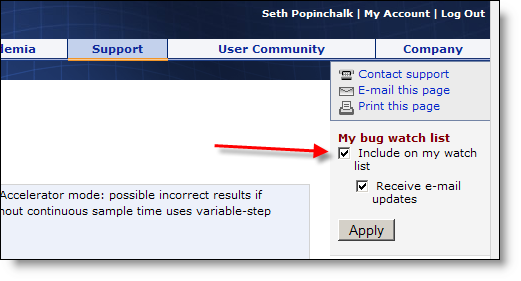
If you have reported a bug, or discovered a bug report you are interested in, you can subscribe to that bug report to receive updates when anything changes.
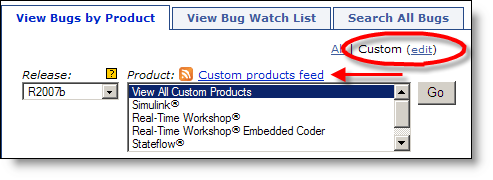
You can even customize the bug reports to show only products and releases that you care about. This provides you with an RSS feed to which you may subscribe.
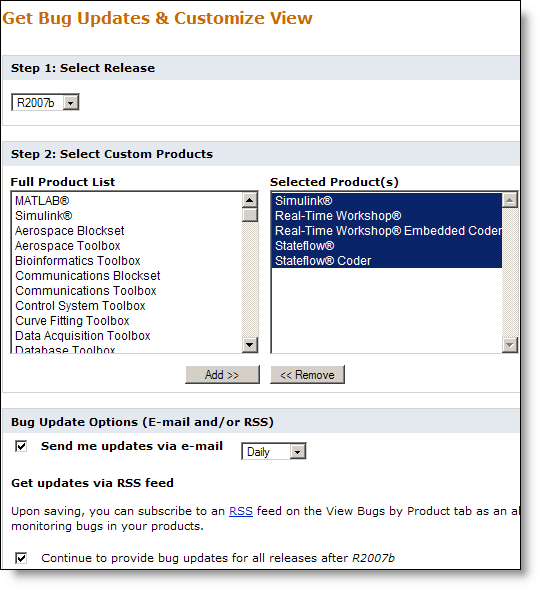
These updates can also be delivered daily, weekly or monthly to your e-mail inbox. Here are my subscription settings:
When the R2007b+ release went live for download, I received an e-mail notifying me the bug fixes.
- Category:
- What's new?





Comments
To leave a comment, please click here to sign in to your MathWorks Account or create a new one.