Seth on Simulink

November 10th, 2008

Model Advisor: Don’t Forget the Doc!

After posting last week about Model Advisor enhancements for R2008b, I got this e-mail from my friend Salina:

Seth! You didn’t even mention the help for each check!

My apologies go to Salina and the other writers who worked on enhancing the Model Advisor documentation.  Let me make it up to you by showing the world how to get to the new check specific documentation.

Read the Doc

In the past, you had to dig around to find information on specific checks.  In R2008b Simulink, it got a lot easier to get to the right help:
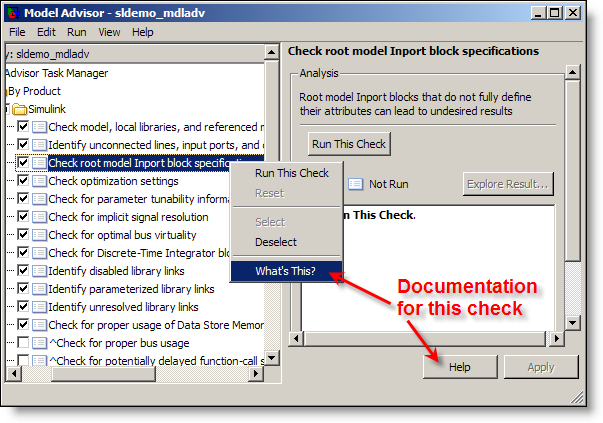
R2008b adds check specific help to Model Advisor

You can now right click on a specific check and select “What’s This?” from the context menu, or click the help button on that specific check.  The help button used to bring you to generic Model Advisor documentation, which most people didn’t find helpful.

The documentation opens in a small window with specific details about the selected check.
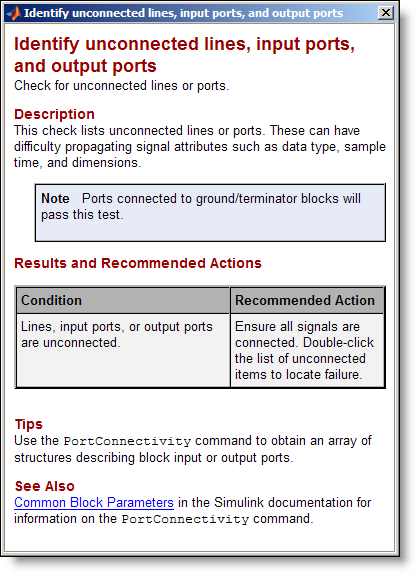
The Model Advisor help opens in a separate documentation window

This window will include tips, recommendations on what to do with the results of the check, and some have explanations on what might cause the check to fail. The See Also links go to the main help browser and include more detailed information about the check. The small window is intended to be “just-in-time” help.

Thank you for the reminder Salina.  Leave a thank you for Salina if you read the doc!

One Response to “Model Advisor: Don’t Forget the Doc!”

  1. Parasar Kodati replied on :

    Hi Folks

    Check out a video that introduces Modeling Standard Checks and illustrates the use of Model Advisor to implement them in Simulink models:

    http://www.mathworks.com/products/simverification/demos.html

    The video also shows how to create custom checks in the Model Advisor.

    regards
    Parasar

Leave a Reply

Wrap code fragments inside <pre> tags, like this:

<pre class="code">
a = magic(3);
sum(a)
</pre>

If you have a "<" character in your code, either follow it with a space or replace it with "&lt;" (including the semicolon).


Seth Popinchalk is an Application Engineer for The MathWorks. He writes here about Simulink and other MathWorks tools used in Model-Based Design.
  • wei: @Ashish, I agree with your observation on compiler optimization but fail to see why Han’s code would be...
  • Ashish Sadanandan: Han, Sorry for butting in with a reply, but the modification to the for-loop you’ve...
  • arun kumar: dear seth i have been involved in developing and simulating asynchronous systems for my VLSI lab. in...
  • Han Geerligs: Hi Aarti, thanks for providing the example! I was just wondering why the lines model_YDim = model_XDim;...
  • Seth: @Han - Aarti’s response is in a post titled Generated Code for Variable Size Signals.
  • garla: what is advantage of exporting the bus object with the format as “cell” and “object” ....
  • J.r: @ Guy - Example sent to your account. Thank you.
  • Guy: @ J.r - The ability for atomic subsystems and Model Reference to remove the “fake algebraic loop”...
  • J.r: Sorry to hit an old thread, but this seems like the best place to solicit help on this topic. Is there supposed...
  • Bindu: please tell me how can i get the sampling time used in simulation

These postings are the author's and don't necessarily represent the opinions of The MathWorks.