 Cleve’s Corner: Cleve Moler on Mathematics and Computing
 The MATLAB Blog
 Guy on Simulink
 MATLAB Community
 Artificial Intelligence
 Developer Zone
 Stuart’s MATLAB Videos
 Behind the Headlines
 File Exchange Pick of the Week
 Hans on IoT
 Student Lounge
 MATLAB ユーザーコミュニティー
 Startups, Accelerators, & Entrepreneurs
 Autonomous Systems
 Quantitative Finance
 MATLAB Graphics and App Building
Representing Numbers: Integers and Fixed-Point
In embedded systems, computation time and memory are critical resources. Floating-point calculations require special floating-point units for efficient computation and this translates to processors that are more expensive. For this reason, designers of embedded systems often use fixed-point numbers. In this post, I want to introduce the basic concepts of fixed-point number representation. I also want to share with you an article from the MATLAB Digest about Converting Models from Floating Point to Fixed Point for Production Code Generation.
Integers
Integers are the most basic way to store numbers in binary. For integers, each bit represents a different number in powers of two. To visualize this, I want to look at a toy three-bit number system. The values of the bits in this toy system are 22 (4), 21 (2), and 20 (1). This three-bit system can represent all integer values between 0 and 7 using the following bit patterns:
|
22 |
21 |
20 |
Value |
|
0 |
0 |
0 |
= 0 |
|
0 |
0 |
1 |
= 1 |
|
0 |
1 |
0 |
= 2 |
|
0 |
1 |
1 |
= 3 |
|
1 |
0 |
0 |
= 4 |
|
1 |
0 |
1 |
= 5 |
|
1 |
1 |
0 |
= 6 |
|
1 |
1 |
1 |
= 7 |
With the addition of a sign bit to keep track of positive or negative numbers, our three-bit unsigned integers become four-bit signed integers. Just putting a sign bit at the beginning of the number creates an intriguing problem of +0 and -0 representations. There are different ways to deal with signed number representations. Using the two's complement method, each negative number is the bitwise NOT of the positive number. Therefore, if one is 0001, negative one is 1110. With two's complement numbers, negative zero is the most negative number, 1000 = -8. The signed four-bit patterns look like this:
|
Sign |
22 |
21 |
20 |
Value |
|
0 |
1 |
1 |
1 |
= 7 |
|
0 |
1 |
1 |
0 |
= 6 |
|
0 |
1 |
0 |
1 |
= 5 |
|
0 |
1 |
0 |
0 |
= 4 |
|
0 |
0 |
1 |
1 |
= 3 |
|
0 |
0 |
1 |
0 |
= 2 |
|
0 |
0 |
0 |
1 |
= 1 |
|
0 |
0 |
0 |
0 |
= 0 |
|
1 |
1 |
1 |
1 |
= -1 |
|
1 |
1 |
1 |
0 |
= -2 |
|
1 |
1 |
0 |
1 |
= -3 |
|
1 |
1 |
0 |
0 |
= -4 |
|
1 |
0 |
1 |
1 |
= -5 |
|
1 |
0 |
1 |
0 |
= -6 |
|
1 |
0 |
0 |
1 |
= -7 |
|
1 |
0 |
0 |
0 |
= -8 |
This extends the range from -8 to +7, and the numbers are evenly spaced over that range. Integer representations are really just a special case of fixed-point numbers.
Fixed-Point Numbers: Binary Point
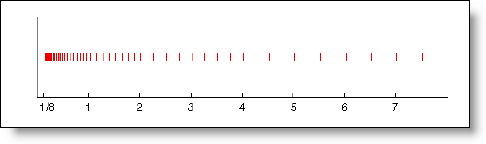
Fixed-point numbers use the same integer representations, but they assign a different meaning to the bits. We can introduce the idea of fractional bits and a binary point. With integers, your smallest spacing between numbers is 1. If we decide to let a bit represent ½ we now have closer spacing in our system. The number of bits to the right of the binary point is the fraction length. Using our toy three-bit system, we can assign a fixed binary point after the first bit. This is then a three-bit system with a fraction length of two. The values of the bits are now 1, ½, and ¼. A number 0.10 equals ½. This three-bit fixed-point system can represent the following range of numbers:
|
20 |
2-1 |
2-2 |
Value |
|
0 |
0 |
0 |
= 0 |
|
0 |
0 |
1 |
= ¼ |
|
0 |
1 |
0 |
= ½ |
|
0 |
1 |
1 |
= ¾ |
|
1 |
0 |
0 |
= 1 |
|
1 |
0 |
1 |
= 1 ¼ |
|
1 |
1 |
0 |
= 1 ½ |
|
1 |
1 |
1 |
= 1 ¾ |
This allows more precision over a smaller range of numbers. The location of the binary point determines the range of the numbers and the spacing between them.
What if we wanted to move the binary point to be after the 5th bit in our three-bit system? In this case, the fraction length would be -2. Instead of fractional bits, the least significant bit equal to 4. In a system like this, the bits would be 16, 8, and 4.
|
24 |
23 |
22 |
Value |
|
0 |
0 |
0 |
= 0 |
|
0 |
0 |
1 |
= 4 |
|
0 |
1 |
0 |
= 8 |
|
0 |
1 |
1 |
= 12 |
|
1 |
0 |
0 |
= 16 |
|
1 |
0 |
1 |
= 20 |
|
1 |
1 |
0 |
= 24 |
|
1 |
1 |
1 |
= 28 |
This representation gives us a larger range, but greater spacing between bits. Imagine an engine controller that has to represent values between 0 and 10,000 RPMs. Unsigned eight-bit integers have a maximum value of 255. A sixteen-bit unsigned int can hold values over the range 0 to 65535. If we choose an eight-bit number with fraction length of -6, we could store these numbers using only 8 bits. The range of such a system is 0 to 16320 with a spacing of 64.
Fixed-Point Number: Slope and Bias
A fixed-point number system can also encode the real-world value using an arbitrary slope and bias. Regular integers have a slope of 1 and a bias of 0. When using slope and bias, the binary representation stores an integer that is used to calculate the real-world value. The calculation is the ever familiar line equation, y = m ∙ x + b. This representation shifts the range and scaling of the numbers represented. Using our toy three-bit integers, we can define a slope of 1.25 and a bias of 20. The bits still represent 4, 2, and 1, but the value computed is 1.25 ∙ x + 20.
|
22 |
21 |
20 |
Integer |
Real World Value |
|
0 |
0 |
0 |
= 0 |
1.25 ∙ 0 + 20 = 20 |
|
0 |
0 |
1 |
= 1 |
1.25 ∙ 1 + 20 = 21.25 |
|
0 |
1 |
0 |
= 2 |
1.25 ∙ 2 + 20 = 22.50 |
|
0 |
1 |
1 |
= 3 |
1.25 ∙ 3 + 20 = 23.75 |
|
1 |
0 |
0 |
= 4 |
1.25 ∙ 4 + 20 = 25.00 |
|
1 |
0 |
1 |
= 5 |
1.25 ∙ 5 + 20 = 26.25 |
|
1 |
1 |
0 |
= 6 |
1.25 ∙ 6 + 20 = 27.50 |
|
1 |
1 |
1 |
= 7 |
1.25 ∙ 7 + 20 = 27.75 |
There are more intricacies to fixed-point representations, and the Simulink Fixed-Point documentation gives a great overview.
Challenges of Working in Fixed-Point
The challenges of using fixed-point add complexity to embedded system development. You have to make sure you have the correct scaling and bias for your application in order to avoid overflow or underflow. If you have Simulink Fixed-Point you can use fixed-point data types in your Simulink model and get bit true simulation of your design. The MATLAB Digest article Converting Models from Floating Point to Fixed Point for Production Code Generation explains the workflows that help you get this right in your Simulink design.
Now it’s your turn
Do you develop fixed-point code? What did you learn from this overview of fixed-point number representation? Leave a comment here and share your fixed-point story.
- Category:
- Fundamentals,
- Numerics



Comments
To leave a comment, please click here to sign in to your MathWorks Account or create a new one.