Guy and Seth on Simulink

September 9th, 2009

New Stuff – Simulink R2009b

Last week the MathWorks released the R2009b family of products.  There are many new capabilities in the latest release and with this blog post, I want to highlight a some of the features in Simulink I’m really excited about.  While you read this, start installing the latest products from the MathWorks.com downloads area (login and license required).

Reading the release notes is so R2007b!

Did you know that there is a presentation containing highlights and screen shots from R2009b Simulink?  If you have missed this in the past, you can go back and check out R2008a, R2008b and R2009a highlights.  Try it yourself, and browse through all the cool new features in R2009b Simulink.
R2009b Simulink Feature Slides

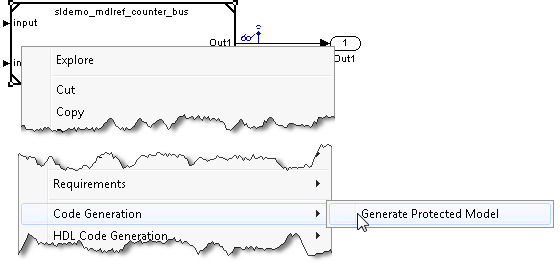
Model Reference Protected Models!

Share your model functionality without sharing your model intellectual property!  Anyone with R2009b Simulink can use a protected model.  If you have a license to Real-Time Workshop, you can create a protected model.
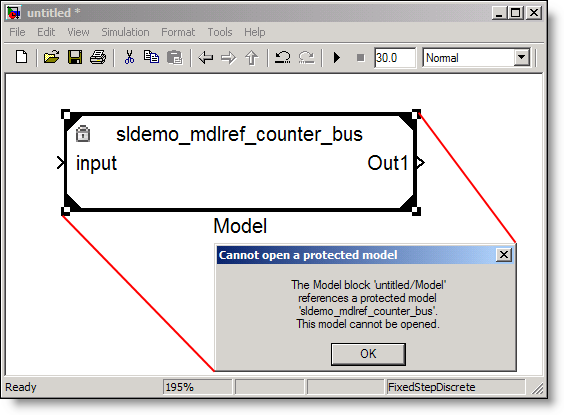
Model Reference Protected Mode

Model Reference Variants

If you have multiple implementations of your component model, variant objects enable you to control the implementation used.  This allows you to globally control and coordinate switching between variant implementations of your model.
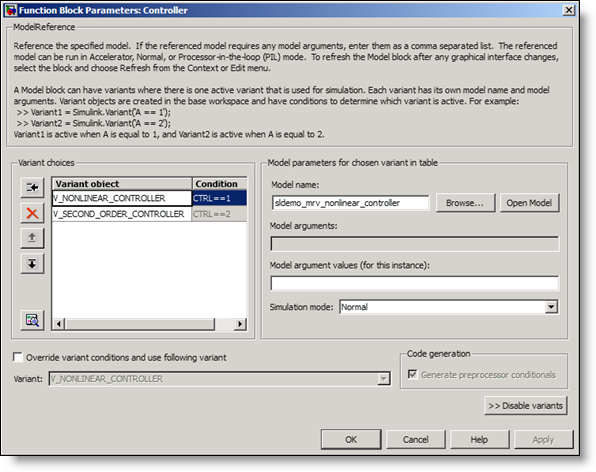
Simulink Model Reference Variants

Tabs in the Mask Editor!

Now you can create tabs in your custom block masks.
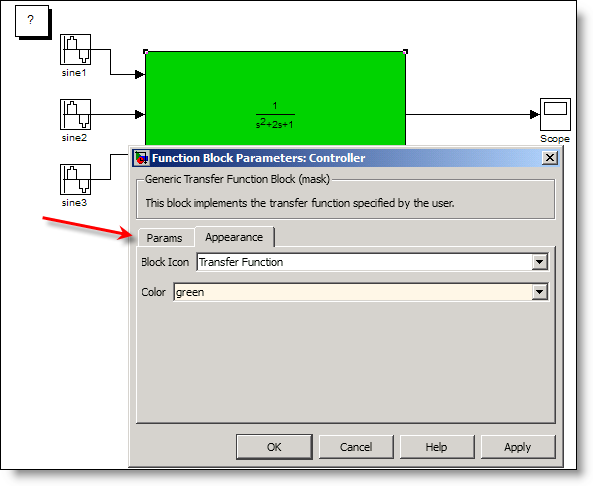
Simulink R2009b masks include tabs!

Variably Sized Signals!

Special blocks and Embedded MATLAB now support dynamically sizing signals during simulation!
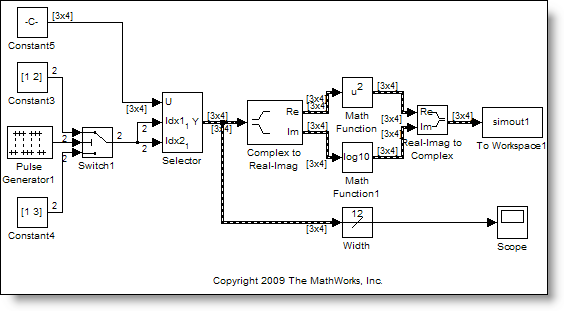
Variable sized signals in Simulink R2009b

The SIM command can return a single output!

The SIM command has a new single output syntax so all your results are part of a single SimulationOutput object. This enables SIM to be called within a PARFOR loop, thus enabling easy parallel Simulation using the Parallel Computing Toolbox.

paramNameValStruct.SimulationMode = 'rapid';
paramNameValStruct.AbsTol = '1e-5';
paramNameValStruct.SaveState = 'on';
paramNameValStruct.StateSaveName = 'xoutNew';
paramNameValStruct.SaveOutput = 'on';
paramNameValStruct.OutputSaveName = 'youtNew';
simOut = sim('vdp',paramNameValStruct);

New Library Links Tool for fixing broken links!

After making changes to a model and disabling library links, the Library Links tool will enable you to reestablish those links to your library.  Each change in the model can be pushed back into the library, or the block can be restored from the original library source.
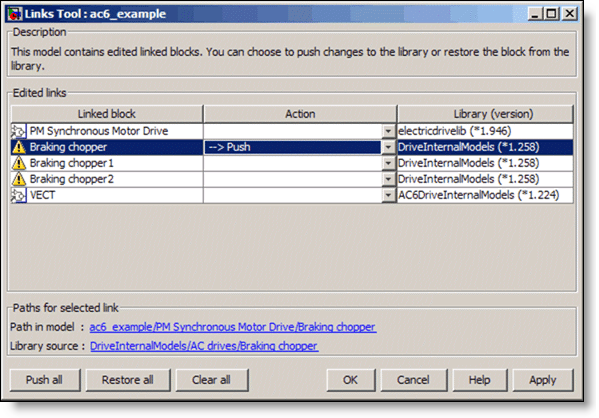
The R2009b Simulink Library Links Tool

Now it’s your turn

Have you downloaded R2009b?  Leave a comment here and tell me about your favorite new features.

8 Responses to “New Stuff – Simulink R2009b”

  1. JCA replied on :

    Sounds like a good update.

    It has two changes that are especially relevant to my work right now, but unfortunately at this stage I won’t be able to switch versions.

    First, I hear it fixes my favorite bug: 529072

    That one was killing me on this project, so it’s good to hear it’ll be gone for the next one.

    Second, is the IP protection feature. We’re struggling with that right now at the end of our project (I know, should have thought about it sooner!).

    I’m hoping you can suggest something that I can do with 2007b. Basically I have a block within a large model that I need to protect. The block with all the IP is currently an Embedded MATLAB code block. We want to deliver the block as part of the model, but the customer must not be able to see the code (they’ll look at the raw mdl text if they have to, trust me). Can you suggest any non-invasive ways of doing that? The end result is built using rtw and is run in a “realtime”-windows environment (don’t ask! :) ).

    Great blog, and thanks for any reply you can give. At the very least, the hoops I’m describing here will be an effective sales tool for 2009b. :)

    Cheers

  2. Seth replied on :

    @JCA – I am glad to hear that we fixed your favorite bugs. This is one of the benefits of the six month release cycle… you don’t have to wait a long time to get bugs fixed.

    In R2007b your really limited based on the requirements you have provided. The easiest way to hide IP in that release is to use RTW to Generate an S-function. This does not support inlined code generation, so you have to use an RTW target that supports calling non-inlined S-functions. Even in that situation, I have seen some users generate code, then use a C-language obfuscation tool to provided the source to be included with the final generated model. This would still be needed today as our R2009b IP protection solution is for simulation only.

  3. wei replied on :

    @Seth, Could mask parameter entry change from popup to edit text? Take a look at Constant block’s ‘OutDataTypeStr’.

  4. Shen-Hsiao replied on :

    Any chance that the Simulink interface under Mac OS X will be updated to match that of the Matlab desktop? The “drag-and-drop” of blocks doesn’t work on the X11/Motif-like interface of the current v7.4 on R2009b.

  5. Seth replied on :

    @Shen-Hsiao – It is hard to know exactly what problem you are describing with such little information, but there is a known issue with Mac’s that have multiple monitors. There is a published bug report here (requires log-in). I should note that there are a couple workarounds described on the bug report, so you might want to try them. If this is the problem you have, we are working on a fix for this.

  6. Seth replied on :

    @wei – I know you asked this a LONG time ago, but to answer your question, when switching between Pop-up and edit text, you would need a control parameter (like a check box). This check box could set the visibility of the Pop-up to ‘off’ and set the edit-text to ‘on’. If the Prompt appears the same, the visual effect will be that it switched. Then, in the MaskInitialization, code would need to decide which parameter to use and assign to the variable used in the system (or action to take based on the settings of those three parameters). Does that make sense?

  7. wei replied on :

    @Seth, Thank you for answering. The suggestion is inferior and ruins user’s experience. What really needed is to open up mask dialog API so mask block can be implemented with native look and feel GUI. I will add two more examples: the Editor push button for lookup block and multi-tabs for signal attributes.

    A mini-GUIDE would be nice for mask GUI designer.

  8. konaen replied on :

    8 Problems with Simulink ‘Scope’ Block

    Although the version of Simulink is updating every year, I didn’t see any improvement on the most frequently used block ‘Scope’. Sometimes I found it is very inconvenient to use. There are 8 problems/suggestions that I summarized according to my experience:

    1. I need a cursor.
    Just like a real oscilloscope, I need cursors to read current time tick, to measure X or Y difference. I don’t want to zoom in many times and make subtraction.

    2. I want to zoom out X, Y-axes independently.
    There are ‘Zoom’, ‘Zoom X-axis’ and ‘Zoom Y-axis’ buttons. But I do not understand why there is no ‘Zoom out’,'Zoom out X-axis’,'Zoom out Y-axis’ buttons. Sometimes, I really need to zoom out X, Y-axes independently.

    3. I DO NOT want ‘Autoscale’ button to change my saved axes settings.
    ‘Autoscale’ button is useful, but not always. After many times of ‘Zoom in’ and ‘Zoom out’, I get the ‘best’ view of the waveform finally. So I ‘save current axes settings’. Afterwards, I want to take a look at the overall waveform so I click the ‘Autoscale’ button. Then, I hope to return to my ‘best’ view so I click the ‘restore saved axes settings’ button. But unfortunately, it does not bring me back!

    4. I want to view the waveform from t1 to t2 exactly.
    Sometimes I only want to display part of the waveform exactly, e.g. from t=0.15 s to t=0.23 s. However, it seems that the ‘Time range’ parameter does not support such setting. It only allows a partial view starting from t=0.

    5. I want to save my waveform after the simulation.
    Why I have to remember to check the ‘save data to workspace’ box before the simulation? Many times after a long time simulation, I found I forgot to check this box and I have no choice but to run it again! Why not just provide me a menu to save the data to workspace at any time I prefer? Also, ‘Copy figure’ menu (like the one in ‘Figure’ window) is often desired.

    6. I want to organize many scope windows into a single window.
    For large scale simulation, many waveforms need to be monitored. But too many scope task buttons on my OS taskbar with undistinguishable title make my feel confused. To find the desired scope window, I have to check them one by one. I hope I can put these scope windows into a single window and use a tabbar to label them, just like the M-editor. It seems that the ‘dock scope’ button can provide this function, but after docking, I cannot use the ‘Zoom’ button!

    7. I need a more accurate time tick.
    It seems that the time ticks are not accurate enough. After many times of ‘Zoom in’, the neighboring time ticks become the same (e.g. ’0.0001,0.0001,0.0001,0.0001′), although the simulation time step is actually smaller than 1e-4. If I cannot get a cursor, at least I hope I can read the time tick accurately by myself.

    8. I hope ‘Autoscale’ function can reserve some margin for the waveform.
    Boolean signals are frequently used. But after autosacling, I find the yellow waveform completely overlaps with the figure frame, making it very hard to distinguish between 0 and 1. In this situation, I have to set Y-min, Y-max to -1 and 2 respectively so as to view clearly. This is time-consuming, so I hope the ‘Autoscale’ function can always reserve some margin for the waveform.

Leave a Reply

Wrap code fragments inside <pre> tags, like this:

<pre class="code">
a = magic(3);
sum(a)
</pre>

If you have a "<" character in your code, either follow it with a space or replace it with "&lt;" (including the semicolon).


MathWorks
Guy Rouleau and Seth Popinchalk are Application Engineers for MathWorks. They write here about Simulink and other MathWorks tools used in Model-Based Design.

These postings are the author's and don't necessarily represent the opinions of The MathWorks.