Guy and Seth on Simulink

January 18th, 2011

You need an integrator with variable limits… there’s a solution for that!

Blogger, Guy RouleauBy Guy Rouleau

Today I received a question where the user was looking for an Integrator block with variable upper and lower limits that could be specified from signals. I was happy to simply answer: There's a solution for that!

In order to help users finding the information they need, we have a bank of technical solutions published on our website. These solutions are created by technical support engineers when they answer a question. If they think that someone else in the world might have a similar questions, they publish it.

So I went to the support section of our website and searched for variable limits integrator:
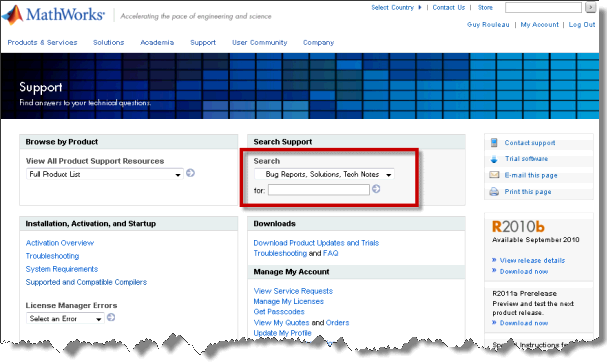
Support section of MathWorks website

The first result I found is the following solution:

How can I create an Integrator block with variable limits in Simulink?

When looking at the details, I realized that I created this solution myself a few years ago, not long after I joined MathWorks. It uses the state port of the Integrator block with a few Logical Operator and Relational Operator blocks to make an integrator with variable limits:
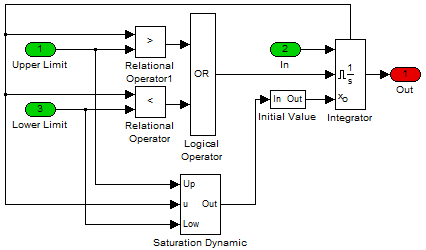
Technical solution: Variable limits integrator

Conclusion

If you are looking for an explanation or an example that you cannot find in the doc, try our technical solutions. You might find very interesting stuff and save a lot of time.

Now it's your turn

When you cannot find the info you are looking for in the doc, where do you look? Post a comment here.

6 Responses to “You need an integrator with variable limits… there’s a solution for that!”

  1. EBS replied on :

    Perhaps it would be worth considering adding this functionality into the existing Simulink integrator?

  2. Atul replied on :

    Hi,I am Atul from India;
    I am using license version Matlab 7.9.0 R2009b.I am basically looking for 1]how to generate HDL code for a design which is done in Simulink blocks?
    2]when simulink block “convolutional encoder is when being replace by xilinx blockset convolutional encoder” then it shows block error?
    3]What is block error?message shows ip port is undriven?what is this ?how can i fix this issue?

    thanks….

  3. Tejaswini Sunkara replied on :

    Hi, I am using matlab2010a and I have a doubt. How do I make the comb filter process the analog sine wave generated by a signal generator. Another question is that how do i give analog input to a mixer. We got a biological system into complete electronic circuitry so it is necessary that the inputs are analog. We are using sine wave because it is easy to work with that type of wave under any given frequency. In the simulation blocks we don’t have any block that can make up a costas loop. I tried to construct it but in vain as I was unable to give any proper negative feedback. So can you please help me with these problems that I am facing in the simulink

  4. Noussa replied on :

    hi ,
    i m working in human video tracking on simulink & i ve done the background extraction, edge detection now i m trying to work with a human cardboard i ve divided the blob of the human in 7 parts i ve put the head in a recangle the foot also, but i can define the torso, leg, head…
    so plz i need ur help
    thX

  5. Bikash kumar Chinhara replied on :

    sir,
    I have read the model. I have one problem. Would u please solve this ….
    The problem is :

    I want to make a simulink/model to find the integration of sin(x)*cos(x) symbolically. i.e. I need to define a function with symbolic argument and want to give the argument of the model from the command window.

    With warm regards
    Bikash kumar chinhara
    bikash_chinhara@rediffmail.com

  6. Ashesh replied on :

    hi everyone,

    I have the same doubt, I have a integration with variable limits but I need to know how can I overcome with this through programming.

    Thanks

Leave a Reply

Wrap code fragments inside <pre> tags, like this:

<pre class="code">
a = magic(3);
sum(a)
</pre>

If you have a "<" character in your code, either follow it with a space or replace it with "&lt;" (including the semicolon).


MathWorks
Guy Rouleau and Seth Popinchalk are Application Engineers for MathWorks. They write here about Simulink and other MathWorks tools used in Model-Based Design.

These postings are the author's and don't necessarily represent the opinions of The MathWorks.