Guy and Seth on Simulink

May 24th, 2011

Making things easier

With every release, we add new capabilities to improve the usability of Simulink. In R2011a, there is a good list of enhancements that should make your life a little bit easier. Here are a few examples:

Creating protected models via right-click

In R2009b, protected model reference was introduced. To use this feature, you had to use the Simulink.ModelReference.protect command to generate the protected model, then drag a model reference block from the Simulink Library and specify the name of the newly created file.

In R2011a, all you have to do is right-click on the Model Reference block to protect and select Code Generation -> Generate Protected Model.
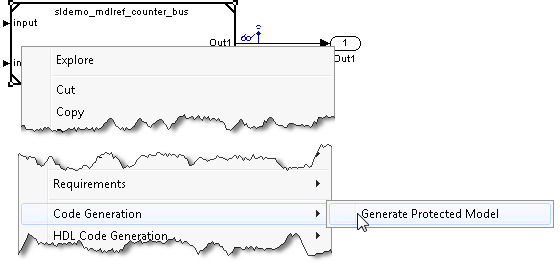
Protecting a referenced model

A protected model is saved in the current directory and a new model is created with a Model Reference block already configured.

Creating MATLAB structures from the Bus Editor

Since R2010a, it is possible to use a MATLAB structure to specify initial conditions of a bus signal. When you have a bus object in the workspace, you can use Simulink.Bus.createMATLABStruct to automatically create the structure. In R2011a, a menu item and a toolbar button have been added to the Bus Editor to invoke Simulink.Bus.createMATLABStruct:
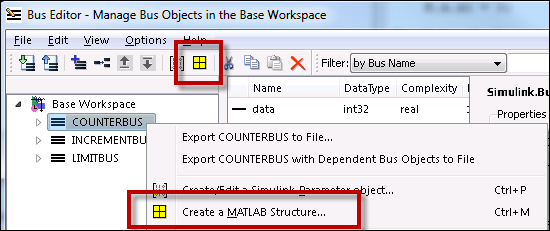
Creating a MATLAB Structure from the Bus Editor

Model Reference Parameter dialog box displays model names of all variant choices

Model Reference Variants were introduced in R2009b. Before R2011a, the table of variant choices had 2 columns: Variant object and Condition. This means that to see the associated model on the right, you had to click on each variant individually:
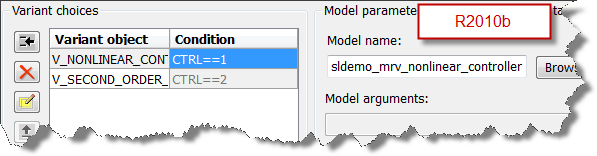
pre R2010b Model Reference Parameter dialog box

In R2011a, a column has been added to see the model associated with each variant:
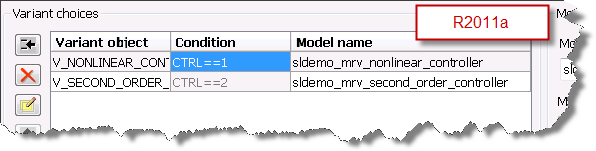
Improved R2011a Model Reference Parameter dialog box

Now it's your turn

Are you going to take advantage of these enhancements? Do you have suggestions to improve the usability of Simulink? Leave a comment here.

3 Responses to “Making things easier”

  1. Allan Baker replied on :

    I like the code protection. I’m going to have to try that.
    Now I’ll give you something else to chew on. One thing that we are struggling with is protecting the generated code. We currently generate some of our C-code from an embedded matlab simulink model for integration into a C++ simulation as well as for running real time on a DSP. The model needs to generate equivalent code for both targets. Our protected embedded matlab code is compiled separately in a DLL and linked into our C++ simulation and delivered with the non-proprietary code. Trouble is that not all of our embedded matlab algorithm needs to be protected and our customer wants visibility into the parts that aren’t proprietary. We could break out the embedded matlab from one function into a non-proprietary function with function calls to proprietary subfunctions, but I also don’t want to hurt my realtime DSP performance. I need all of those subfunctions to be generated into their own library that could be linked in separately. So, I need the code-gen to be able to generate and embedded a library of proprietary functions separately but not have the overhead mess of c-evaling out of my embedded Matlab. I don’t need to worry about protection for the DSP target at all, I only need protection for the C++ target. Any solutions for this use case?

  2. Jodi Martin replied on :

    Getting customer feedback during the development process is very important to helping MathWorks build better software. Please consider signing up for Usability Research and help us make MathWorks better. Visit the website below to sign up!

    http://www.mathworks.com/products/usability

  3. Paul Metcalf replied on :

    This is another very interesting and clear article by Guy.
    On the best practice use of busses, could you consider writing something slightly longer as I think it’s becoming a really important structural fundamental in Simulink. A short essay that I could reference would be fantastic?
    Paul

Leave a Reply

Wrap code fragments inside <pre> tags, like this:

<pre class="code">
a = magic(3);
sum(a)
</pre>

If you have a "<" character in your code, either follow it with a space or replace it with "&lt;" (including the semicolon).


MathWorks
Guy Rouleau and Seth Popinchalk are Application Engineers for MathWorks. They write here about Simulink and other MathWorks tools used in Model-Based Design.

These postings are the author's and don't necessarily represent the opinions of The MathWorks.