Guy and Seth on Simulink

June 7th, 2011

Data Store Enhancement: Accessing Specific Bus and Array Elements

In Simulink R2011a, Data Store blocks have been improved to support bus signals and more. To give you a quick idea, these enhancements can transform the syntax you are used to on the left to what you see on the right! This new syntax simplifies the model and the generated code. In this post I will show you some of the new capabilities that make this possible.
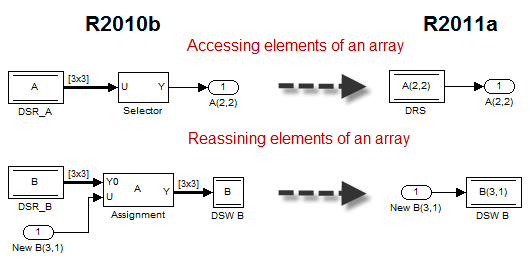
Advantages of the specific elements assignment feature of the Data Store in R2011a

Bus Support

Data Stores can now be used with buses! To connect a nonvirtual bus signal to a data store, all you have to do is specify the name of the bus object in the Data Type field of the Data Store Memory block:
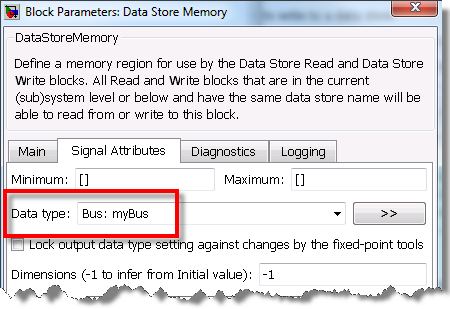
specifying a bus object for a Data Store Memory block

Optionally, you can also specify a MATLAB structure as the bus initial value. I recommend using the function Simulink.Bus.createMATLABStruct or the Bus Editor to generate the MATLAB structure from a bus object.

Accessing specific elements of a bus or a array

Before R2011a, Data Store Write and Data Store Read blocks had only one port. With this port, you could write or read the entire memory region.

While implementing bus support, we added the option to write or read specific elements of a bus or an array. To allow this, a new Element Assignment tab has been added to the Data Store Read and Data Store Write blocks. Using this tab, you can select the components of the bus you want to write or read.

Let's look at an example. Once I have created bus object and configured the Data Store Memory block to use it, I open the dialog of a Data Store Read or Write block and select the Element Assignment tab. For this example, I decide to write the second column of element A.b.b1 and the 4th element of A.b.b2.
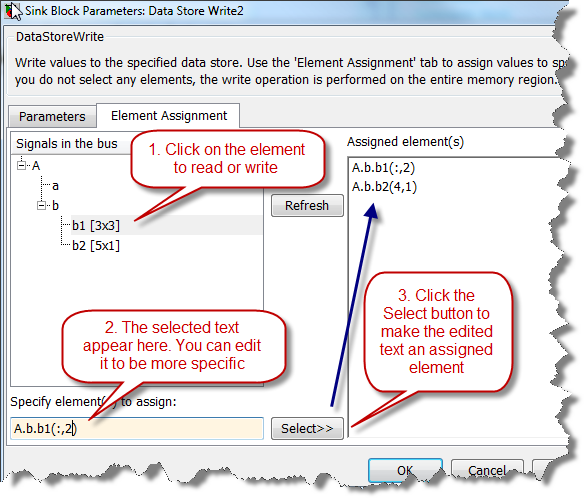
Configuring the Data Store Write to access only one element of a bus

Configured that way, the Data Store Write and Data Store Read have one port per assigned element, and the names of the selected elements are displayed on the blocks. Here is what a simple model looks like:
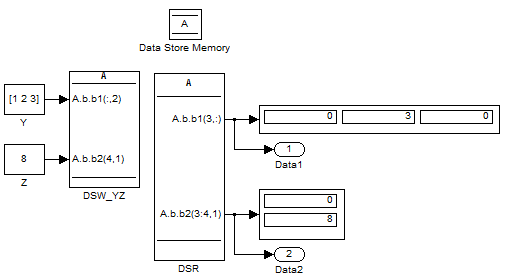
Example model illustrating how to access specific elements of DSM

Generated Code

If you generate code for the model, you will notice that this way to read and write memory is efficient, avoiding extra data copies.
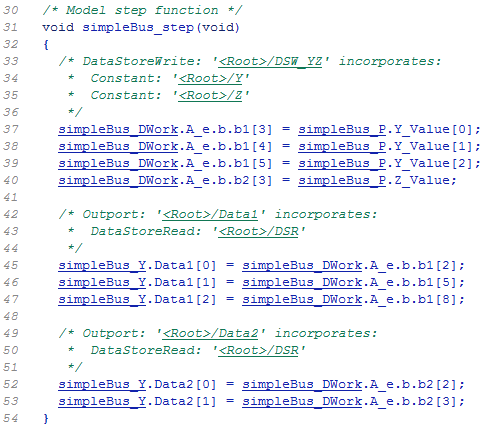
Example code generated for data store

To learn more about this feature, look at the documentation titled Accessing Specific Bus and Matrix Elements. You will find out that it supports the previously existing features of buses and data store, including global data store, access from the MATLAB Function block and arrays of buses.

Now it's your turn

Did you have a need to pass bus signal through data store in the past? Are you going to take advantage of this feature? Let us know by leaving a comment here.

7 Responses to “Data Store Enhancement: Accessing Specific Bus and Array Elements”

  1. Scott replied on :

    I was wondering if a DSR will propagate the signal name to the output signal(s) and also if the generated code will create a static copy of the whole structure or just the elements being read. The example code doesn’t create a static copy of the DSR in BlockIO, probably because it’s directly connected to the external output structure. Thanks

  2. Kaushik replied on :

    Hi Scott, (1) DSR does not automatically propagate signal labels today. Users can explicitly name these signals. We are looking into propagating labels out of DSR blocks for a future release. (2) There should be no data copies when reading elements out of DSRs. The generated code will directly index off the corresponding DSM block’s memory. Reducing data copies was one of the main requirements for building indexing directly into these blocks.

  3. Scott replied on :

    Kaushik, is it possible to prevent the external output structure from being created, so that the DSM variable is used in the code? I’ve had several instances where a subsystem contains a DSR connected to a root outport and the generated code will copy the DSM variable into an external output structure that is never used in the generated code. In that case, the external output structure would only be needed for simulation. Thanks again.

  4. James Myatt replied on :

    Any plans to add support for adding index ports, rather than having it hard coded?

  5. Kaushik replied on :

    James: The main objective was to add bus and arrays of buses support to DSMs. We do have an enhancement request to build dynamic indexing into DSR/DSW blocks. However, there are no immediate plans to address this. Note, this functionality can be achieved by using the MATLAB function block (i.e. EML) in R2011a.

  6. Kaushik replied on :

    Scott: If you are sharing DSM data outside your model and do not want to pass it around by connecting it to root outports, consider using global data stores. This way you will not incur the cost and can access the same data anywhere in the model hierarchy.
    Please refer to the following doc link for more info on global data stores (might require login):
    http://www.mathworks.com/help/toolbox/simulink/ug/bryzv43-2.html

  7. Matt replied on :

    Hi Scott, we don’t support such an optimization today. We have considered it in the past, but rejected it because it can introduce an incompatibility with respect to the behavior of the code historically generated.

Leave a Reply

Wrap code fragments inside <pre> tags, like this:

<pre class="code">
a = magic(3);
sum(a)
</pre>

If you have a "<" character in your code, either follow it with a space or replace it with "&lt;" (including the semicolon).


MathWorks
Guy Rouleau and Seth Popinchalk are Application Engineers for MathWorks. They write here about Simulink and other MathWorks tools used in Model-Based Design.

These postings are the author's and don't necessarily represent the opinions of The MathWorks.
