Skip to Main Content Skip to Search
File Exchange
MATLAB Newsgroup
Link Exchange
  Blogs  
 Contest 
MathWorks.com

Steve on Image Processing

February 24th, 2007

ROIPOLY - rectangular regions and logical indexing

Several readers commented on my recent roipoly and poly2mask posts, and I wanted to follow up on a couple of issues they raised. The first issue is a common point of confusion about the selection of rectangular regions, and the second is how to access and modify pixels contained within a region of interest.

Contents

Rectangular regions

Users sometimes wonder why poly2mask and roipoly don't return some of the boundary pixels of a rectangular region as part of the mask. Here's an example.

x = [2 4 4 2 2];
y = [2 2 4 4 2];

mask = poly2mask(x, y, 5, 5)
mask =

     0     0     0     0     0
     0     0     0     0     0
     0     0     1     1     0
     0     0     1     1     0
     0     0     0     0     0

Some users expect rows 2 through 4 and columns 2 through 4 to be included in the mask. One reader commented that he uses a different function instead of roipoly because of this behavior.

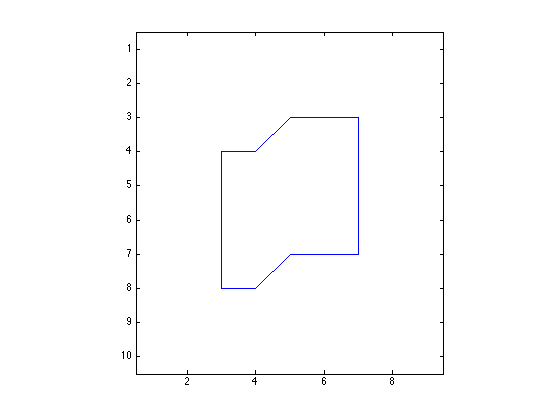
As I have illustrated in my previous posts, roipoly and poly2mask treat a pixel not as a point, but as a unit square area. The upper-left corner of the (2,2) pixel is (1.5,1.5), and the lower-right corner is (2.5,2.5). So the polygon defined by the x-y vertices in the example above covers only one-fourth of the (2,2) pixel.

I suggest that you get used to defining rectangles that cover complete pixel areas. Such rectangles go along pixel edges, not through pixel centers. Here's a second example to demonstrate:

xp = [1.5 4.5 4.5 1.5 1.5];
yp = [1.5 1.5 4.5 4.5 1.5];

maskp = poly2mask(xp, yp, 5, 5)
maskp =

     0     0     0     0     0
     0     1     1     1     0
     0     1     1     1     0
     0     1     1     1     0
     0     0     0     0     0

Now the "mystery" is completely removed about which border rows and columns are in the mask. There's no need to use some other function.

Logical indexing

Another reader asked how to get and modify pixels inside a region of interest. One nice way to do that in MATLAB is to use logical indexing. The expression A(B), if B is logical and the same size as A, selects all the elements in A corresponding to the true elements of B.

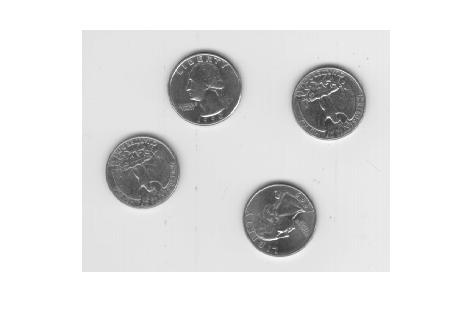
I'll demonstrate using an example mask from the roipoly documentation.

clear
I = imread('eight.tif');
imshow(I)
c = [222 272 300 270 221 194];
r = [21 21 75 121 121 75];
mask = roipoly(I,c,r);
imshow(mask)
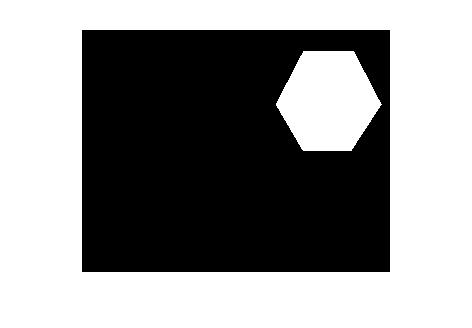
If you use whos or look in the workspace browser, you can see that mask is a logical matrix.

whos
  Name        Size             Bytes  Class      Attributes

  I         242x308            74536  uint8                
  c           1x6                 48  double               
  mask      242x308            74536  logical              
  r           1x6                 48  double               

The expression I(mask) is a column vector containing all the elements of I corresponding to the true values of mask. Here, for example, is how you would compute the mean of the pixels inside the region of interest:

mean(I(mask))
ans =

  156.0468

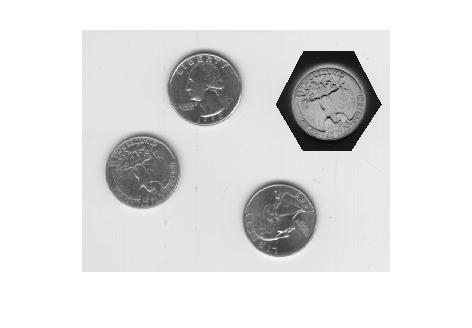
You can use logical indexing on the left-hand side of an assignment as well.

I2 = I;
I2(mask) = 255 - I(mask);  % Or imcomplement(I(mask)).
imshow(I2)
Here's a documentation link for logical indexing. Or you might be interested in this MATLAB Digest article that Loren and I wrote about MATLAB indexing.


Get the MATLAB code

Published with MATLAB® 7.3

13 Responses to “ROIPOLY - rectangular regions and logical indexing”

  1. Brian W. replied on :

    Thank you. :)

  2. keerthi replied on :

    thank you som uch. it is very informative and useful.

  3. andy replied on :

    Thank you! But how to decompose the mask to make it work with the decomposed image??

  4. Steve replied on :

    Andy—What’s a decomposed image?

  5. andy replied on :

    I want to create a mask which contains a ROI.Just like things in JPEG2000,how to create a mask with a given region of interest.the mask should contain all the coefficents in every subband in the wavelet domain.
    thank u!

  6. Steve replied on :

    Andy—A mask is just a binary image. The set of nonzero pixels in the mask defines the region of interest. You can create the mask however you like.

  7. SYED ABDAHEER replied on :

    Respected Sir
    I have gone through above said matlab based commend line. I thiunk its based on only two dimentional image. But how can I made the things for medical (3-D) images.Please give your suggestion.
    With warm regards from
    SYED ABDAHEER

  8. Steve replied on :

    Syed—For a logical indexing expression A(D), D has to match the size of A. If you have a 2-D logical mask and are working with 3-D data, then you either have to replicate the mask along the third dimension, or you have to work with the data one plane at a time.

  9. subarna replied on :

    Nice explanation, thank you.
    if the ROI is a rectangle (axis not verticle), and if we wish to see it in a verticle rectanglular box by using imshow, how to proceed?
    how to assign this extracted rectangular ROI to another vertical rectangle? since the indices of mask follow lower to higher column values, not according to the directions of the polygon to be extracted.

  10. Steve replied on :

    Subama—I don’t understand your question.

  11. ilyas replied on :

    Hi, Steve,

    I am very thankful for your nice explanation. I would like to ask you a question. when we use roipoly and then figure pops up. After that we have option to select region of interest by selecting vertices on figure by mouse. The question is what I should to to save the part of image which I select by mouse.

    Thank you so much for your time and consideration.

  12. ilyas replied on :

    I am sorry. I mean how I can exract and save the part of image which I select by mouse.

  13. Steve replied on :

    Ilyas—The post you commented on explains how to use the mask returned by roipoly to extract the image pixel values that are inside the polygon. If you have a truecolor (M-by-N-by-3) image, though, you’ll need to use separate logical indexing expressions for each color component, like this:

    R = im(:,:,1);
    G = im(:,:,2);
    B = im(:,:,3);
    
    red_pixels = R(mask);
    green_pixels = G(mask);
    blue_pixels = B(mask);
    

Leave a Reply


Steve Eddins manages the Image & Geospatial development team at The MathWorks and coauthored Digital Image Processing Using MATLAB. He writes here about image processing concepts, algorithm implementations, and MATLAB.

  • ismail: i love chess keep posting :) can we make a web cam identify a chess set ? so we have a roboarm plays for real...
  • Navan: While black is going to win with a smothered mate, it is hard to see what moves would have led to this...
  • Doug: Forced ’smothermate&# 8217; is about to happen, with the added insult of threatening the queen on the...
  • Viton: Let’s give it a try: - RxQ : White Rook takes black Queen (White King was checked, can’t take...
  • Omar: Hi Steve, when using tformfwd to find corresponding points in the new space, the resulting co-ordinates from...
  • Steve: Cris—You’ ;re right, I should have caught the plot scaling issue. I wasn’t actually trying...
  • Cris Luengo: Not to spoil your upcoming bog entry too much, but if you scale the first graph (times vs Q) by setting...
  • Steve: Jim—Thanks for adding your comment showing how the syntax works for matrices.
  • Jim: for i = A …statements 230; end; Description: The …statements 230; are executed (as MATLAB...
  • Steve: Omar—Nice work.

These postings are the author's and don't necessarily represent the opinions of The MathWorks.

Related Topics