 Cleve’s Corner: Cleve Moler on Mathematics and Computing
 The MATLAB Blog
 Guy on Simulink
 MATLAB Community
 Artificial Intelligence
 Developer Zone
 Stuart’s MATLAB Videos
 Behind the Headlines
 File Exchange Pick of the Week
 Hans on IoT
 Student Lounge
 MATLAB ユーザーコミュニティー
 Startups, Accelerators, & Entrepreneurs
 Autonomous Systems
 Quantitative Finance
 MATLAB Graphics and App Building
R2010b – MATLAB changes
Last week I wrote about Image Processing Toolbox changes in R2010b, and this week I want to mention some MATLAB changes that particularly caught my eye.
I should start by saying that I don't plan to mention everything here. I encourage you to take a look at the MATLAB release notes to see what changes might be of interest to you. You should also take a look at Mike on the MATLAB Desktop and Loren on the Art of MATLAB for their take on R2010b.
First, in the "small gems" category, I love the new Ctrl-J keyboard shortcut for wrapping comments. I especially appreciate that Ctrl-J will wrap a whole paragraph of comments without having to select the paragraph first. This is something I do all the time when preparing blog posts.
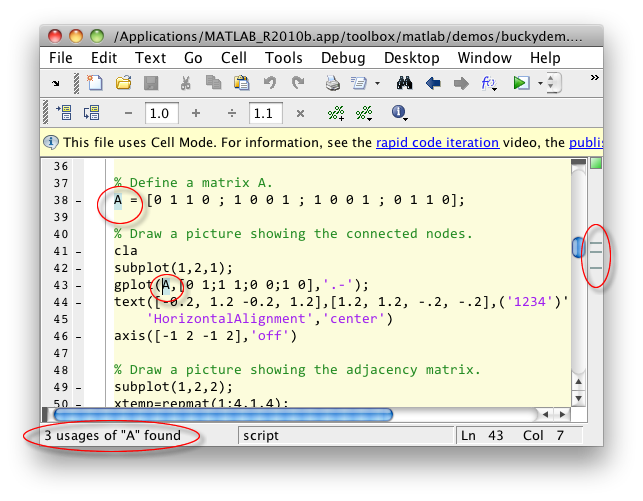
Second, I like the variable highlighting feature in the Editor. I don't know about this feature until one day it just started happening in the development build. Here's a screenshot that Mike took showing the feature. Read his blog post for more details.
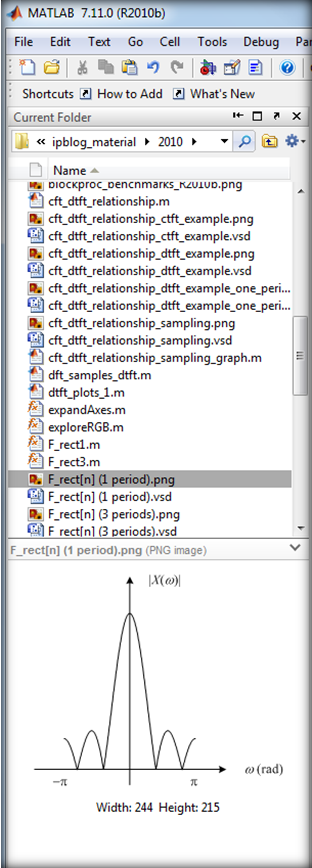
A few months ago, a developer from another team stopped by my office to interview me about image files and image file I/O in MATLAB. It turns out he was working on a file previewer in the Current Folder browser. It's shipping now. Here's a screenshot of the feature. (The screenshot is showing some of the files from my blog materials folder.)
On the math side, there's new support for arithmetic operators on uint64 and int64 data types.
a = intmax('uint64')a = 18446744073709551615
a/2 + 5
ans =

  9223372036854775813
On the programming side, object-oriented programming in MATLAB now supports the notion of enumerations.
clear
type WeekDays
classdef WeekDays
   enumeration
      Monday, Tuesday, Wednesday, Thursday, Friday
   end
end
today = WeekDays.Tuesday
today =

    Tuesday
whos
  Name       Size            Bytes  Class       Attributes

  today      1x1               104  WeekDays
In the file import/export category there are several new things to mention:
- A new VideoWriter class. Unlike the old avifile, the new class works cross-platform and can write files larger than 2 GB.
- netCDF 4 support
- N-channel JPEG 2000 support
- New functions added to low-level interfaces for HDF4, HDF5, and netCDF
- Many new examples in the command line help for the HDF5, netCDF, and CDF low-level interfaces.
Do you have R2010b yet? What do you think?






Comments
To leave a comment, please click here to sign in to your MathWorks Account or create a new one.