Doug’s MATLAB Video Tutorials

August 18th, 2008

Puzzler: Find largest connected island

Every now and then we send MATLAB challenges through the department to help sharpen our programming skills. What amazes me is the sheer variety of solutions that people come up with.

Today, I have a challenge for the community here. Given a matrix of random, positive, whole numbers, find the largest group of identical, four connected values.

If there are two groups tied for the same size, choose the largest valued. If there is still a tie, it is a free choice which to use. Simply return a binary matrix with ones where the island of connected pixels is.
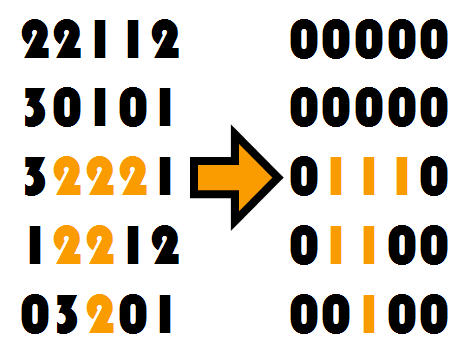
island.jpg

I suspect that this challenge will be much easier for people with access to the Image Processing Toolbox. I am curious to see what kind of creative solutions people will find with and without the toolbox.

Here is the starter code:


n = 10; % size of matrix
v = 9; % max value of matrix, different values give bigger islands
a = round(rand(n)*v);
flag = mySolver(a); % mySolver will return a binary matrix

Your mission, write mySolver.m and place it in the comment section.

When you post your code in the comments, please use the tags


<pre> <code>

all the code so someone can just copy and paste it from the comments.

</code> </pre>

26 Responses to “Puzzler: Find largest connected island”

  1. Brett replied on :
     
    
    function [mask,bigval] = mySolver(a)
    %Brett's shot at Doug's "Biggest 4-connected" puzzler
    %08/18/08
    biggestArea = 0;
    for ii = 9:-1:0
        L = bwlabel(a==ii,4);
        stats = regionprops(L,'area');
        [tmp,tmpbig] = max([stats.Area]);
        if tmp > biggestArea
            biggestArea = tmp;
            mask = L == tmpbig;
            bigval = ii;
        end
    end
    
     
  2. Anne M replied on :

    Not at all elegant, but I just wanted to see if I could do it…
    To make the post come out right, I had to change all less than statements to use greater than instead. Something funny with html tags, I guess.

     
    function solutionMatrix = mySolver(a)
        [nr,nc] = size(a);
        maxValue = max(max(a));
        testValue = maxValue;
        bestMatrixSoFar = a*0;
        while testValue > 0
            testMatrix = (a == testValue);
            while sum(sum(testMatrix)) > 0
                trySolutionMatrix = a*0;
                [r,c] = find(testMatrix);
                trySolutionMatrix(r(1), c(1)) = 1;
                testMatrix(r(1), c(1)) = 0;
                numFoundOld = 0;
                numFound = 1;
                while (numFound ~= numFoundOld)
                    [r,c] = find(testMatrix);
                    for ii = 1:numel(r)
                        if (c(ii)>1 && trySolutionMatrix(r(ii),c(ii)-1)) ...
                                || (nc>c(ii) && trySolutionMatrix(r(ii),c(ii)+1)) ...
                                || (r(ii)>1 && trySolutionMatrix(r(ii)-1,c(ii))) ...
                                || (nr>r(ii) && trySolutionMatrix(r(ii)+1,c(ii)))
                            trySolutionMatrix(r(ii),c(ii)) = 1;
                            testMatrix(r(ii),c(ii)) = 0;
                        end
                    end
                    numFoundOld = numFound;
                    numFound = sum(sum(trySolutionMatrix));
                end %while (numFound ~= numFoundOld)
                if sum(sum(trySolutionMatrix)) > sum(sum(bestMatrixSoFar))
                    bestMatrixSoFar = trySolutionMatrix;
                end
            end %while sum(sum(testMatrix)) > 0
            testValue = testValue - 1;
        end %while testValue > 0
        solutionMatrix = bestMatrixSoFar;
    end
     
  3. Ted replied on :
     
    function [big]=mySolver(a)
    % Ted's shot at Doug's "Biggest 4-connected" puzzler
    %     still uses bwlabel, but faster using hist
    uval=unique(a);
    big=zeros(size(a));bigval=0;
    for i=1:length(uval),
       % find all 4-conn regions of this unique value
       [L,n]=bwlabel(a==uval(i),4);
       % get areas of each region
       area=hist(L(:),0:n);
    
       % area of "big"
       sumbig=sum(big(:));
       % we only care about the biggest one(s) in the test
       [sv,si]=sort(area(2:end),'descend');
       % if the biggest region is bigger than "big" we will replace it
       if(sv(1)>=sumbig),
          mxi=1;               % by default, pick the 1st of the sorted list
          k=find(sv==sv(1));   % check if we have multiple entries that are same size
          if(length(k)>1),[mxv,mxi]=max(rand(length(k),1));end; % get rand index
          % replace the big image with the appropriate block, update bigval
          big=(L==si(mxi));bigval=uval(i);
       end;
    end;
     
  4. Daniel Armyr replied on :

    Not having the image toolbox I gave this a shot using core matlab, but the only solutions I come up with are non-vectorized, and use a multitude of counters. At the very best, my code would become something like what Anne allready wrote, so I am refraining from submitting.

  5. david replied on :

    Think this one works (not using the toolbox)

    
    function flag = mySolver(a)
    
    n = size(a,1);
    
    largestIsland = [];
    
    for i = 1:n
    	for j = 1:n
    		%to find extent of island including current pixel, floodfill
    		%startin here and subtract from original
    
    		currIsland = myFlood(a~=a(i,j), 1, i,j) & ~(a~=a(i,j));
    
            %if size is larger, or equal but higher value
    		if nnz(currIsland) > nnz(largestIsland) || ...
    ( nnz(currIsland) == nnz(largestIsland) && sum(a(currIsland)) > sum(a(largestIsland)) )
    			largestIsland = currIsland;
    		end
    	end
    end
    
    flag = largestIsland;
    
    end
    
    function I = myFlood(I,c,i,j)
    % Flood fills image I from point (i,j) with color c.
    LastFlood = zeros(size(I));
    Flood = LastFlood;
    Flood(i,j) = 1;
    Mask = (I == I(i,j));
    FloodFilter = [0,1,0; 1,1,1; 0,1,0];
    while any(LastFlood(:) ~= Flood(:))
       LastFlood = Flood;
       Flood = conv2(double(Flood),FloodFilter,'same') & Mask;
    end
    I(Flood) = c;
    
    end
    

    brett’s version seems to fail for certain examples, haven’t quite pinned down why yet.

  6. Zachary Smith replied on :

    I wasn’t sure whether to optimize for length of code or speed of execution. I opted for the latter, so I added the first part of the code to first locate the connected islands and then search through them instead of searching (looping) through the entire matrix.


    function [mask] = mySolver(a)
    n = length(a);
    v = ~(diff(a,1,1));
    h = ~(diff(a,1,2));
    [I,J] = find([h zeros(n,1)]|[zeros(n,1) h]|[zeros(1,n);v]|[v;zeros(1,n)]);
    num = zeros(n,n);
    isize = ones(1,length(I));
    N_islands = 0;
    for k = 1:length(I),
        if(I(k)>1&a(I(k),J(k))==a(I(k)-1,J(k)))
            cur = num(I(k)-1,J(k));
            num(I(k),J(k)) = cur;
            isize(cur) = isize(cur)+1;
            if(J(k)>1&(a(I(k),J(k))==a(I(k),J(k)-1) && num(I(k),J(k)-1)~=cur))
                rep = num(I(k),J(k)-1);
                num(num == rep) = cur;
                isize(cur) = isize(cur) + isize(rep);
                isize(rep) = 0;
            end
        elseif(J(k)>1&a(I(k),J(k))==a(I(k),J(k)-1))
            cur = num(I(k),J(k)-1);
            num(I(k),J(k)) = cur;
            isize(cur) = isize(cur)+1;
        else
            N_islands = N_islands + 1;
            num(I(k),J(k)) = N_islands;
            value(N_islands) = a(I(k),J(k));
        end
    end
    [temp,order] = sort(value,'descend');
    [temp,ind] = max(isize(order));
    mask = num == order(ind);
    
     
  7. Doug replied on :

    Everyone,

    I think this exercise shows the value of having a large library of functions to call upon. By far, the easiest code to maintain and understand is the code that used Image Processing Toolbox to figure out the connectivity of the values.

    There are very often calculations and visualizations that will be done by many people in your community. That community may be your work group, your company, people in your field, or just people using MATLAB in general.

    Many companies have internal MATLAB toolboxes for their specialized functions, The MathWorks often has specialized toolboxes for fields of study (Image Processing, Signal processing, Parallel Computing, etc…) and the whole of the MATLAB community produces high quality functions also.

    I encourage you to seek-out (or create) user groups within your company, look for toolboxes that The MathWorks has made, and to look to The MATLAB Central File Exchange. This search will very often save you from re-inventing the Wheel. Even better, it will keep you from having to maintain code if it comes from a trusted source.

    -Doug

  8. Doug replied on :

    Everyone,

    I found it interesting how there are a few different ways to solve this problem. Brett and Ted both made use of the Image Processing Toolbox to deal with the connectivity, that makes the problem a lot easier. It is mostly bookkeeping from there to make sure you find the biggest connected island.

    Anne and Zachary used clever logical short circuiting in their solutions. If MATLAB is ever faced with an *condition(1) and condition(2)* type of operation if condition(1) is false, the entire statement is automatically false, so condition(2) is never executed. They use this idea to make sure they never step out of bounds on a matrix.

    David uses convolution with a plus shaped mask to flood fill and find connectivity. I had not thought of that solution.

    Thanks for all the interesting ways to solve this problem.

    -Doug

  9. Doug replied on :

    David,

    I tested all the posted solutions thus far. For every test case, they all gave valid solutions. I ran hundreds of random tests.

    In your comment you said that Brett’s fails for certain inputs. Many inputs have multiple correct answers. For simplicity, I specified to make an arbitrary choice. My strong suspicion is that the “failures” you saw were cases where each of you chose different correct answers.

    -Doug

  10. matt fig replied on :

    Here is my solution. It is long, but it appears to be as fast or faster than any of the other non-toolbox codes. Thanks for the puzzle!

     
    function [c] = mySolver(a)
    %MYSOLVER finds the largest island of four-connected elements.
    [row,col] = size(a);
    tmp = nan(row+2,col+2); % Buffer with NaN border.
    tmp(2:row+1,2:col+1) = a;
    c = zeros(size(tmp)); % Mark the groups.
    cntr = 1; % Label the indivdual groups.
    for ii = 2:row+1;
        for jj = 2:col+1;
            if tmp(ii,jj)==tmp(ii-1,jj) % Look up.
                if ~c(ii-1,jj)
                    c(ii,jj) = cntr;
                    c(ii-1,jj) = cntr;
                    cntr = cntr + 1;
                else
                    c(ii,jj) = c(ii-1,jj);
                end
            end
            if tmp(ii,jj)==tmp(ii,jj+1) % look right.
                if tmp(ii,jj)==tmp(ii-1,jj+1) % look right-up diag.
                    if ~c(ii-1,jj+1) && ~c(ii,jj)
                        c(ii,jj) = cntr;
                        c(ii-1,jj+1) = cntr;
                        c(ii,jj+1) = cntr;
                        cntr = cntr + 1;
                    elseif ~c(ii-1,jj+1)
                        c(ii-1,jj+1) = c(ii,jj);
                        c(ii,jj+1) = c(ii,jj);
                    elseif ~c(ii,jj)
                        c(ii,jj) = c(ii-1,jj+1);
                        c(ii,jj+1) = c(ii-1,jj+1);
                    else
                        c(c==c(ii-1,jj+1))=c(ii,jj);
                        c(ii,jj+1) = c(ii,jj);
                    end
                else
                    if ~c(ii,jj)
                        c(ii,jj) = cntr;
                        c(ii,jj+1) = cntr;
                        cntr = cntr+1;
                    else
                        c(ii,jj+1) = c(ii,jj);
                    end
                end
            end
        end
    end
    
    c = c(2:row+1,2:col+1); % Remove NaNs.
    un = min(c(:)):max(c(:)); % The group numbers.
    
    if un(1)==0
       un(1) = []; % They could all be part of a group.
    end
    
    ln = zeros(length(un),1); % The sizes of each group.
    d = zeros(length(un),1); % Hold the value of each group.
    
    for kk = 1:length(un)
        vct = find(c==un(kk));
        if ~isempty(vct)
            ln(kk) = length(vct); % Size of each group.
            d(kk) =a(vct(1)); % The value of each group.
        end
    end
    
    idx = ln==max(ln); % Find the largest num of elements.
    [idx2,idx2] = max(d(idx)); % And corresponding values.
    grp = find(idx,idx2); % Make selection.
    c(c~=grp(end)) = 0;  % Final matrix.
    c(c==grp(end)) = 1;
     
  11. Doug replied on :

    Matt,

    Looking at your code, it is clear that you are optimizing for speed. I did two tests to compare all of the current solutions. They are all fast when doing one iteration of the problem, essentially instant. So for many people that means there is no need to optimize.

    However, if this is a problem that were to scale larger, there are two ways to do that. You could do many small problems, or one larger problem. I tried both, and for the most part all of the solutions scaled well. Ted, Zach and you had solutions that scaled the best in both cases.

    The profiler is very good at finding bottlenecks in code. Oddly enough, the biggest bottleneck when running lots of small problems was in Brett’s code in STRMATCH, which is called by REGIONPROPS. This kind of bottleneck is not noticed until you run a function thousands of times.

    I say, just write your code in the clearest manner possible, then optimize for speed only if you need to. Very often you will not need to anyways.

    -Doug

    PS. A video on profiler:
    http://blogs.mathworks.com/pick/2006/10/19/profiler-to-find-code-bottlenecks/

  12. matt fig replied on :

    Anne M,

    Your code will not find the island if it is made of zeros.

     
    a = [0 2 3 0;0 3 4 0;0 0 5 0;0 4 5 2]
     

    All other codes found this island.

  13. Doug replied on :

    Matt,

    Excellent catch. I am surprised that my testing did not find that! You would think that running so many random test cases would have found a similar case. What is the feature that causes the failure?

    This shows that good testing is important and tough to do.

    Doug

  14. Anne M replied on :

    Waitaminute…is zero a positive whole number? If it is not, I maintain that I solved the problem as it was presented. Although I must admit that the illustrative graphic doesn’t match the way I considered the problem. But just change

     
    while testValue > 0
     

    in my code to

     
    while testValue >= 0
     

    and it’s fixed.

  15. Doug replied on :

    Oh my! It seems Anne is right, in fact hers is the only right answer of the bunch! I would love to take credit for making a very clever “special case” into the fabric of the challenge, but alas, I did not. Even better catch by Anne!

    -Doug

  16. Anne M replied on :

    Doug,
    I don’t agree that mine is the only right answer, because according to the exact problem definition, there should be no zeros anywhere in the matrix, so from what I understand, everybody else’s code does in fact succeed on all legally defined matrices. The only point I was trying to make was, my code at least behaved the way I intended it to, and if I was wrong about the problem definition a simple change would rectify that.
    -Anne

  17. Doug replied on :

    Anne,

    At this point I will leave it up as is, since I made a mistake in the problem statement. Instead of “positive whole numbers” I should have said “nonnegative integers” (0, 1, 2, 3,…)

    Thanks for keeping me honest on terminology, once I get your address, a bunch of MATLAB swag will be on its way!

    Thanks,
    Doug

  18. matt fig replied on :

    Good catch Anne, sorry about that.

    Hey Doug, I don’t have access to the toolboxes where I work yet, could you just say a little about how our (the non-toolbox folks) solutions compare speed-wise and scale-wise to the code using the toolboxes?

    Also, speaking of scaling, I ran the profiler and found the bottleneck in my code, it was mostly the find statement at the end. I spent a few minutes fixing it, and now it is way faster. Especially for a larger problems, for example:

     
    a = round(rand(500)*9);
    tic,ms = mySolver(a);toc
    Elapsed time is 0.717184 seconds.
     

    This compares with about 50 seconds for my first crack at it! This simply proves that a few minutes spent profiling can pay off big time.
    Here is the code:

     
    function [c] = mySolver(a)
    %MYSOLVER finds the largest island of four-connected elements.
    [row,col] = size(a);
    tmp = [nan(row,1),a]; % Pad with NaNs.
    tmp = [nan(1,col+1);tmp];
    c = zeros(size(tmp)); % Mark the groups.
    d = zeros(1,ceil(numel(a)/2)); % Hold the value of each group.
    ln = d; % Hold the number of elements in each group.
    cntr = 1; % Label the individual groups.
    
    for ii = 2:row+1;
        for jj = 1:col;
            if tmp(ii,jj)==tmp(ii,jj+1) % look right.
                if tmp(ii,jj)==tmp(ii-1,jj+1) % look right-up diag.
                    if ~c(ii-1,jj+1) && ~c(ii,jj)
                        c(ii,jj) = cntr;
                        c(ii-1,jj+1) = cntr;
                        c(ii,jj+1) = cntr;
                        d(cntr) = a(ii-1,jj-1);
                        ln(cntr) = ln(cntr) + 3;
                        cntr = cntr + 1;
                    elseif ~c(ii-1,jj+1)
                        c(ii-1,jj+1) = c(ii,jj);
                        c(ii,jj+1) = c(ii,jj);
                        ln(c(ii,jj)) = ln(c(ii,jj)) + 2;
                    elseif ~c(ii,jj)
                        c(ii,jj) = c(ii-1,jj+1);
                        c(ii,jj+1) = c(ii-1,jj+1);
                        ln(c(ii-1,jj+1)) = ln(c(ii-1,jj+1)) + 2;
                    else
                        idx = c(ii-1,jj+1); % Save this for now.
                        vct = c==c(ii-1,jj+1);
                        lnv = find(vct);
                        c(vct)=c(ii,jj);
                        c(ii,jj+1) = c(ii,jj);
                        ln(c(ii,jj)) = ln(c(ii,jj)) +  length(lnv)+1;
                        ln(idx) = ln(idx) - length(lnv);
                    end
                elseif ~c(ii,jj)
                    c(ii,jj) = cntr;
                    c(ii,jj+1) = cntr;
                    d(cntr) = a(ii-1,jj-1);
                    ln(cntr) = ln(cntr) + 2;
                    cntr = cntr+1;
                else
                    c(ii,jj+1) = c(ii,jj);
                    ln(c(ii,jj)) = ln(c(ii,jj)) + 1;
                end
            elseif tmp(ii,jj+1)==tmp(ii-1,jj+1) % look right-up diag.
                if ~c(ii-1,jj+1)
                    c(ii,jj+1) = cntr;
                    c(ii-1,jj+1) = cntr;
                    d(cntr) = a(ii-1,jj);
                    ln(cntr) = ln(cntr) + 2;
                    cntr = cntr + 1;
                else
                    c(ii,jj+1) = c(ii-1,jj+1);
                    ln(c(ii-1,jj+1)) = ln(c(ii-1,jj+1)) + 1;
                end
            end
        end
    end
    
    clear tmp % free up memory.
    c = c(2:end,2:end); % Remove padding.
    idx = ln==max(ln); % Find the largest num of elements.
    [idx2,idx2] = max(d(idx)); % And corresponding values.
    grp = find(idx,idx2); % Make selection.
    c(c~=grp(end)) = 0;  % Final matrix.
    c(c==grp(end)) = 1;
     
  19. Tim Davis replied on :

    Try this one. It doesn’t require any toolboxes, just “sparse” and “dmperm”.

    
    function c = mySolver (a)
    %MYSOLVER find the largest nonzero connected component
    [m n] = size (a) ;
    N = m*n ;
    k = reshape (1:N, m, n) ;
    west  = [(k (:,2:n) .* (a (:,1:n-1) == a (:,2:n))) zeros(m,1)] ;
    south = [(k (2:m,:) .* (a (1:m-1,:) == a (2:m,:))) ; zeros(1,n)] ;
    W = find (west) ;
    S = find (south) ;
    A = sparse ([k(W);k(S);(1:N)'], [west(W);south(S);(1:N)'], [a(W);a(S);(1:N)'], N, N) ;
    [p q r s] = dmperm (A+A') ;
    [siz b] = max (diff (r)) ;
    c = zeros (m,n) ;
    c (p ([r(b) : r(b+1)-1])) = 1 ;
    

    Here are some timings. With

    
    a = round (rand (2000)*9) ;
    

    The code above takes just under 9 seconds, which is about 20 times faster than at least one of the earlier posts. “dmperm” is also what the Image Processing Toolbox uses. This code uses dmperm directly.

  20. Tim Davis replied on :

    I was a little confused by all the back-and-forth discussion of zero blocks. Is a block of zeros to be found, if it’s the biggest? Or are zeros to be ignored? The version above intentionally ignores zeros. If you want to include blocks of zeros, then do this instead. Take your pick:


    function c = mySolver (a)
    [m n] = size (a) ;
    N = m*n ;
    k = reshape (1:N, m, n) ;
    west  = [(k (:,2:n) .* (a (:,1:n-1) == a (:,2:n))) zeros(m,1)] ;
    south = [(k (2:m,:) .* (a (1:m-1,:) == a (2:m,:))) ; zeros(1,n)] ;
    W = find (west) ;
    S = find (south) ;
    t = length (W) + length (S) + N ;
    A = sparse ([k(W);k(S);(1:N)'], [west(W);south(S);(1:N)'], ones(t,1), N, N) ;
    [p q r s] = dmperm (A+A') ;
    [siz b] = max (diff (r)) ;
    c = zeros (m,n) ;
    c (p ([r(b) : r(b+1)-1])) = 1 ;
    
    
  21. Tim Davis replied on :

    I left out the comments in the code, above. Most of the functions should be familiar to most MATLAB users. dmperm is the odd one; you can read more about dmperm and how it works, and look at its source code, here:

    http://www.mathworks.com/matlabcentral/fileexchange/loadFile.do?objectId=11740&objectType=FILE

  22. Matt Fig replied on :

    Tim,

    There is a problem in your second code. In the case when a zero block is the same size as a non-zero block, your code sometimes returns the zero block.

    a = zeros(4) + triu(ones(4)) + diag([-1 -1 0 0])
    vs.
    a = zeros(4) + triu(ones(4)) + diag([0 0 -1 -1])

  23. Tim Davis replied on :

    Matt,
    Good point, thanks for catching that. I missed that in the problem statement.

    It’s easy to fix. The size of each component is given by diff(r), where the kth component is nodes p(r(k):r(k+1)-1) where a “node” is an entry in the linear-index order of the image a.

    max(diff(r)) just finds the biggest one. It’s a small tweak to pick amongst the ties. I’ll post an update.

  24. Tim Davis replied on :

    The fix is to replace the max(diff(r)) line with:

    
    [ignore b] = sortrows ([diff(r') a(p(r(1:end-1)))'])
    b = b (end) ;
    

    I’ll post a file on the File Exchange that’s commented so you can see what the algorithm is doing. The non-commented code is:

    
    function c = mySolver (a)
    [m n] = size (a) ;
    N = m*n ;
    k = reshape (1:N, m, n) ;
    west  = [(k (:,2:n) .* (a (:,1:n-1) == a (:,2:n))) zeros(m,1)] ;
    south = [(k (2:m,:) .* (a (1:m-1,:) == a (2:m,:))) ; zeros(1,n)] ;
    W = find (west) ;
    S = find (south) ;
    t = length (W) + length (S) + N ;
    A = sparse ([k(W);k(S);(1:N)'], [west(W);south(S);(1:N)'], ones(t,1), N, N) ;
    [p q r s] = dmperm (A+A') ;
    [ignore b] = sortrows ([diff(r') a(p(r(1:end-1)))'])
    b = b (end) ;
    c = zeros (m,n) ;
    c (p ([r(b) : r(b+1)-1])) = 1 ;
    

    Thanks for pointing out the glitch.

  25. Tim Davis replied on :

    Oh, I’m a bit dyslexic. The code has a variable “west” that should be called “east.” East and West are the same to me, and I always get rows vs columns mixed up too …

    The code on the File Exchange will have the right name.

  26. Tim Davis replied on :

    Check out find_components, on the File Exchange. It doesn’t require the Image Toolbox, just MATLAB itself:

    http://www.mathworks.com/matlabcentral/fileexchange/loadFile.do?objectId=21366

    which has lots of comments that explains what the code does, and some plots of the graph showing the connected components (graph, as in graph theory). This Puzzler is a fun example of the kind of things dmperm is good for.

    (Except that the Code Metrics don’t display properly … sigh).

Leave a Reply

Wrap code fragments inside <pre> tags, like this:

<pre class="code">
a = magic(3);
sum(a)
</pre>

If you have a "<" character in your code, either follow it with a space or replace it with "&lt;" (including the semicolon).


Doug Hull is a proud MathWorker who is on a mission to help you with MATLAB.

Doug's picture

These postings are the author's and don't necessarily represent the opinions of The MathWorks.