 Cleve’s Corner: Cleve Moler on Mathematics and Computing
 The MATLAB Blog
 Guy on Simulink
 MATLAB Community
 Artificial Intelligence
 Developer Zone
 Stuart’s MATLAB Videos
 Behind the Headlines
 File Exchange Pick of the Week
 Hans on IoT
 Student Lounge
 MATLAB ユーザーコミュニティー
 Startups, Accelerators, & Entrepreneurs
 Autonomous Systems
 Quantitative Finance
 MATLAB Graphics and App Building
Piecewise linear curve fitting
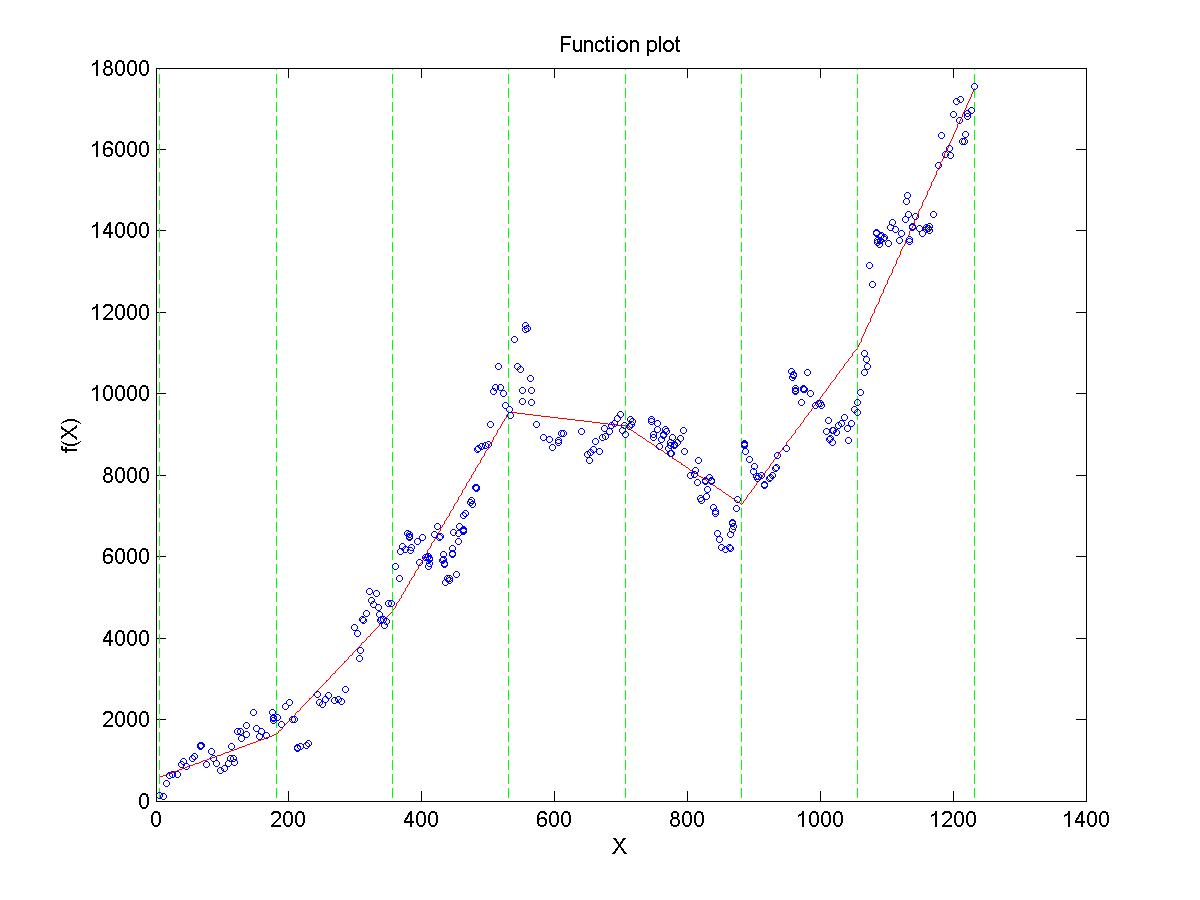
Recently I had some very noisy data that I wanted to fit a curve to. The problem is there were different regions that were somewhat linear, but the overall data was far from linear. A spline or a polynomial did not capture the behavior in a global sense. What I wanted was the ability to fit a line to each region. SLM does that right out of the box.
I think it is very instructive to look at how this code was packaged up. There is a clearly labeled tutorial that was easy to scan looking for an example like what I wanted to do. All of the files have lots of comments. sometimes more comments that code I think. The files are named coherently so they make a nice package. These are all great things to make a package that other people can use.






Comments
To leave a comment, please click here to sign in to your MathWorks Account or create a new one.