
Automate the Documentation of Your MATLAB Analysis with Agentic AI
 |
Co-author: Rohan Amarapurkar Rohan Amarapurkar is the product manager for the MATLAB Desktop and Editor. Rohan holds a Master's in Electrical Engineering from USC and previously was a UX Researcher at MathWorks. |
This is a scenario that I shared with Rohan to get his advice: you finish an analysis in MATLAB, the plots look great, and now you need to share it with your team. So you start the tedious dance—export to PDF, copy the figures, write up a README, hope you didn't forget anything. And then someone asks you to tweak one parameter, and the whole process starts again.
There is now a more elegant solution, and in this blog post I am going to introduce a workflow that lets AI do the heavy lifting. With the MATLAB MCP Core Server and a few well-crafted prompts, you can go from analysis to a beautifully documented GitHub repository in minutes.
|
What's new |
Why it matters |
|
AI-driven documentation workflow using MCP |
Your analysis, figures, and narrative stay in sync automatically |
|
Plain-text Live Script format (R2025a) |
Finally, meaningful Git diffs for Live Scripts |
|
Export to Markdown with embedded outputs |
GitHub renders your analysis as a professional README |
The documentation problem
Let's admit it: documentation is often an afterthought. We write code, iterate on our analysis, and by the time it works, we're ready to move on. But good documentation is what separates a throwaway script from a reusable, shareable piece of work—especially if you're a researcher sharing publications, a student building your portfolio or an engineer looking to share your analysis with a colleague (or maybe your future self).
Starting point: your existing analysis
Most of us don't start from a blank page. We have a script that already works. Let me show you what I mean. Here's a simple analysis of the power outage dataset that ships with MATLAB (outages.csv):
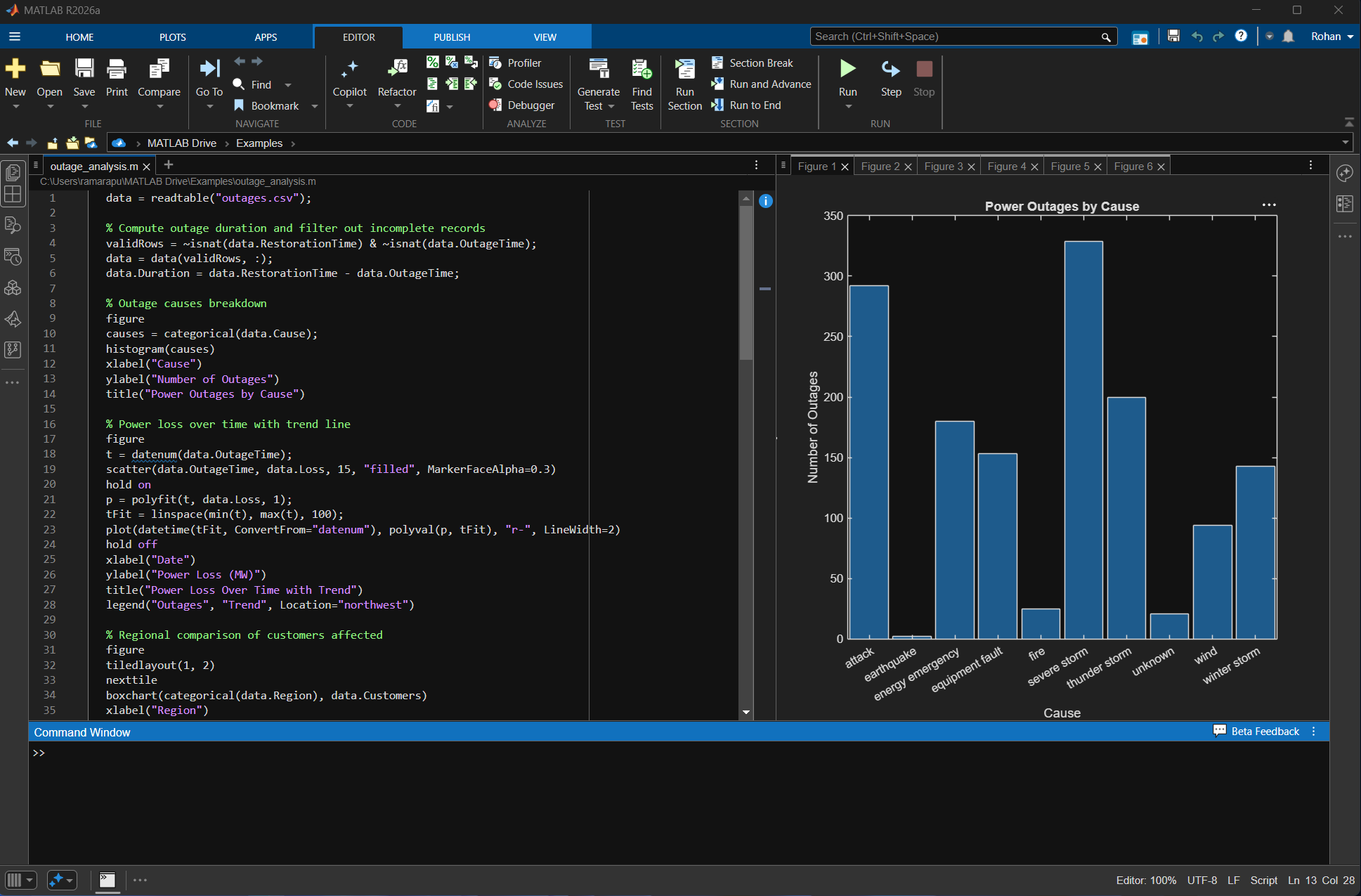
It works. The plots look great. But it's just a script — no headings, no explanation of what we're finding, no narrative that a colleague could follow. This is where the MATLAB MCP Core Server comes in.
Why plain-text Live Scripts change the game
Before we dive into the workflow, let me explain why it's possible now, and why Rohan's team was instrumental in enabling it.
When we talked to Live Script users, one pain point came up again and again: the binary .mlx format didn't play well with modern development workflows. You couldn't get meaningful diffs in Git. You couldn't open your scripts in VS Code or your favorite text editor. And if the file got corrupted, you were often out of luck.
With the new plain-text format introduced in R2025a, Live Scripts are now stored as .m files with Markdown-based markup in comments. Here's what that looks like:
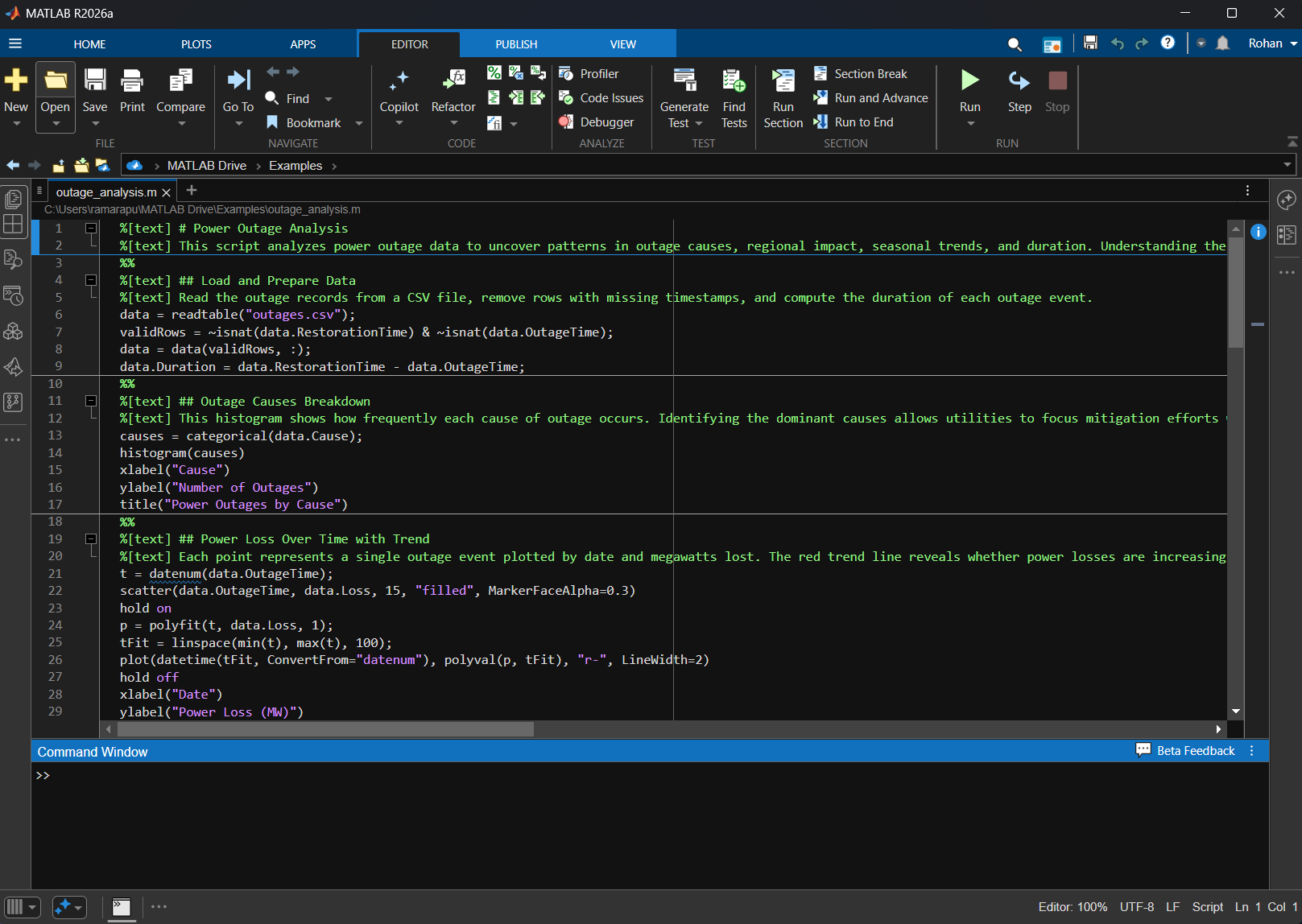
The key benefits:
- Git-friendly: You can now see exactly what changed between commits
- Editor-agnostic: Open and edit in VS Code, Notepad++, or any text editor
- AI-friendly: Large language models can generate and modify plain-text Live Scripts directly
This last point is what makes the agentic workflow possible. An AI agent can read your existing script, restructure it as a Live Script in plain text, and MATLAB opens it seamlessly in the Live Editor with full formatting.
The automated documentation workflow
Now let me walk you through the complete workflow. I'll be using Claude Code with the MATLAB MCP Core Server, but this works with any MCP-compatible client.
Step 1: Convert your script to a Live Script using skills
Here's the key insight: you don't need to write a Live Script from scratch. You can hand your existing analysis to an AI agent and ask it to transform it.
The matlab/skills repository contains curated skill templates for various MATLAB workflows. For generating properly formatted plain-text Live Scripts, point your AI assistant to the matlab-live-scripts skill.
The concept of Agent Skills introduced first by Anthropic in Claude enables "lazy-loading" of context in your agentic conversation (think Neo in The Matrix who "knows kung-fu" after getting a single file upload). We have shared a few MATLAB specific skills in github.com/matlab/skills.
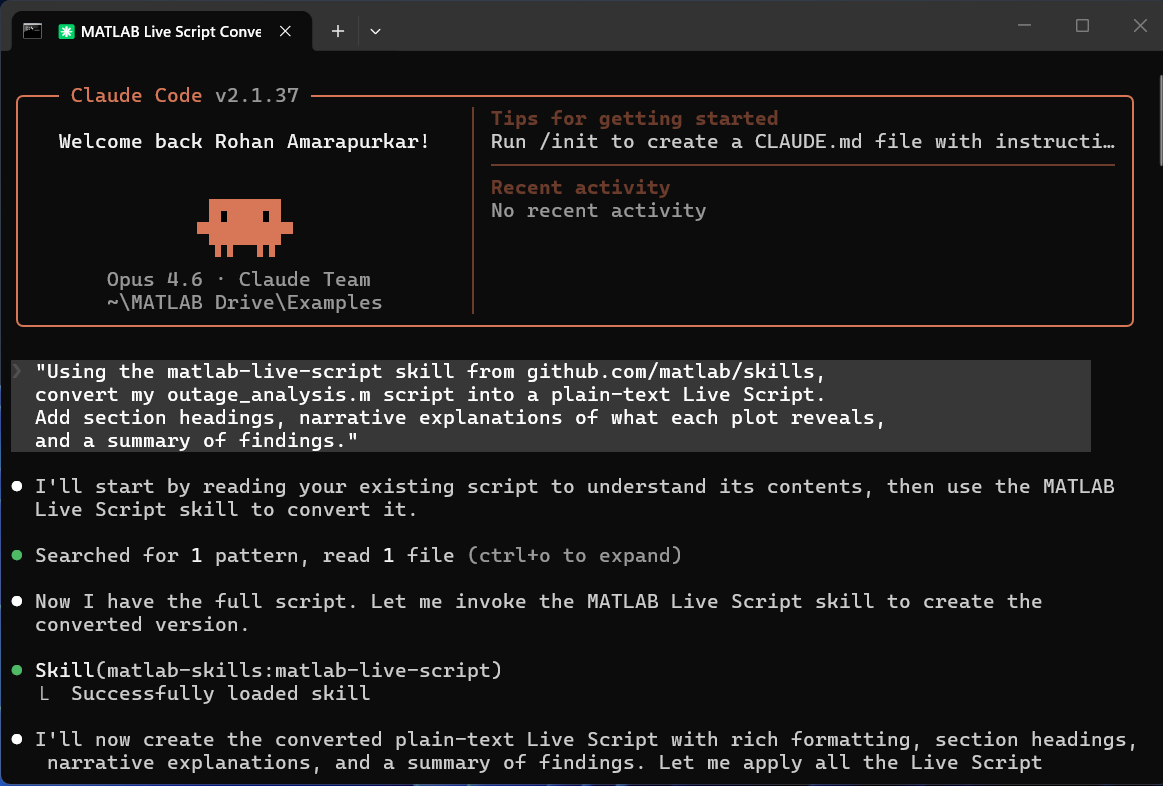
Here's an example prompt you might use:
Using the matlab-live-script skill from github.com/matlab/skills,
convert my outage_analysis.m script into a plain-text Live Script.
Add section headings, narrative explanations of what each plot reveals,
and a summary of findings.
The AI reads your existing code, understands the analysis, and generates a .m file with the correct markup syntax—section headers using %[text] ## Title, explanatory text between code blocks, and the required appendix closure. Your analysis logic stays the same; it just gets wrapped in a professional narrative.
Step 2: Review the results in the Live Editor
After generating the Live Script, open it in MATLAB to verify everything looks right. The figures will be embedded inline with your code and narrative once you run the script. You'll see your outage histograms, scatter plots, and box charts rendered beautifully alongside the explanatory text that the AI generated.
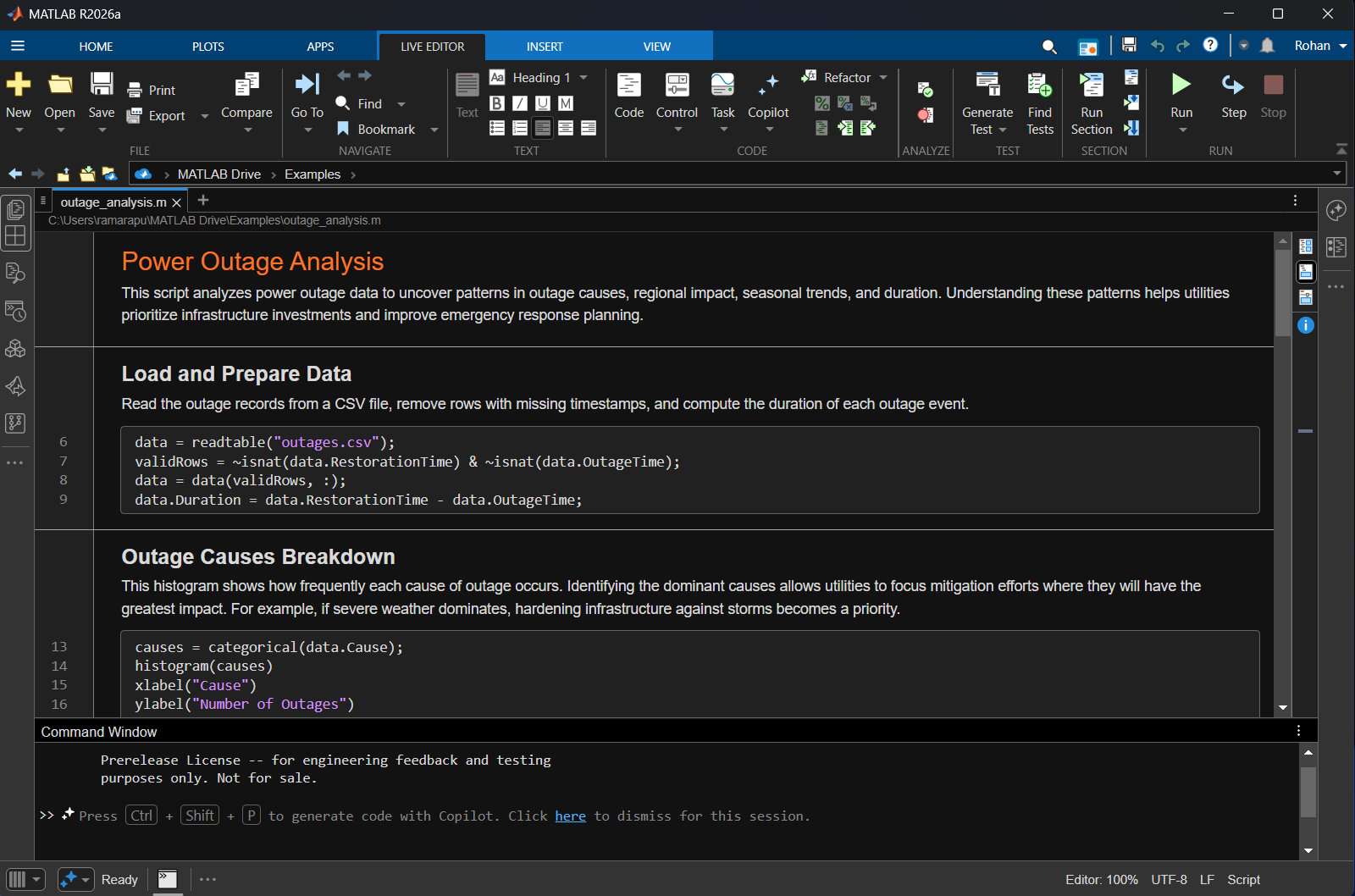
This is also where you can make adjustments. Maybe you want to tweak a plot title, add a finding the AI missed, or reorganize a section. The plain-text format means any edits show up cleanly in version control.
Step 3: Export to Markdown
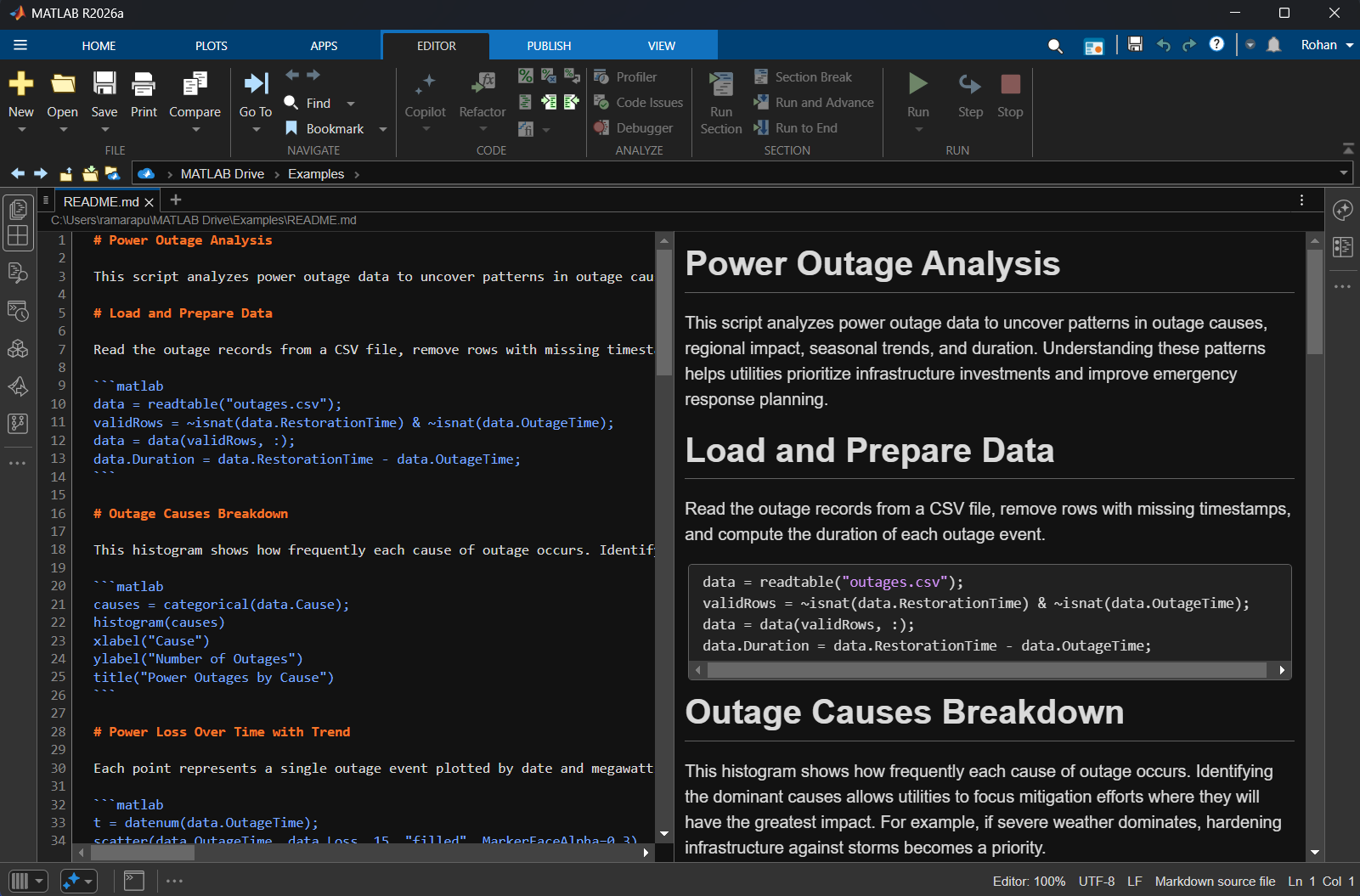
Now for the magic. MATLAB's export function (R2023b+) can convert your Live Script to Markdown:
export('outage_analysis.m', 'README.md', ...
Format='markdown', ...
EmbedImages=false, ...
IncludeOutputs=true)
Setting EmbedImages=false creates a README_media/ folder with your figures as separate files—which is what you want for GitHub. The Markdown file references them with relative paths, and GitHub renders everything beautifully.
Step 4: Push to GitHub or GitLab
The final step is committing your work to version control. Whether you're a researcher sharing your publications or a student building your portfolio—GitHub is the natural choice. GitLab works just as well.
Your repository structure will look like this:
outage-analysis/
├── README.md ← Exported from Live Script
├── README_media/ ← Figures referenced by README
│ ├── figure_0.png
│ ├── figure_1.png
│ └── figure_2.png
├── outage_analysis.m ← Plain-text Live Script (source)
└── .gitattributes
Putting it all together
The complete workflow in one AI conversation might look like this:
Each step triggers the appropriate MCP tools, and your documentation stays perfectly in sync with your analysis. And here's the best part: when someone asks you to tweak a parameter—say, filter for outages after 2010 or focus on a single region—you just re-run the conversation and the entire repository updates: code, figures, narrative, and README.
Tips for best results
A few lessons learned from using this workflow:
- Use the plain-text format (R2025a+): Set it as your default in Settings → MATLAB → Editor/Debugger → Live script format → M. This makes AI generation much more reliable.
- Set .mlx as binary in .gitattributes if you're also tracking the binary format: *.mlx binary
- Add an "Open in MATLAB Online" badge: Help others run your analysis instantly:
[] (https://matlab.mathworks.com/open/github/v1?repo=USERNAME/REPONAME)
Special thanks to Rohan Amarapurkar for contributing to this post and for his work making Live Scripts AI-friendly.
- 범주:
- Agentic AI






댓글
댓글을 남기려면 링크 를 클릭하여 MathWorks 계정에 로그인하거나 계정을 새로 만드십시오.