
Vectorizing Language with Word and Document Embeddings
Natural language is the foundation of human communication, but it’s unstructured and full of nuance. Synonyms convey similar ideas, a single word can carry multiple meanings, and language interpretation shifts with context. Capturing this complexity in a format that algorithms can understand is an important challenge in natural language processing (NLP). Vectorization and techniques like word embeddings and document embeddings encode language in an efficient way that NLP algorithms can work directly with.
In this post, we’ll explore why vectorizing language matters, what word and document embeddings are, and how you can implement and visualize embeddings with MATLAB. These embeddings enable applications like semantic search, text classification, topic modeling, and recommendation systems.
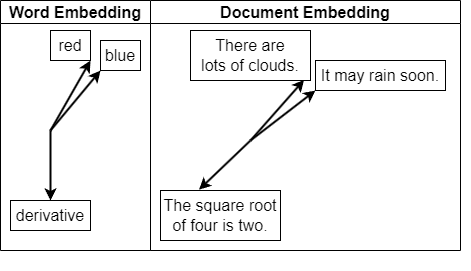 In MATLAB, you can easily create document embeddings for tasks like document classification and information retrieval.
 You’ll see meaningful groupings, for example, animals, vehicles, or geographical regions. This indicates that the embedding space organizes words by semantic relationships. For an example, see Visualize Word Embeddings Using Text Scatter Plots.
Why Vectorization Matters in NLP
Vectorization is language converted into numbers. It transforms raw text into features that machine learning and deep learning models can understand, making it foundational to any NLP application, from sentiment analysis to language translation and chatbots. A naive way to perform vectorization is using one-hot encoding, where each word is represented as a long, sparse vector with a 1 in a single position. However, this approach has major drawbacks:- It does not capture semantic similarity (e.g., “car” and “vehicle” are just as unrelated as “car” and “banana”).
- It creates high-dimensional data that’s inefficient to store or compute on.
- It ignores word order and context.
What Are Word Embeddings?
Word embeddings are vector representations of words that capture their meaning based on context and usage. Word embeddings, such as Word2Vec, GloVe, and fastText, map words into dense, low-dimensional vectors where semantically similar words are close in the vector space. This transformation enables algorithms to generalize better and capture deeper linguistic relationships. The key characteristics of word embeddings are:- Each word is represented by a fixed-length vector (typically 50–300 dimensions).
- Words with similar meanings (e.g., “cat” and “kitten”) end up with similar vectors.
- Arithmetic with embeddings can reveal relationships: word2vec("king") - word2vec("man") + word2vec("woman") ≈ word2vec("queen")
emb = fastTextWordEmbedding;
vec1 = word2vec(emb,"Greece");
vec2 = word2vec(emb,"Athens");
sim = cosineSimilarity(vec1,vec2)
sim = single
0.7875These representations enable tasks such as clustering and analogy completion, and serve as input features for machine learning models.
Contextual Word Embeddings
Unlike traditional word embeddings (often referred to as static embeddings) that assign a single vector to each word, contextual word embeddings generate dynamic representations that vary depending on surrounding words. This allows models to capture the subtle nuances of meaning. For example, contextual word embeddings distinguish between “bank” in “river bank” versus “savings bank.” Contextual embeddings are produced by large language models like BERT and GPT, which consider the entire sentence when generating a vector for each token. In MATLAB, you can integrate these models using transformer-based architectures or external APIs, enabling powerful applications in sentiment analysis, semantic search, and language understanding. For an example, see Information Retrieval Using OpenAI™ Document Embedding in the LLMs with MATLAB repository.What Are Document Embeddings?
While word embeddings focus on individual words, document embeddings represent entire phrases, sentences, or documents as single vectors. They aim to capture not only word meanings but also word order, structure, and context.
In MATLAB, you can easily create document embeddings for tasks like document classification and information retrieval.
emb = documentEmbedding;
documents = ["Call me Ishmael. ..." + ...
"Some years ago—never mind how long precisely—having ..." + ...
"little or no money in my purse, and nothing particular ..." + ...
"to interest me on shore, I thought I would sail about ..." + ...
"a little and see the watery part of the world."];
embeddedDocuments = embed(emb,documents)
embeddedDocuments = 1×384
0.0640 0.0701 0.0566 0.0361 0.0787 -0.0815 0.0793 0.0077 ...
Visualizing Embeddings
Understanding how embeddings capture meaning in language often starts with visualization. By projecting high-dimensional word or document vectors into a 2D or 3D space, you can explore how semantically similar terms cluster together. MATLAB provides built-in functions like t-SNE and PCA to help you make sense of these embeddings.emb = fastTextWordEmbedding;
words = emb.Vocabulary(1:5000);
V = word2vec(emb,words);
% Reduce to 2D using t-SNE
XY = tsne(V);
% Plot
figure
textscatter(XY,words)
title("t-SNE Visualization of Word Embeddings")
You’ll see meaningful groupings, for example, animals, vehicles, or geographical regions. This indicates that the embedding space organizes words by semantic relationships. For an example, see Visualize Word Embeddings Using Text Scatter Plots.
Final Thoughts
Word and document embeddings form the backbone of modern NLP. They allow algorithms to “understand” text by converting language into numbers that capture meaning and context. Where are you going to apply embeddings? Classifying documents, analyzing sentiments, or building your own language-based application? Get start with examples from the Text Analytics Toolbox documentation and comment below to share your workflow.- Category:
- Deep Learning



Comments
To leave a comment, please click here to sign in to your MathWorks Account or create a new one.