
Plain-Text MATLAB Apps in R2026b: A Diff You Can Read
 |
Guest Writer: Daniel Cuccia Danny is a software engineer on the App Building Infrastructure team. He started his career at MathWorks in 2018 on the App Designer team. As his understanding of how MATLAB's internal systems fit together grew, through work on features like the app code generation architecture, he found his way to the infrastructure team, where he now works on how app architecture itself works in MATLAB. Danny has studied everything from audio engineering to simulation programming to game development, but has always been drawn to software architecture as the backbone of what he builds. Outside of MathWorks he plays countless instruments, snowboards, and is always picking up a new hobby alongside his family. |
For years, one of my quiet frustrations with App Designer apps was a file: the .mlapp, and I know I’m not alone. It held everything: layout, callbacks, helper methods, the whole app, in a single classdef, all inside one binary file. That's tidy in principle, and fine for my simple casual apps. In practice, it nudged, almost forced, all of us toward keeping everything in that one file, and those .mlapp files grew. And grew. Until "let me just find where the button callback lives" turned into a spelunking expedition through a multi-thousand-line classdef.
The part that really got me wasn't the size, though. It was what happened when two people tried to work on the same app. Or when I opened my own project six months later and wanted to see what I'd changed. The answer from source control was, essentially, a shrug: "something in the app is different." Gee... thanks.
So a while back, I set out to fix a specific, unglamorous problem: make MATLAB apps something you can actually collaborate on.
The thing I actually wanted: a diff you can read
Here's the whole dream, and it's a modest one. I wanted to open a pull request and see this:
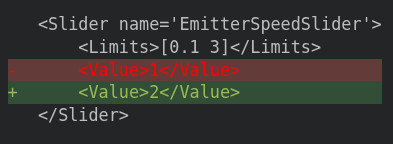
Not "binary file changed." Not a re-render of the entire app. Just: someone doubled the emitter speed. I can review that. I can approve that. I can blame that (lovingly).
To get there, an app needs to live as plain text: text that a human reads and recognizes, and that a version control tool can line up side by side. That's exactly what the new plain-text app format gives you. Save-as -> change the file format (or change the default in the App Designer preferences), and your app becomes two files which App Designer manages for you that sit happily in Git, Subversion, or whatever you use:
- a .m file with your app's classdef and implementation: your code, your logic, your callbacks
- a .xml file that holds the layout and configuration: where the components live and information about how they're set up
What lives where
Take my little demo app, ParticleGenerator. The .m file is exactly what you'd hope: readable app code, and not much else.
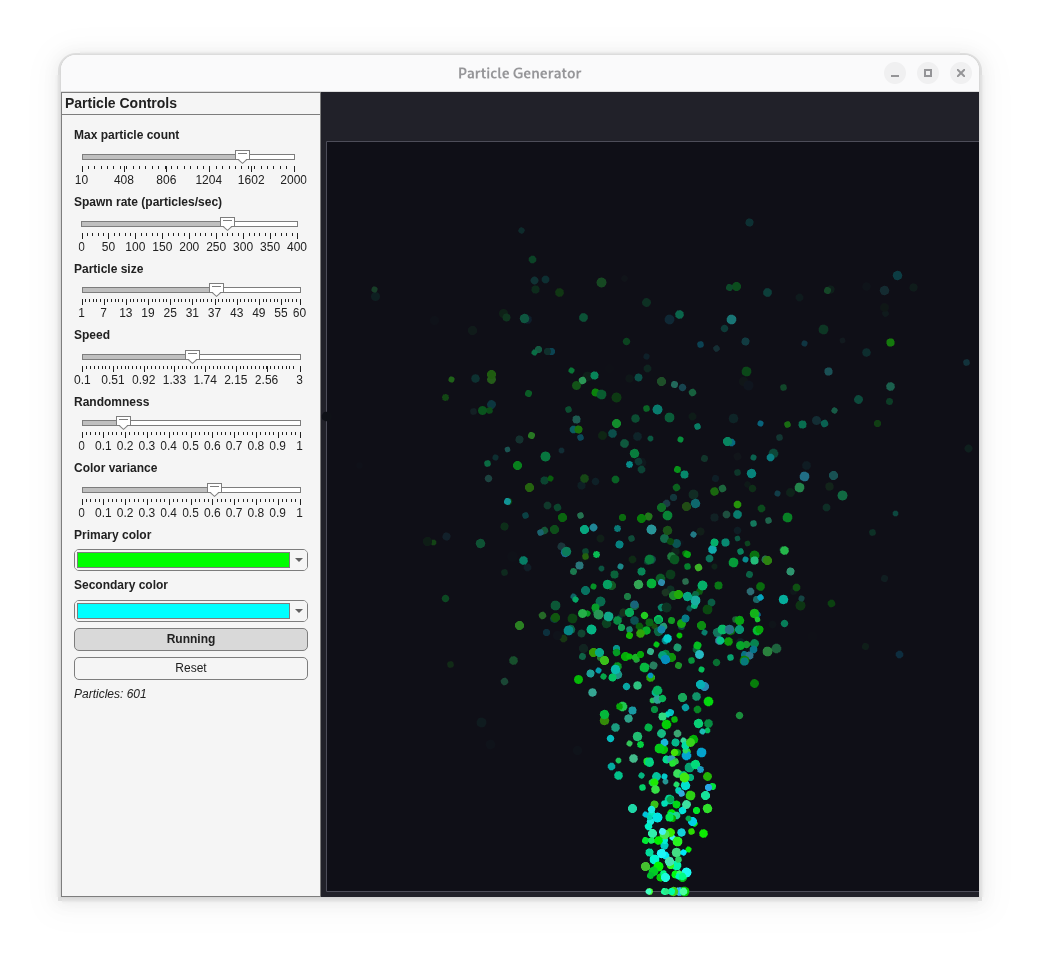
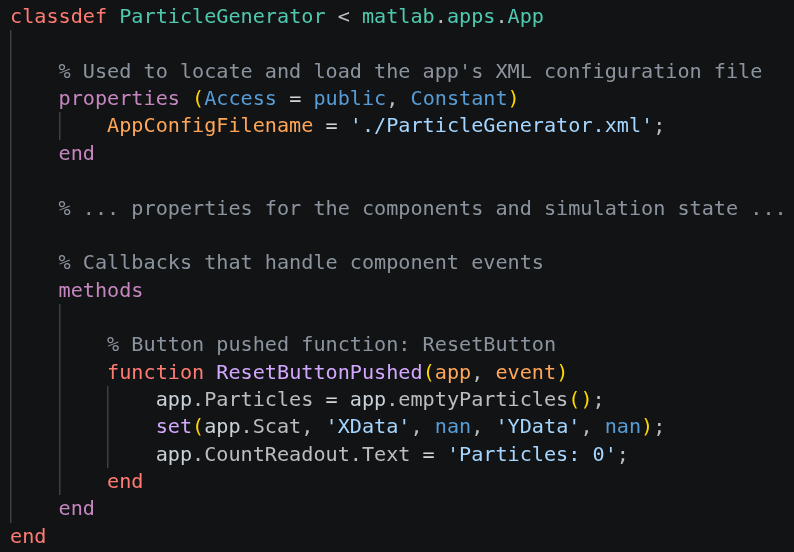
That's the app I want to write. Notice what isn't there: the ceremony of wiring up a figure, positioning every component by hand, or the bookkeeping that makes an app an app. I get to write the part that's mine, what the app does, and let the framework handle the rest.
The layout lives next door, in the .xml file:
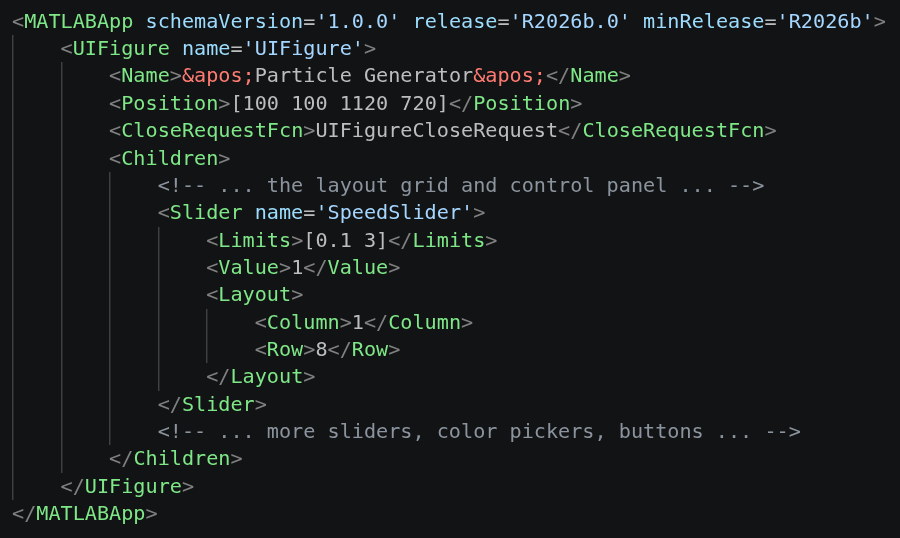
So there's the split, and it maps onto how I actually think about the app. When I want to change what a button does, I open the .m and find ResetButtonPushed. When I want to change where that button sits, or what a slider's range is, I open the .xml and find the component by name. The behavior and the layout stop being tangled together in one blob of M code. You can read the .xml and know exactly what the app is made of, component by component, before you even run it.
Collaboration, finally
This is the part I built the whole thing for, so let me slow down on it.
Because the app is two text files with named components, source control finally has something to work with. Say a teammate and I are both in ParticleGenerator this week. I’m chasing performance in the tick loop, the method that advances every particle each frame, trying to shave the per-frame cost. They’re adding a new tunable: a gravity slider, so you can dial the pull on the particles instead of living with the value I hardcoded.
The layout part of their change just lands. Their new slider is a self-contained, named block in the .xml, and it drops in next to the existing controls without coming anywhere near my work. Different file, different spot, no conversation required.
Where we actually collide is one line inside tick. I noticed gravity*dt gets recomputed on every frame for no reason, so I folded it into a constant. They swapped that same gravity = -55 line for a read off their new slider. Two people, one line, and Git can’t pick for us:
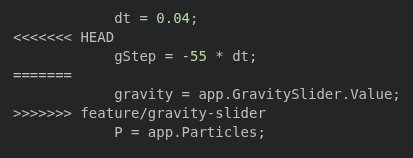
Under the .mlapp, this was the painful case. Source control on its own had nothing to offer, just a binary blob it couldn’t merge. MATLAB’s Comparison Tool could at least show you the two versions, but resolving them was a left-or-right choice: take my copy of the app or take theirs, not both. There was no way to keep my optimization and their slider in a single pass.
Now it’s an ordinary code merge, and both ideas obviously belong together. I keep the precomputed step, they keep the tunable value, and the two just... combine:
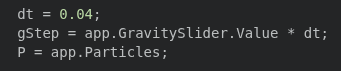
I read both sides, understood both intents, and reconciled them line by line like any other MATLAB source. Nobody’s afternoon got overwritten.
And when a change is small, you can take it at a glance. This slider tweak at the top of this article is the whole shape of it: a <Value> went from 1 to 2, and that’s the entire story the review has to tell. Six months later, git blame points at the exact line and the exact commit, instead of shrugging at a binary blob. That’s the difference between history you can question and history you just have to trust.
Choosing a data format
Have you ever stood in front of a room of seasoned engineers and announced that your new file format uses XML? I have. It did not go quietly. MATLAB engineers and scientists live and breathe M code, so proposing that a chunk of the app lives somewhere else, and in angle brackets no less, raised some very fair questions. If the .m is already the app’s code, why doesn’t the layout just live there too?
Here’s the answer I landed on, and the one I still give: the layout isn’t really code. It’s a description. Here are the components, here’s how they’re set up and where they sit. The .m says what the app does. The .xml says what the app is. Two different jobs and it turns out they’re happier in two different files.
Then, someone near the front asked the question I’d secretly been hoping for. If the layout doesn’t have to run in MATLAB, does the app come up faster? It does! Because that .xml contains a static description, the visual of an app can render and feel responsive while MATLAB is still getting its boots on behind it.
So no, it’s not all more M code. And the angle brackets? I didn’t mind them tagging along.
Give it a try
If you've ever squinted at a "binary file changed" line and wished for something better, this one's for you. If you ever wanted to open a MATLAB app in Notepad++ for a quick typo fix, I got you. If you have strongly-well-intentioned questions of your own, the documentation has the answers I couldn’t get into here. Open an App Designer app, save-as the new plain-text format, make a small change: move a component, tweak a callback, rename a label, and then look at the diff. That little moment of "oh, I can actually read this" is the whole point.
App Designer’s new plain-text format is available in R2026b. Go make a diff you can be proud of, and... blame the ones you’re not... (lovingly).


댓글
댓글을 남기려면 링크 를 클릭하여 MathWorks 계정에 로그인하거나 계정을 새로 만드십시오.