
MATLAB + Agentic AI: The Workflow That Actually Works
Bio: This blog post is co-authored by Toshi Takeuchi, Community Advocate active in online communities. Toshi has held marketing roles at MathWorks over the last 19 years.
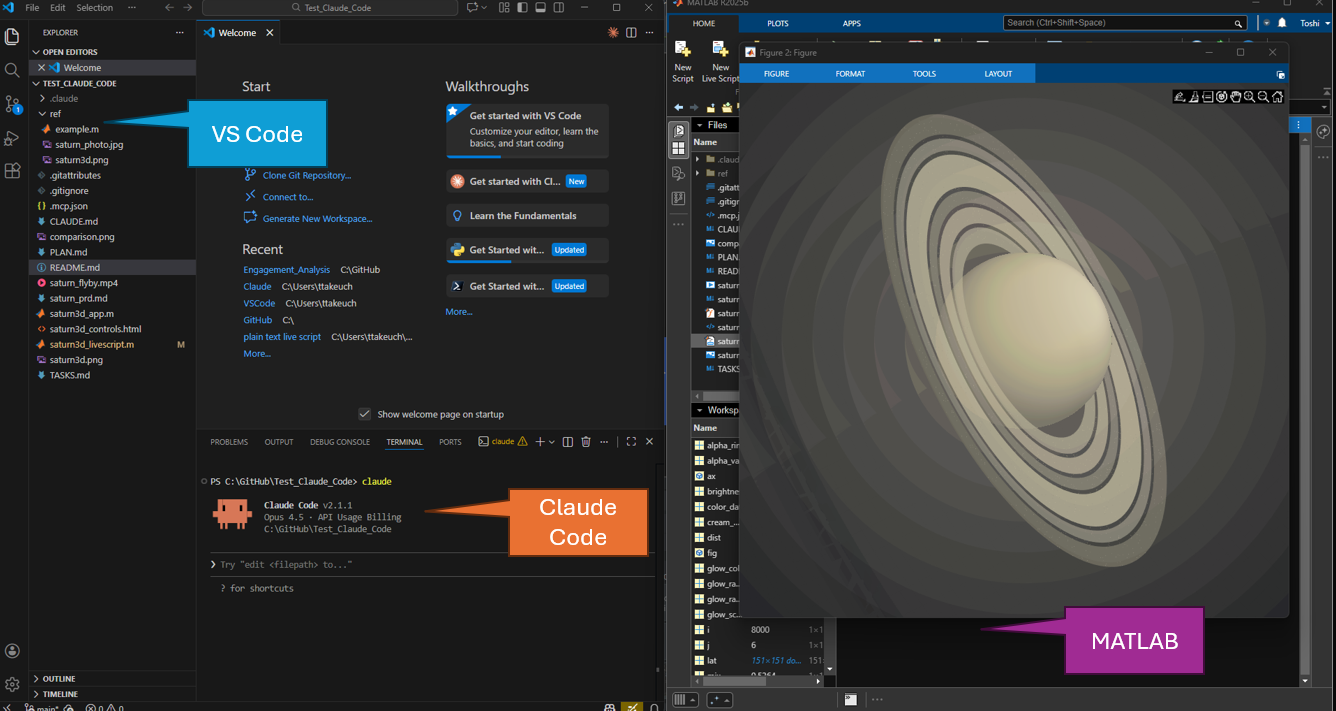
MathWorks released MATLAB MCP Core Server in October 2025, enabling coding agents to drive a local MATLAB installation via Model Context Protocol. Since then, many of us have been exploring agentic workflows. Toshi recently published a video series showcasing a creative project that caught a lot of attention: recreating a NASA photograph of Saturn as a 3D visualization (video) in MATLAB, adding a flyby animation (video), generating scripts into live scripts (video), and wrapping everything into an interactive app (video).
Today, I would like to share a chat I had with Toshi about the Research / Plan / Implement (RPI) approach he used in his agentic coding project. I also asked Toshi where all of this is headed - how agentic coding could reshape scientific and engineering workflows, because that’s a question many of us are asking. I hope that you find his answer insightful.
Why 3D Saturn? Why RPI?
Mike: “I really enjoyed your videos on LinkedIn and Bluesky. Where did the idea come from?”
Toshi:
Mike, your earlier blog posts got me thinking about trying MATLAB MCP Core Server, but the real spark came when I saw a beautiful image of Saturn on LinkedIn. I wondered “Could I recreate this in 3D using MATLAB?”
I mostly use MATLAB for plotting and had zero experience with advanced graphics, so it felt like the perfect project to try an agentic workflow on. And with MATLAB Mini Hack gallery full of helpful examples, I had plenty of materials for the coding agent to learn from.
Mike: The results are amazing! I want to run them myself on MATLAB. Where is the code please?
Toshi:
Sure, I’m happy to share it, but keep in mind that you might not get the exact same results, because LLMs are non-deterministic. And that’s a good thing. The whole point of agentic workflows is that your creativity becomes part of the process. This was my holiday project, so I kept it fun and exploratory. I’d love to see how you make it your own.
- example.m - The example I fed to my coding agent (I converted this script contributed by Adam Danz in MATLAB Mini Hack into plain text live script format)
- saturn3d_livescript.m - Main MATLAB script (plain text live script with documentation)
- saturn3d_app.m - Interactive app with uihtml controls
- saturn3d_controls.html - HTML/JS control interface used within saturn3d_app.m
Mike: “You mentioned the Research/Plan/Implement (RPI) approach in your videos. What does it mean?”
Toshi:
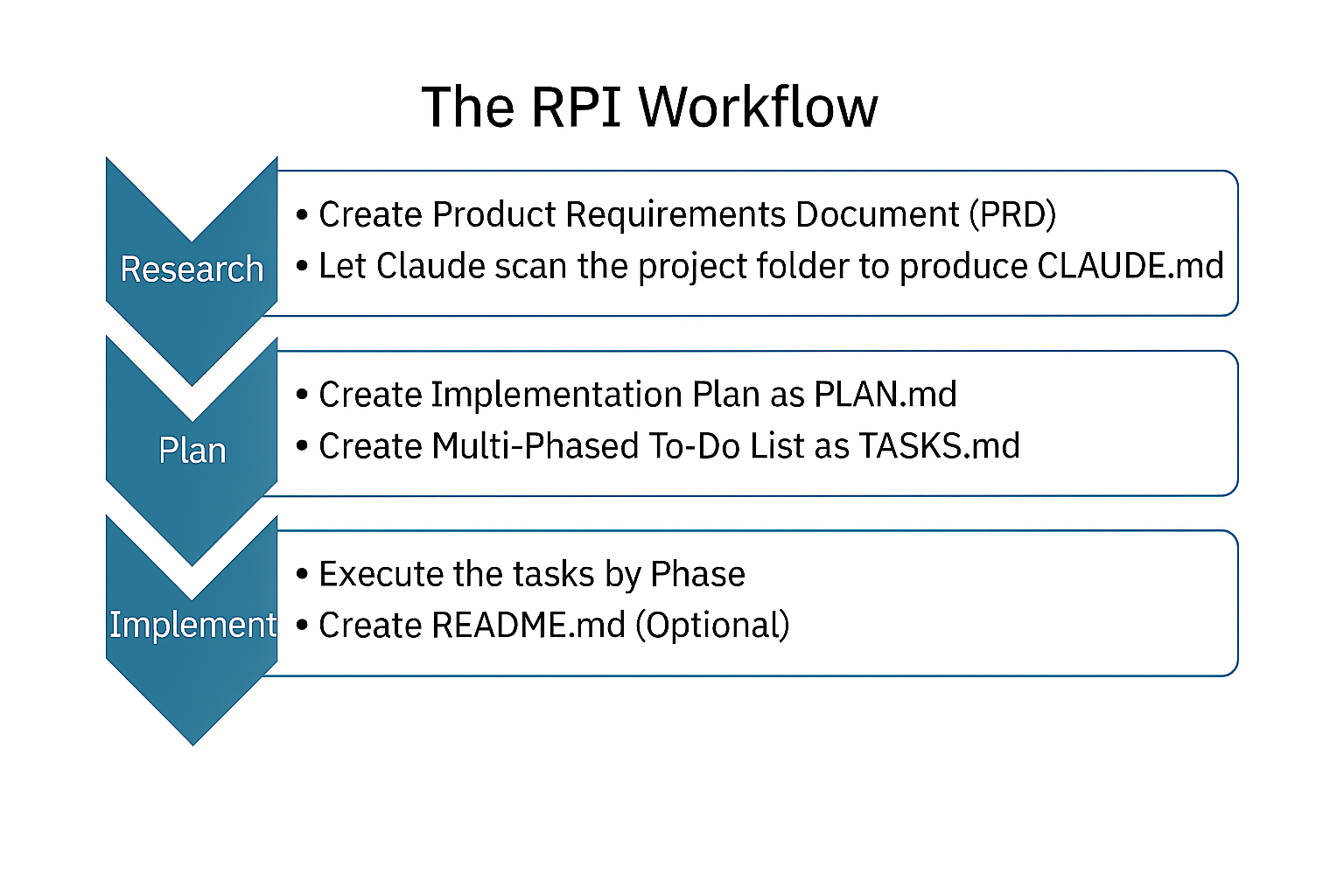
I kept seeing people talk about it on Reddit and YouTube. This is probably not a good use case, but in the past I often just told Copilot to “start coding,” and the results were hit‑or‑miss. The RPI approach in an agentic workflow forces you to plan first, and I was blown away by the difference. The hype was real.
The RPI Workflow
Mike: “Let''s start with research. What exactly did you do?”
Toshi:
The Research stage begins with a Product Requirements Document (PRD) which the coding agent creates from a prompt we supply. To create a PRD, I turned on the Plan Mode, and wrote a description of the goal - recreating Saturn’s appearance in terms of look. Here is the actual prompt I used:
"Help me write a PRD for a MATLAB project that recreates NASA's Saturn photo as a 3D graphic. I want the MATLAB output closely mimic the image in 3D, including, shading, colors, halos, and POV. Keep the PRD concise and appropriate for the scope of this project. The reference photo and a MATLAB code example are provided."
Then I dragged in the reference photo and example code, and let the coding agent work on it. It asked me clarifying questions and refined the document step by step.
One interesting moment was when the coding agent asked me if I wanted visual effect or technical accuracy. I went with visual effect, but I wonder what I would have gotten if I had chosen technical accuracy. If I had domain expertise in astrophysics, that would have been an interesting path to go down.
Once the PRD.md looked solid, I generated a CLAUDE.md file, which Claude Code, the coding agent I used, creates by scanning files in the folder. It works as a persistent configuration file that anchors the agent’s behavior. This file may be called AGENTS.md in other coding agents.
Everything’s just Markdown, so it’s easy to review and edit.
Mike: “Thinking through the goals and requirements - Sounds like something we should be doing anyway. What comes next in the Plan stage?”
Toshi:
In the Plan stage, the coding agent generates an implementation outline based on the research documents and saves it as PLAN.md. I usually iterate on this a few times to clean up the logic.
Then I have the coding agent create a multi‑phased to‑do list based on that plan and save it as TASKS.md. This document tracks progress and ensures the implementation happens in phases instead of all at once. If something goes wrong, you can stop the agent before it moves on.
Mike: Do you ever hand edit these files? Or are they something that only the coding agent touches?
Toshi:
I usually let the coding agent handle those files. That keeps everything consistent across the project without me manually updating each document. But when something needs a small tweak or clarification, I’ll edit it myself.
Mike: “At this point we have accumulated a lot of Markdown files. Why do we need them?”
Toshi:
To manage the context window - the LLM’s short‑term memory. As the window fills, the model starts forgetting details and performance drops. We humans write things down for the same reason. By storing all important details in Markdown files, we can reset the context window between steps while preserving the information that matters.
Mike: “That makes sense. Then what happens in the implementation stage?”
Toshi:
Once the planning documents look good, you exit the Plan Mode and let the coding agent start the Implementation stage, phase by phase. If anything breaks or looks wrong, you stop it, make corrections, and re‑run the phase. The coding agent stays on track thanks to PLAN.md and TASKS.md.
Once everything is completed, then you can also let the agent generate a README.md file.
I still check the generated code, but the process could become even more autonomous if I write unit tests up front and add them to the task list. The coding agent can generate those tests as well, so that’s the next logical improvement.
Mike: “You mean adding verification and validation steps. This almost sounds like Model-Based Design.”
Toshi:
Right? Good ideas keep coming back.
Mike: “What else do you think you can improve on the RPI process?”
Toshi:
I see a lot of talks about using of subagents and also "Ralph Wiggum loop." Subagents are great for delegating self‑contained tasks, such as generating a live script, and this helps preserve the main agent's context window. The Ralph Wiggum loop takes the RPI idea even further by running the implementation phase in a continuous loop instead of planning out every step in advance. And beyond local workflows, you can run Claude Code in a GitHub Actions CI/CD pipeline in the cloud. For example, you can trigger code review with Claude Code when you push changes. You can use MATLAB with GitHub Actions to trigger MATLAB tests as well.
Setup and Tooling
Mike: “Where do you keep all the project files?”
Toshi:
To trust a coding agent, you need a controlled environment with easy rollback - that means Git. In MATLAB, you can right‑click a folder to initialize a local Git repo, and MATLAB automatically generates .gitattributes and .gitignore. I love this new feature.
I’m on Windows, and I keep everything under C:\GitHub. For a new project, I create a folder there and initialize it as a local repo. All project files live in that folder. See below all the files I had before starting the RPI workflow. Claude automatically creates .claude folder and .mcp.json was created when you set up MATLAB MCP Core Server.
Once PRD.md is added, this gives enough files for Claude Code to scan to generate CLAUDE.md. Make sure you make the coding agent update all the relevant Markdown files as you make changes.
project/
├── .claude/
├── ref/
│ ├── saturn_photo.jpg
│ └── example.m
├── .gitattributes
├── .gitignore
└── .mcp.json
Mike: “How did you set up MATLAB MCP Core Server and Claude Code?”
Toshi:
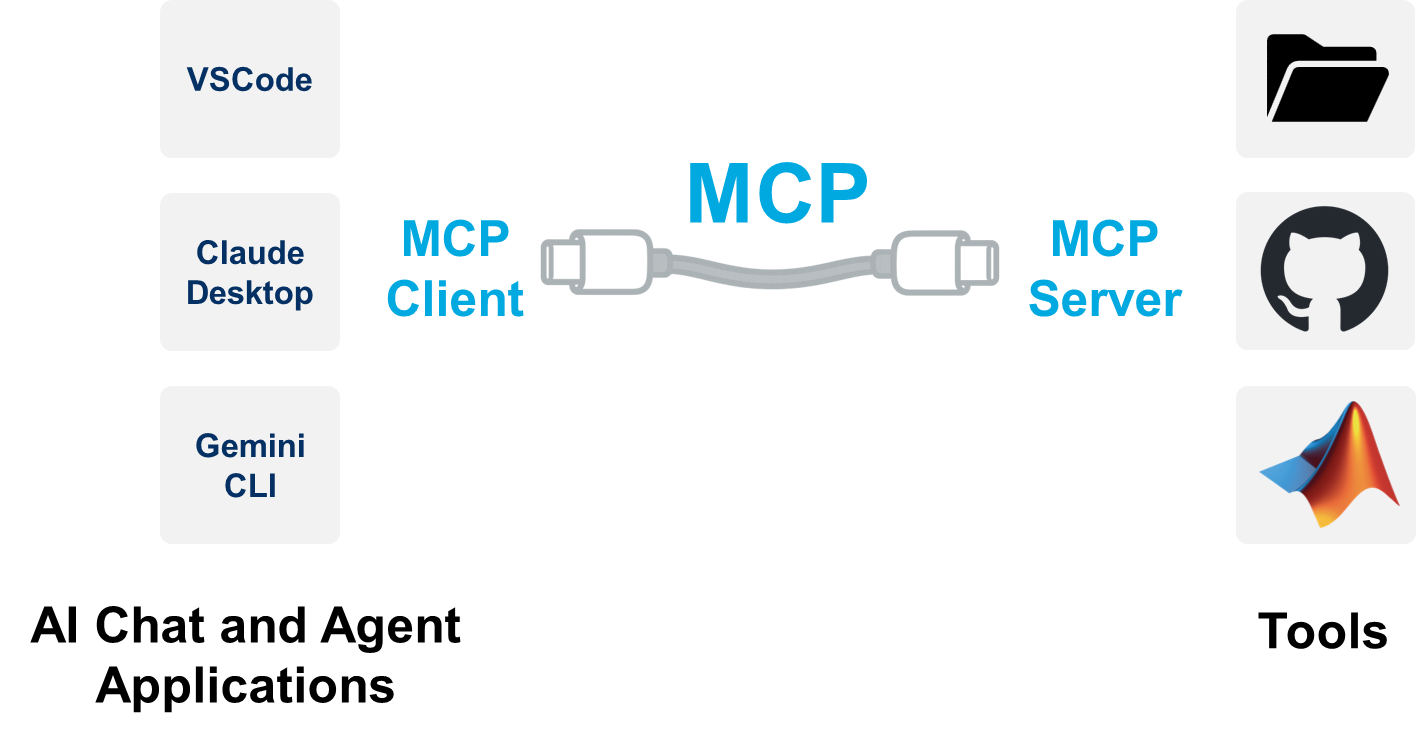
MATLAB MCP Core Server is just an executable - I put it in C:\MCP. The configuration file for MCP is placed in individual project folders because I may want to customize it by project.
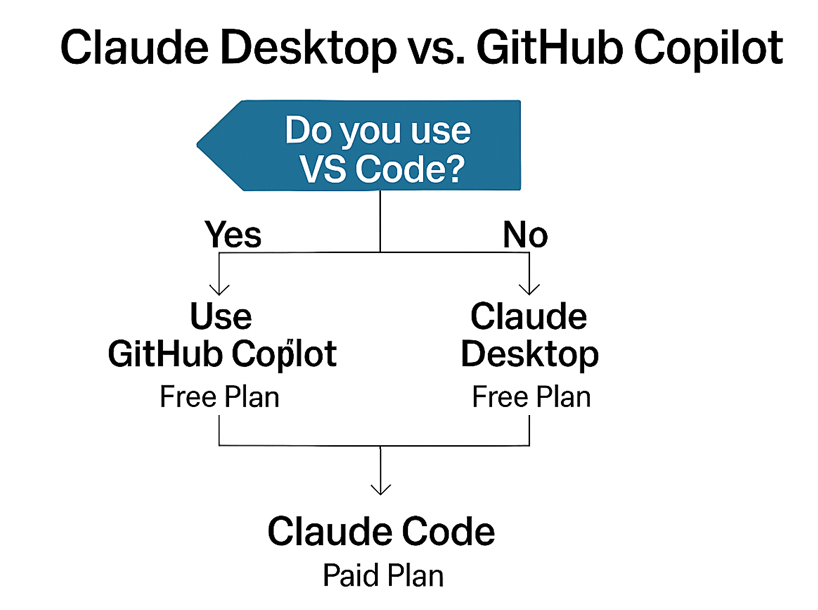
In my case, I run Claude Code inside VS Code as the main coding agent and connect to MATLAB through MCP. But I recommend starting with Claude Desktop (video) or GitHub Copilot (video) inside VS Code, since both have free plans. It’s a good way to get a feel for agentic workflows with MATLAB. If you use VS Code, don't forget to install MATLAB Extension for VS code.
I think Claude Desktop is easier to set up for beginners unless you already use VS Code. And if your Generative AI experience so far is mostly chat‑based, coding agents will feel different. You tell the agent what to do instead of asking questions. Get used to that first. Once you’re ready for more, upgrade to the paid plan to use Claude Code to get the full benefit of RPI. The transition is smooth because you already installed most of the dependencies when you set up Claude Desktop or GitHub Copilot.
Aha! Moments
Mike: “What I liked about your videos was how you used various MATLAB tools together with agentic AI, like creating live scripts and interactive apps. What impressed you the most?”
Toshi:
Claude Skills knocked my socks off - it’s like the “I know kung‑fu” moment in The Matrix. Install a skill, and suddenly the coding agent can do something it couldn't do before. There’s a repo of prebuilt MATLAB Skills for Claude, and they worked incredibly well. I’m sure there are more skills waiting to be created, and anyone can contribute.
Mike: “What surprised you the most about your experience?”
Toshi:
The sense of control. With RPI, I know exactly what the coding agent is going to do. I can pause, correct course, and keep it aligned. Before RPI, an agentic workflow felt like a slot machine - occasionally a jackpot, but mostly disappointment. This is a completely different paradigm. I invest more upfront in time, but the implementation becomes effortless and the results are more reliable.
How to Get Started with Agentic Coding
Mike: “What’s your recommended starter path for MATLAB users?”
Toshi:
Do it with someone else - vibe coding parties are fun and surprisingly productive. Start simple: pick an example you like and recreate it. My 3D Saturn project is a great template.
Once you get going, ideas snowball. The agentic workflow closes the gap between ideation and implementation. And having a partner helps you bounce ideas around, get unstuck faster, and keep the energy high.
Becoming Excellent at Agentic Coding
Mike: “What advice would you give to someone who wants to get really good at this?”
Toshi:
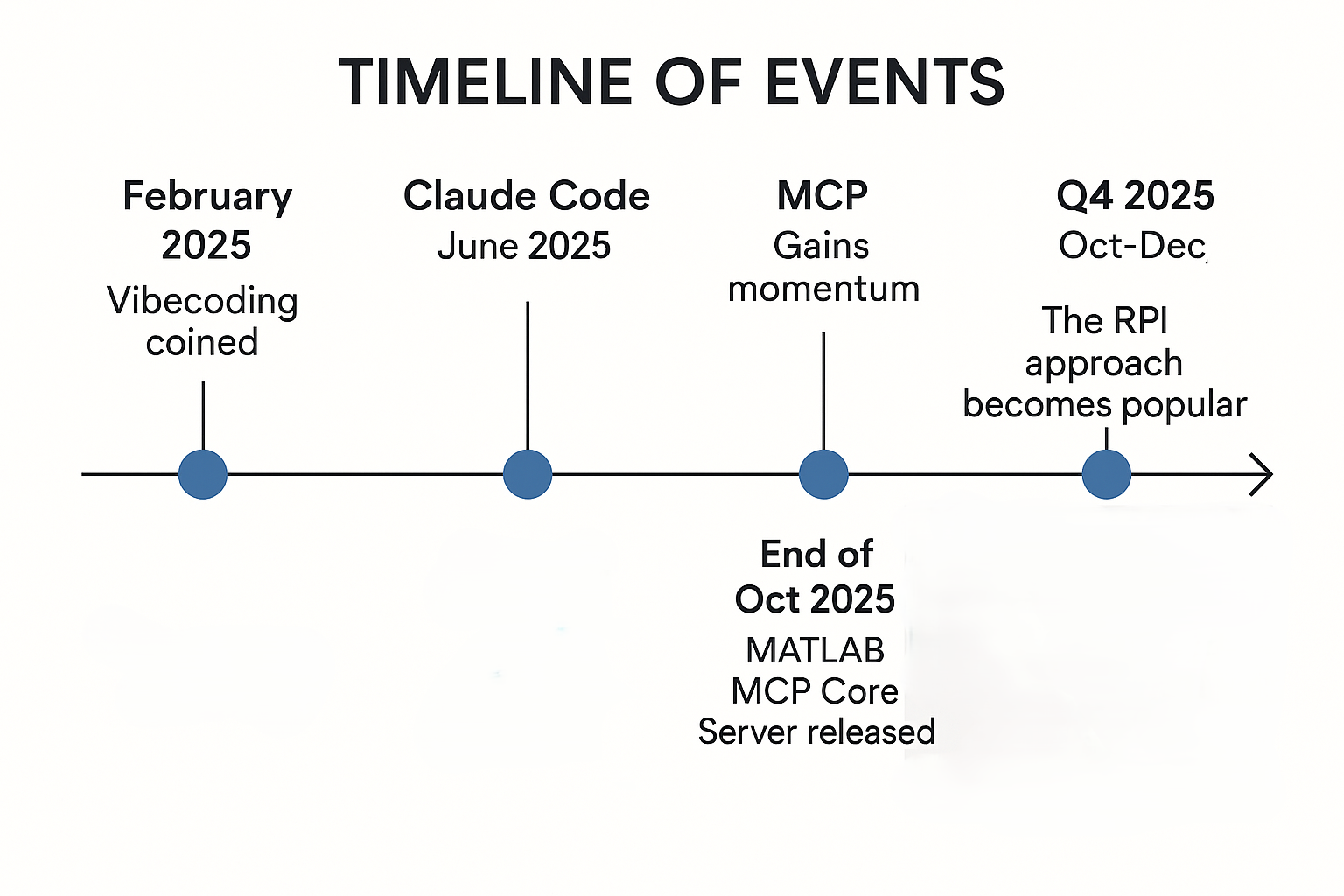
This space evolves really fast. The word "vibe coding" didn't exist until February 2025. Claude Code didn't become widely available until June 2025, and MCP also gained momentum around that time. The RPI approach became popular only in the final quarter of 2025. I can't believe how timely it was that MATLAB MCP Core Server came out in that moment. Therefore, It's important to stay informed and keep practicing. I follow Reddit and YouTube. Most agentic content today is from software development community; I rarely see posts focused on scientific computing or engineering. I’d love to see a dedicated community around that so we can level up together.
The Future of Technical Computing
Mike: “How do you see agentic AI changing the way scientists, engineers, and students work in MATLAB?”
Toshi:
Agentic coding is perfect for rapid prototyping or student projects. All you need is an idea, and you can go as deep as your domain expertise allows. This can stimulate learning. You can prototype at the speed of thought, and many people speak directly to prompt coding agents because typing feels too slow. If you are on Windows, you can use built-in dictation feature with ⊞Win+H keyboard shortcut. Mac has something similar.
Agentic coding will change how we communicate ideas. Instead of pitching new ideas with slide decks, we’ll demonstrate them with working prototypes. That eliminates a lot of back‑and‑forth and get us to "yes" or "no" much faster - freeing up more time for the next idea. In fact, you can work on multiple ideas in parallel in agentic workflows.
MATLAB has always been the tool for turning ideas into prototypes; with agentic workflows, I think science and engineering can be accelerated 10× or even 100×. That’s what excites me most.
Closing Thoughts
Toshi’s experience shows that using agentic coding effectively is not about magical prompt engineering - it’s about solid planning and domain expertise. Clear requirements, thoughtful design, and structured execution transform AI experience from a slot machine into a reliable workflow.
If you’re fired up like I am, reach out - let's plan a vibe coding party!
A quick note on safety:
Agentic tools are powerful, and a few simple habits go a long way toward using them safely, securely, and responsibly:
- Scope access narrowly — allow the coding agent to see only the specific project folder it needs.
- Use Git for traceability — version control gives you transparency, history, and easy rollback.
- Review everything — generated code, terminal commands, file operations, and any external links.
- Approve only actions you understand — avoid letting the agent execute steps you are not familiar with.
- Protect sensitive data — do not use confidential or regulated data, content or code with coding agents.
- Use trusted components — stick to MCP servers, Claude Skills, and plugins from reliable sources.





댓글
댓글을 남기려면 링크 를 클릭하여 MathWorks 계정에 로그인하거나 계정을 새로 만드십시오.